Extract data from Lab Testing Results
AI for Geotechnical & Environmental Lab Tests
Workflow output:
- Lab tests can include 1000's of pages of results which Geotechnical Engineers, Geologists and Environmental Consultants need to process and understand.
- Extract tables of results automatically with this AI workflow template.
How it works
Upload documents
- Create a new project.
- Click the 'upload documents' dropdown and drag and drop the documents you want to use in this workflow.
Select the workflow
- Click the workflows tab and select the workflow you need to use.
- Select the 'input documents' you want to use in the workflow.
- Customise the workflow if needed before running it. View all templates
Run workflow and generate results
- Click run to generate results automatically, all results are sent to the 'Ouputs' tab in your project.
- After the workflow has finished running you will be notified by email and you can view the output of the task.
- View references to trace results to the original source.
Use cases for lab testing data extraction
Unforseen ground conditions are one of the biggest risks to successfully bidding and delivering infrastructure projects.
Minimise the risk costly surprises with your site by assimilating and analysing your data for risks.
The quality and availability of your geotech data is an edge over your competition.
Invest in the quality of your geotechnical to give you confidence to optimise your designs and deliver more on your projects.
Use AI to gather and structure data from numerous different sources.
Convert entire PDF geotechical reports into geo-referenced digital boreholes plotted on your private map.
Download your data in AGS formats ready for integrating into OpenGround and Leapfrog.
We save your staff's time by eliminating manual transcription of borehole data.
Our solution is 80% cheaper than asking your Engineers and Geologists to manually transcribe boreholes themselves.
Civils.ai pays for itself on your first project (not considering all our other features).
Just browsing? Start learning more about using AI in construction
Enroll on our AI in construction training course
- Enroll on the AI in Construction Specialist Certification.
- Packed with 3 years of our research building AI for Construction
- Learn about how AI apps like Civils.ai work, strategies to implement AI on your project and even how to build your own applications.
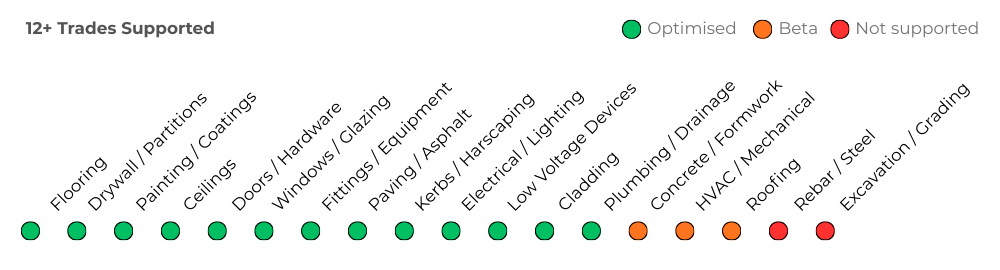
We are always improving our software and expanding the range of takeoffs we support. Here are our latest capabilities:
Takeoffs are counted per drawing sheet, based only on the sheet's scale.
| Drawing sheet scale | Takeoffs |
|---|---|
| Up to 1:365 | 1 |
| 1:366 to 1:505 | 2 |
| 1:506 to 1:720 | 3 |
| Above 1:720 | 5 |
No. However, “Unlimited AI searches & checks” covers standard in-app AI searches and checks, following our fair use policy assuming that one single person is using one single account.
This includes typical query-based tasks such as reviewing documents, checking information, and running standard AI-assisted checks.
Some AI Agents can go beyond simple searches and checks (for example: multi-step agent workflows). These advanced agents may be priced separately on a custom basis.
Where custom pricing applies, we will scope and confirm this with you in advance.
Your uploaded data is stored within a relational database and cloud object storage with our best in class cloud infrastructure provider. All documents are anonymised, un-anonymised data is only viewable from the user account from which the data was uploaded.
All data is transmitted through TLS and uses best practice encryption.
You can automatically delete any data you uploaded at any time by clicking the delete button related to the project or document.
You can also write to us to request that we delete your data at any time and all data related to you will be deleted when you delete your account.
Data is stored securely on servers in the United States, by a vetted, best in class cloud infrastructure provider.
We currently support any form of PDF document or drawings (including handwritten and scanned PDF).
For takeoffs from modern PDFs, we achieve over 97% accuracy.
For hand-drawn or older PDFs (before 1975) these are more challenging and such a high degree of accuracy cannot be guaranteed.
We use a human-in-the-loop process on all AI extracted data to ensure output accuracy.
Workflow processing time can vary depending on how complex the data is being extracted and we aim to return results within 24 hours.
After you start a workflow running you can close Civils.ai and will be notified once the data extraction is completed via email.