 Mary Janine L. Kamenić
 Julianna Widlund P.E
 Stevan Lukic CEng
Upload PDF geotechnical reports — scanned or digital. Civils.ai reads every borehole log and converts it into structured AGS 4.1 and Excel data, geo-referenced and ready for OpenGround or Leapfrog.
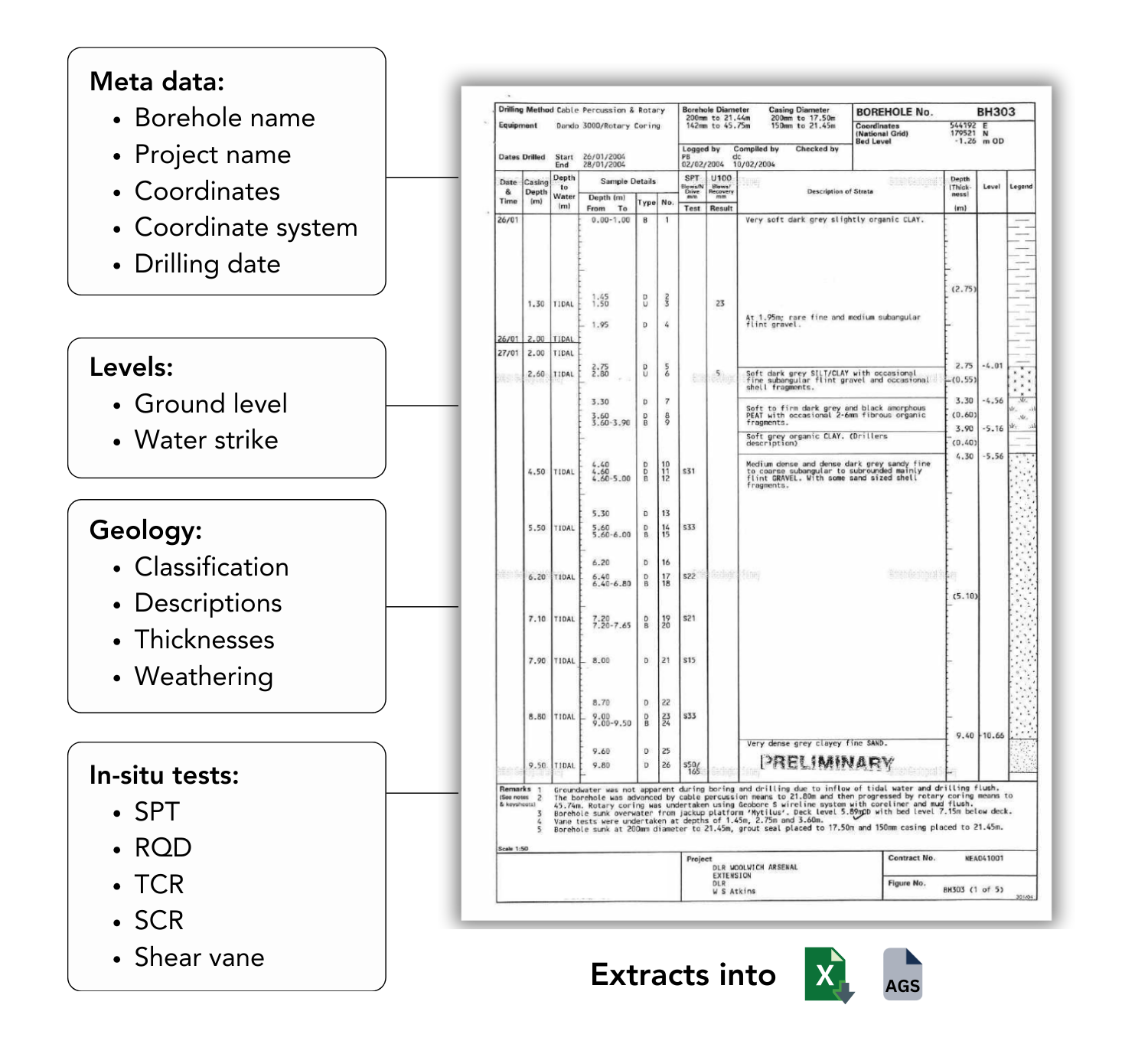
📄 Works with scanned and handwritten logs — no need to split reports into individual pages, just upload the entire document
🗂️ Extracts 16+ data groups (geology, in-situ tests, lab data)
📐 AGS 4.1 output ready for downstream tools
📍 Geo-referenced — plot directly on your site map
🔒 Secure & trusted processing - We've processed over 100,000 boreholes since 2022 for leading Geotechnical teams at the likes of AECOM, ARUP, Arcadis and WSP.
If you're a geotechnical engineer or groundworks contractor, you already know the problem: the data you need is locked inside PDFs. Borehole logs, lab certificates, in-situ test results — all of it sitting in scanned reports that have to be retyped by hand before you can model anything.
Civils.ai's AI borehole digitiser (or borehole log digitizer) reads those PDFs for you and exports structured AGS 4.1, Excel, shapefiles and DXF — geo-referenced and ready for OpenGround or Leapfrog. No retyping, no splitting reports into pages, no file size limits.
Since 2022 we've digitised over 100,000 boreholes on real projects. This guide is a technical walkthrough of what the tool extracts, how it works, the formats it exports, and how accurate it is.
Trusted by 200+ firms across 8 countries
The teams using Civils.ai to digitise their borehole data span the full range of the ground engineering industry:
Global consultancies & engineers — AECOM, Arup, Jacobs, WSP
Specialist ground engineering & piling contractors — Bachy Soletanche
Construction & infrastructure firms — Kajima
Government & land authorities — JTC
From single-site investigations to mega-project ground models, the workflow is the same: drop in the PDFs, get back clean data.
What is an AI borehole log digitiser?
An AI borehole log digitiser is software that reads geotechnical PDF reports and converts the borehole logs inside them into structured, machine-readable data — without manual transcription.
Traditional OCR just lifts raw text off a page. A purpose-built geotechnical digitiser goes further: it understands the structure of a borehole log — stratum depths, geology descriptions, SPT N-values, groundwater strikes, sample references — and maps each field to the correct AGS data group. The output is a dataset you can load straight into your geotechnical software, not a wall of unstructured text.
The problem: geotechnical data trapped in PDFs
Accurate subsurface models depend on volume of high-quality data — and that's exactly what's hard to assemble when every log has to be entered by hand.
The scale of the problem depends on the project:
Project type | Typical boreholes | Data points |
|---|---|---|
Small commercial building | 5 – 20 | — |
Bridges, industrial sites | 20 – 100 | — |
Highways, tunnels, high-rise | 100 – 500+ | — |
Airports, metro systems | 500 – 2,000+ | 50 – 500+ per log |
Manually transcribing thousands of logs, each with hundreds of data points, is slow and error-prone. Every typo introduces risk into the ground model — and unknown ground conditions are one of the biggest sources of cost and programme overrun on any civils project.
Automating extraction lets you assemble the full dataset for a site quickly, so estimating and design decisions stop relying on a single engineer's memory of what the reports said.
What the digitiser extracts
Civils.ai extracts 16+ AGS data groups from each report, covering the full picture of a borehole:

Geology — soil and rock strata, depths and full descriptions from each log
In-situ test results — SPT, CPT and other field test data
Laboratory test results — parameters describing soil and rock behaviour
Groundwater observations — strikes and standing water levels
Metadata — borehole locations, coordinates, depths and project identifiers
Historical reports — entire scanned site investigation reports, with borehole logs automatically located and digitised
Supported inputs: scanned, handwritten, digital
The pipeline is built for the messy, real-world PDFs that actually sit in your archive — not just clean modern logs:
✅ Scanned documents
✅ Handwritten logs
✅ Photographed pages
✅ Born-digital PDFs
✅ No file size limits — upload the entire report, no need to split it into individual pages
This is what makes historical site investigation data usable again, rather than leaving decades of reports locked in inaccessible formats.
Export & integration formats
Having the data is only half the job — being able to export it in the right format is just as critical. Civils.ai exports to the formats your downstream tools expect:
AGS 4.1 — the industry geotechnical data standard. Loads directly into OpenGround, Leapfrog Works and most other geotech/geology packages.
Excel — for fast manipulation, QA and analysis.
Shapefiles & DXF — for seamless integration with GIS and CAD workflows.
Because every borehole carries its coordinates through, the output is geo-referenced — plot it straight onto your site map or feed it into a 3D ground model.
How it works: from PDF to ground data in 4 steps
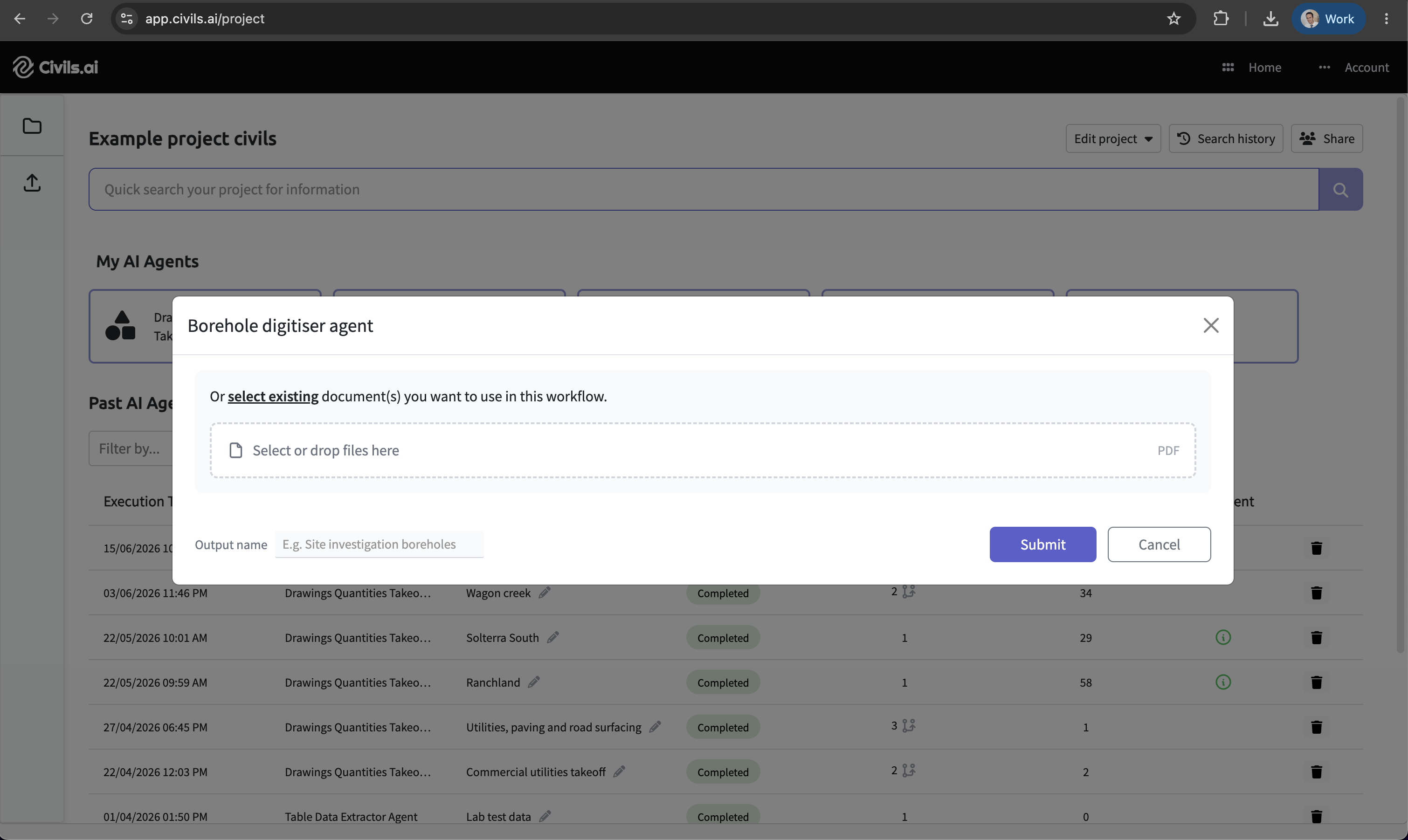
Step 1 — Upload your borehole logs
Create a project, then drag and drop your geotechnical reports into a No-Code Workflow. Processing starts the moment they land.
Step 2 — Let the AI process the data
Civils.ai extracts and digitises every layer, SPT result and groundwater measurement automatically. Expect around 10 minutes of processing per borehole.
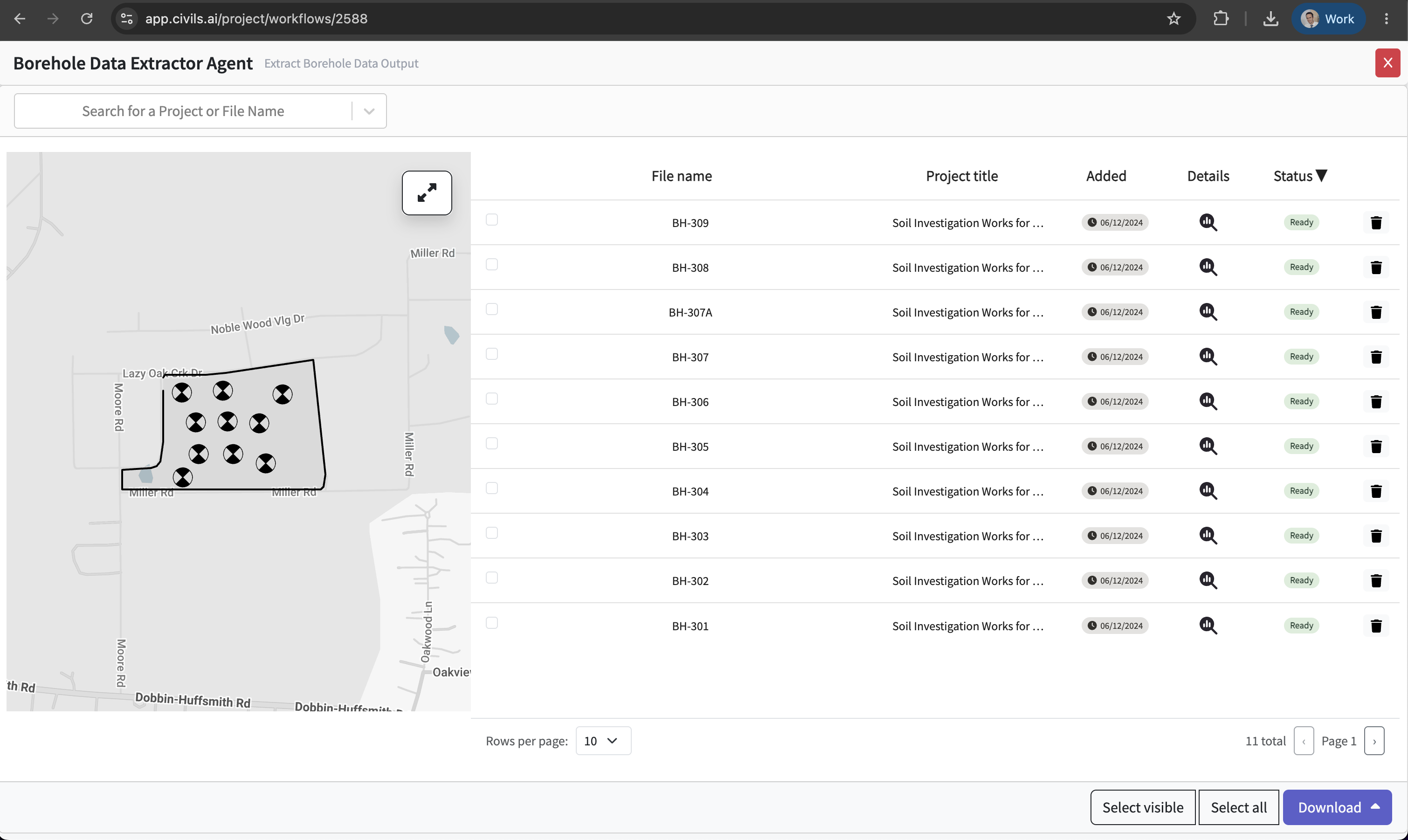
Step 3 — Review and validate
Verify the extracted data inside the platform. Each borehole exposes its Geology, Key Data, Parameter Correlations and Extra Details so you can QA before anything leaves the system.

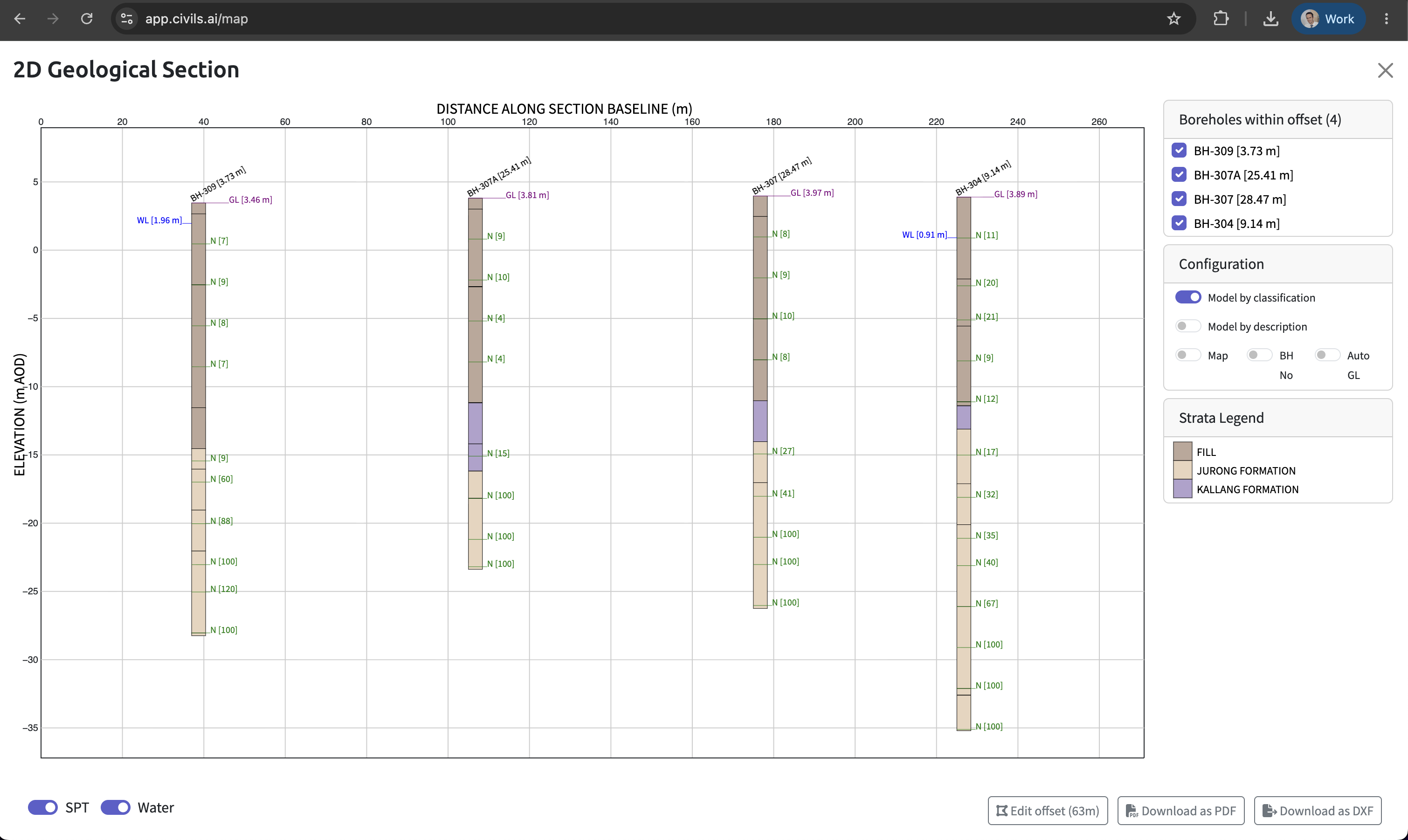
You can even run 2D cross-sections straight from the digitised borehole data.
Step 4 — Download in your preferred format
Export the cleaned, structured data as AGS 4.1, Excel, shapefiles or DXF and drop it straight into your existing workflow.
From digitised data to a 3D ground model
Digitising the logs is the start. Once your borehole data is structured and geo-referenced, Civils.ai helps you understand the ground itself:
2D & 3D visualisation — turn boreholes into interactive cross-sections and 3D ground models, giving the whole team a clear picture of subsurface conditions across the site.
Foundation insight — build a picture of potential bearing capacity issues and suitable foundation types, reducing uncertainty before you commit to a design or bid.
De-risking — more high-quality data, available faster, means better decisions and fewer surprises once you're on site.
How accurate is it?
Over 97% accuracy on takeoffs from modern PDFs.
Human-in-the-loop QA — every output is reviewed by our engineering team before delivery, so what you receive is checked, not just machine-generated.
You own your data — reports and drawings are stored securely with a vetted cloud provider and transmitted over TLS. We never use your data to train models or share it with third parties.
See it in action
Watch a full walkthrough of the AI borehole digitiser:
Frequently asked questions
What can Civils.ai extract from geotechnical reports? 16+ AGS data groups including borehole geology, SPT and CPT in-situ tests, groundwater observations and laboratory results — output as AGS 4.1 and Excel, ready for OpenGround or Leapfrog.
Does it work on scanned or handwritten logs? Yes. Scanned, photographed and handwritten borehole logs are all supported. The pipeline is built for messy, real-world geotechnical PDFs, not just clean modern ones.
How accurate are the extractions? Over 97% accuracy on takeoffs from modern PDFs, with a human-in-the-loop review by our engineering team before delivery.
Can I import the AGS data into OpenGround or Leapfrog? Yes. The AGS 4.1 output loads directly into OpenGround, Leapfrog Works and most other geotech/geology packages. Shapefiles and DXF are also available for GIS and CAD.
Do I need to split my report into single pages first? No. Upload the entire report — there are no file size limits, and the tool locates each borehole log automatically.
How long does processing take? Around 10 minutes per borehole. Most full workflows complete within 24 hours, and you're notified by email when results are ready to review and export.
How is my data handled and who owns it? Data is stored securely with a vetted cloud provider and transmitted over TLS. You retain full ownership of everything you upload — your data is never used to train models or shared with third parties.
Stop retyping borehole logs
Civils.ai has digitised over 100,000 boreholes since 2022 for teams at AECOM, Arup, Jacobs, WSP, Bachy Soletanche, Kajima, JTC and 200+ other firms across 8 countries.
Upload your first geotechnical report and get structured AGS 4.1 data back — no setup fees, cancel anytime.


