 Mary Janine L. Kamenić
 Julianna Widlund P.E
 Stevan Lukic CEng

Photo by Marina Zvada on Unsplash
A request for bid template only protects your bid if the package behind it is right. Here are the 8 sections every RFB needs, a copy-ready template, and the 6 checks to run before you send it.
Quick Summary
| Topic | Key Finding |
|---|---|
| What an RFB is | A GC's invitation for subcontractors to price a defined scope package against a named set of drawings, specs and addenda |
| Where it sits in the spec | MasterFormat Division 00: 00 11 16 Invitation to Bid, 00 21 13 Instructions to Bidders, 00 41 13 Bid Form—Stipulated Sum |
| Sections every template needs | 8: project details, scope, documents list, bid form, exclusions, schedule, insurance/bonding, submission rules |
| Where scope gaps start | The scope description and the bid documents list, not the cover letter |
| Checks before issuing | 6: sheet index, spec sections, drawing/spec conflicts, addenda, unit-price quantities, package boundaries |
| Where AI helps | Cross-checking documents for discrepancies and measuring quantities, with an estimator reviewing the output |
A request for bid template is the document a general contractor sends to subcontractors to collect prices for one scope package. Most templates you'll find online are generic procurement RFPs, written for buying software or services. Construction is different. The template is the easy part. The bid documents behind it decide whether the numbers you get back can be compared, or whether you spend bid day chasing scope gaps. This guide gives you a construction-specific template and a pre-issue check you can run on every package.
Key Term Definitions
Request for Bid (RFB): A written invitation to price a defined scope at a stated time, usually for a lump sum or unit prices. On public work it maps to Section 00 11 16 — Invitation to Bid in MasterFormat (CSI MasterFormat 2020 numbers and titles).
Bid package: The scope description plus every drawing, specification section and addendum the bidder must price against.
Instructions to Bidders: Section 00 21 13. It sets the rules for questions, substitutions, bid security and submission.
Bid form: Section 00 41 13 (stipulated sum) or the unit-price equivalent. It's the sheet that turns a bid into numbers you can compare line by line.
Why Most Request for Bid Templates Fail Estimators
Search for a request for bid template and most results are general RFP forms for businesses and schools. They cover the cover letter well. They say almost nothing about the documents a subcontractor actually prices.
That's backwards. Subcontractors don't price your letter. They price your drawings and specs.
When the RFB's document list says "Drawings A-101 to A-120, Rev C" and the set you uploaded has a Rev B sheet in it, every bidder makes their own call. Some price Rev B, some price Rev C, and some exclude the difference. Now you're leveling three different scopes.
The same thing happens when a spec section named in the scope isn't in the project manual, or when an addendum changes a detail but the scope narrative still describes the old one. These are failures of process, not failures of effort. The fix is a better template, plus a check of the package before it goes out.
Anatomy of a Request for Bid Template: The 8 Sections
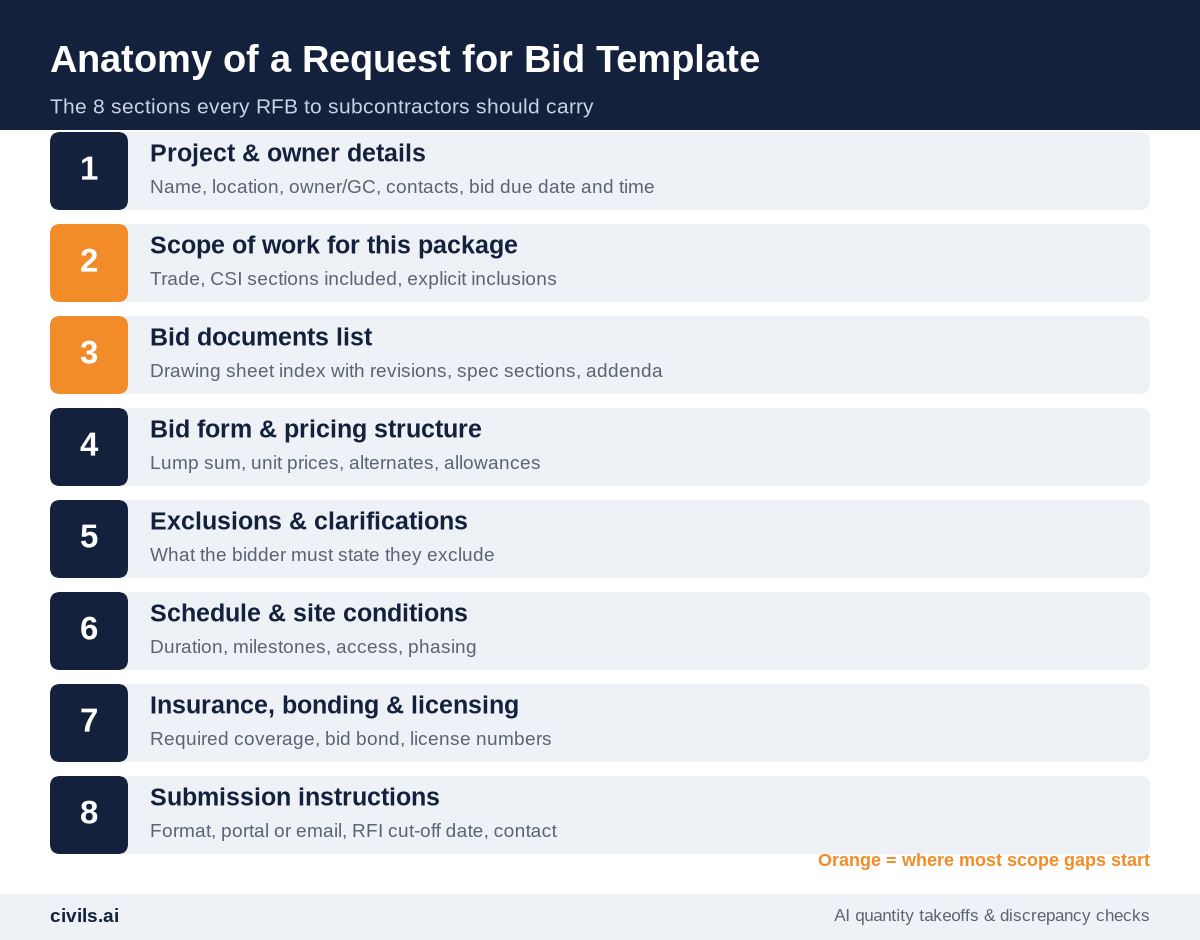
Public owners formalize these sections in Division 00. A typical public bid set, such as this Delaware Technical Community College project manual, runs Invitation to Bid, Instructions to Bidders and Bid Form in that order. Canadian owners use the same MasterFormat numbering in CCDC's Division 00 master specification. A GC's RFB to subcontractors can be lighter, but it should cover the same ground.
1. Project and Owner Details
Project name, address, owner, your estimating contact, and the bid due date with a time and time zone. Add a pre-bid meeting or site visit if there is one, and say whether attendance is mandatory.
2. Scope of Work for This Package
Name the trade and list the CSI sections included, by number and title, for example "Section 03 30 00 — Cast-in-Place Concrete". State inclusions explicitly. Where one package touches another, such as excavation for footings or the embeds for steel, say which package owns the item. For trade-specific traps, see our guide to hidden concrete spec requirements in bid documents.
3. Bid Documents List
List every sheet by number, title and revision, every spec section, and every addendum by number and date. This list is the contract between you and the bidder about what was priced. If it's wrong, the bids are wrong.
4. Bid Form and Pricing Structure
Give bidders a form, not a blank page. Include the base bid, any unit prices with your estimated quantities, alternates, and allowances. A fixed form is what makes bid leveling possible.
5. Exclusions and Clarifications
Require bidders to list exclusions and clarifications in a dedicated section rather than burying them in a cover letter. Ask them to list the addenda they received, too.
6. Schedule and Site Conditions
Give the duration, key milestones, phasing, access restrictions and working hours. Reference the geotechnical report if it affects the package.
7. Insurance, Bonding and Licensing
State the required coverage, whether a bid bond or performance bond applies, and the license or prequalification you need to see.
8. Submission Instructions
Say how bids are submitted (portal or email), the file format, the RFI cut-off date, and who answers questions. One contact avoids conflicting answers.
Free Request for Bid Template (Copy and Adapt)
Paste this into your own letterhead. Replace everything in brackets.
| Section | Template Text |
|---|---|
| Invitation | [GC name] invites [trade] bids for [project name], [address], for [owner]. Bids are due [date] at [time, time zone]. |
| Scope | Furnish and install all work in Sections [numbers and titles], as shown on the drawings listed below, including [explicit inclusions]. Work by others: [items]. |
| Bid documents | Drawings [sheet list with revisions]; Project Manual sections [list]; Addenda [numbers and dates]. Documents available at [link]. |
| Bid form | Base bid (lump sum): $[ ]. Unit prices: [item, unit, estimated quantity, rate]. Alternates: [list]. Allowances: [list]. |
| Exclusions | List all exclusions and clarifications here. Exclusions not listed here will not be accepted. Acknowledge addenda received: [ ]. |
| Schedule | Anticipated start [date], duration [weeks], milestones [list]. Site access: [hours and restrictions]. |
| Insurance and bonding | Coverage per [contract exhibit]. Bid bond: [yes/no, %]. Performance and payment bond: [yes/no]. License: [type and number]. |
| Submission | Submit via [portal/email] as a PDF with the completed bid form. RFIs to [name, email] by [date]. Answers will be issued by addendum. |
Before you send it, review the subcontract terms that will come after the bid. Our guide on how to analyze a construction contract before you sign covers the clauses worth flagging up front.
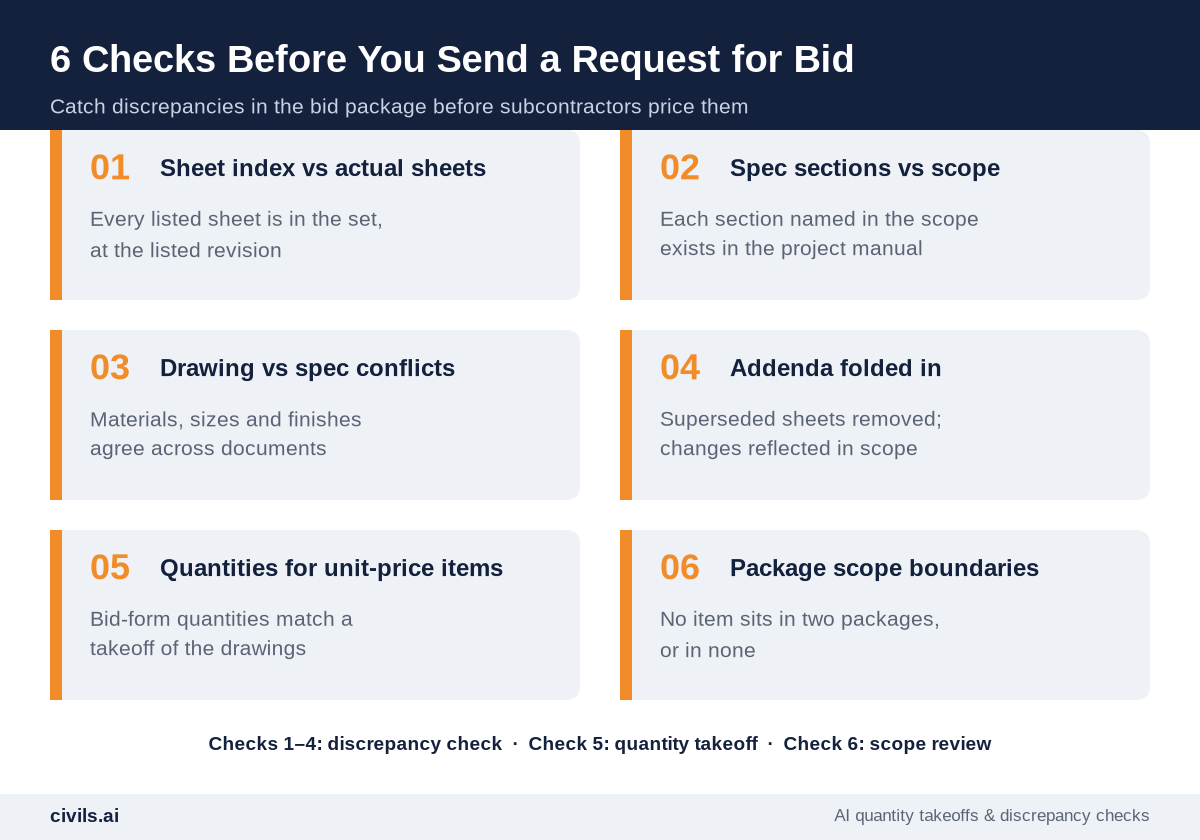
6 Checks Before You Send a Request for Bid
1. Sheet Index vs Actual Sheets
Open every sheet in the upload and match number, title and revision against your bid documents list. Missing sheets and stale revisions are the most common cause of bids that can't be leveled.
2. Spec Sections vs Scope
Confirm that every section number in the scope narrative exists in the project manual, and that related sections (Division 01 requirements, testing, submittals) are listed too.
3. Drawing vs Spec Conflicts
Check that materials, sizes, grades and finishes agree between the drawings and the specs. Where they don't, decide which governs under the contract's order of precedence, or issue an RFI. Document discrepancies as RFIs. Do not assume. Do not resolve conflicts internally.
4. Addenda Folded In
Remove superseded sheets from the package and update the scope narrative so it reflects each addendum. A bidder who prices the base set and acknowledges the addendum on the form has still priced the wrong job.
5. Quantities for Unit-Price Items
If the bid form carries estimated quantities, measure them from the current drawings. A unit-price bid against a wrong quantity gives you a misleading total.
6. Package Scope Boundaries
Line up all your packages and make sure no item appears in two of them, or in none.
How AI Changes the Pre-Issue Check
Checks 1 to 4 are cross-referencing: hundreds of sheets against a list, spec sections against a narrative, and addenda against a base set. That's slow work by hand, and it's exactly where people miss things late on bid week.
Generic AI tools (such as ChatGPT and Microsoft Copilot) aren't built to read drawing sets and cite the sheet they're quoting. Purpose-built construction AI tools are. Civils.ai runs discrepancy checks across drawings, specs and addenda, and returns each issue with the documents it came from, so the estimator can confirm or reject it. Civils.ai reports 99.5% accuracy on structured checklists and has reviewed over 66,000 construction documents.
Check 5 is a quantity takeoff. Civils.ai measures quantities from PDF drawings, with a reported 97% accuracy on quantity takeoffs. See how it works on PDF and CAD quantity takeoffs.
AI-prepared checks and takeoffs are a draft to support your work and should be reviewed by a qualified professional before you issue the package. Check 6 stays with the estimator who knows how the job is being bought.
Request for Bid Pre-Issue Checklist
- Due date set — date, time and time zone in the invitation and the instructions
- Scope by CSI section — every section numbered and titled, with inclusions and work by others
- Documents list matches upload — sheet numbers, titles and revisions checked
- Addenda incorporated — superseded sheets removed, scope narrative updated
- Conflicts logged — drawing/spec discrepancies resolved or issued as RFIs
- Bid form issued — base bid, unit prices with measured quantities, alternates, allowances
- Exclusions section required — with addenda acknowledgment
- RFI cut-off and single contact — stated in the submission instructions
The Bottom Line
A request for bid template is a container. The bids you get back are only as consistent as the package inside it. Use the eight-section template, run the six checks before every issue, and you'll level bids instead of scopes. Speed without a system produces faster mistakes.
Frequently Asked Questions
What is the difference between a request for bid and a request for proposal?
An RFB asks for a price against a defined scope and documents. An RFP asks for a proposal, where price is one factor alongside approach or qualifications. MasterFormat lists them separately: 00 11 16 Invitation to Bid and 00 11 19 Request for Proposal.
What should a request for bid template include?
Project details, the scope by CSI section, a bid documents list with revisions, a bid form, an exclusions section, schedule and site conditions, insurance and bonding requirements, and submission instructions.
Should subcontractors get the full drawing set?
Yes, or at least every sheet that affects their scope, listed by revision. Partial sets are a common source of scope gaps between packages.
Can AI check a bid package before it goes out?
Yes. Tools built for construction documents, such as Civils.ai, can flag discrepancies between drawings, specs and addenda and measure quantities for unit-price items. An estimator should review every flagged issue before the package is issued.
Do I need a bid form, or can subcontractors send their own proposals?
Use a bid form. Free-format proposals bury exclusions and make line-by-line comparison much harder.
Related reading: AI for quantity surveying.