 Mary Janine L. Kamenić
 Julianna Widlund P.E
 Stevan Lukic CEng

Photo by Lucas Kepner on Unsplash
Bluebeam vs PlanSwift vs STACK vs AI takeoff: compare features and pricing, as checked November 2026, and see which takeoff tool fits your trade.
Quick Summary
| Topic | Key Finding |
|---|---|
| PlanSwift pricing | $2,000 per year (Essential) or $3,000 per year (Core) for one seat, with a 14-day trial (PlanSwift) |
| Bluebeam pricing | $260 to $590 per user per year across Basics, Core, Complete and Max (Bluebeam) |
| STACK takeoff pricing | $299 (Premium) or $349 (Pro) per user per month, billed annually, on 12-month terms (STACK) |
| Platform | PlanSwift and Bluebeam Revu are Windows desktop apps. STACK is 100% cloud. Civils.ai runs in the browser |
| Estimating built in | PlanSwift (all plans) and STACK Pro. Bluebeam measures and links quantities to Excel |
| Where AI takeoff fits | High-volume measuring and drawing checks, with a person reviewing every quantity before it goes into a bid |
All prices are in US dollars, as checked on each vendor’s own pricing page in November 2026. Vendors change plans often, so confirm before you buy.
Bluebeam vs PlanSwift is the comparison most estimators start with, and STACK is often the third name on the shortlist. The three overlap on measuring, but they were built for different jobs: Bluebeam for marking up PDFs, PlanSwift for takeoff and estimating on a Windows desktop, and STACK for cloud takeoff through to proposal. AI takeoff tools add a fourth option — the software measures, and you review.
This guide is for GC estimators and subcontractors in the US and Canada choosing a takeoff tool. It compares features and pricing from each vendor’s own pages, then gives a verdict by trade and workflow.
Key Term Definitions
Digital (on-screen) takeoff: Measuring areas, lengths and counts by clicking on a PDF or CAD drawing on screen instead of scaling paper plans by hand. See what a takeoff is in construction for the manual, digital and AI methods.
Assembly: A saved recipe that turns one measurement into materials and labor — for example, a linear foot of wall into studs, track, board and screws.
AI takeoff: Software that detects and measures items on the drawings itself, so the estimator checks and edits a draft instead of tracing every item.
On-Screen Takeoff (OST): On Center Software’s Windows takeoff program, now part of ConstructConnect, the same company that owns PlanSwift (ConstructConnect).
Bluebeam vs PlanSwift vs STACK: Features and Pricing Compared
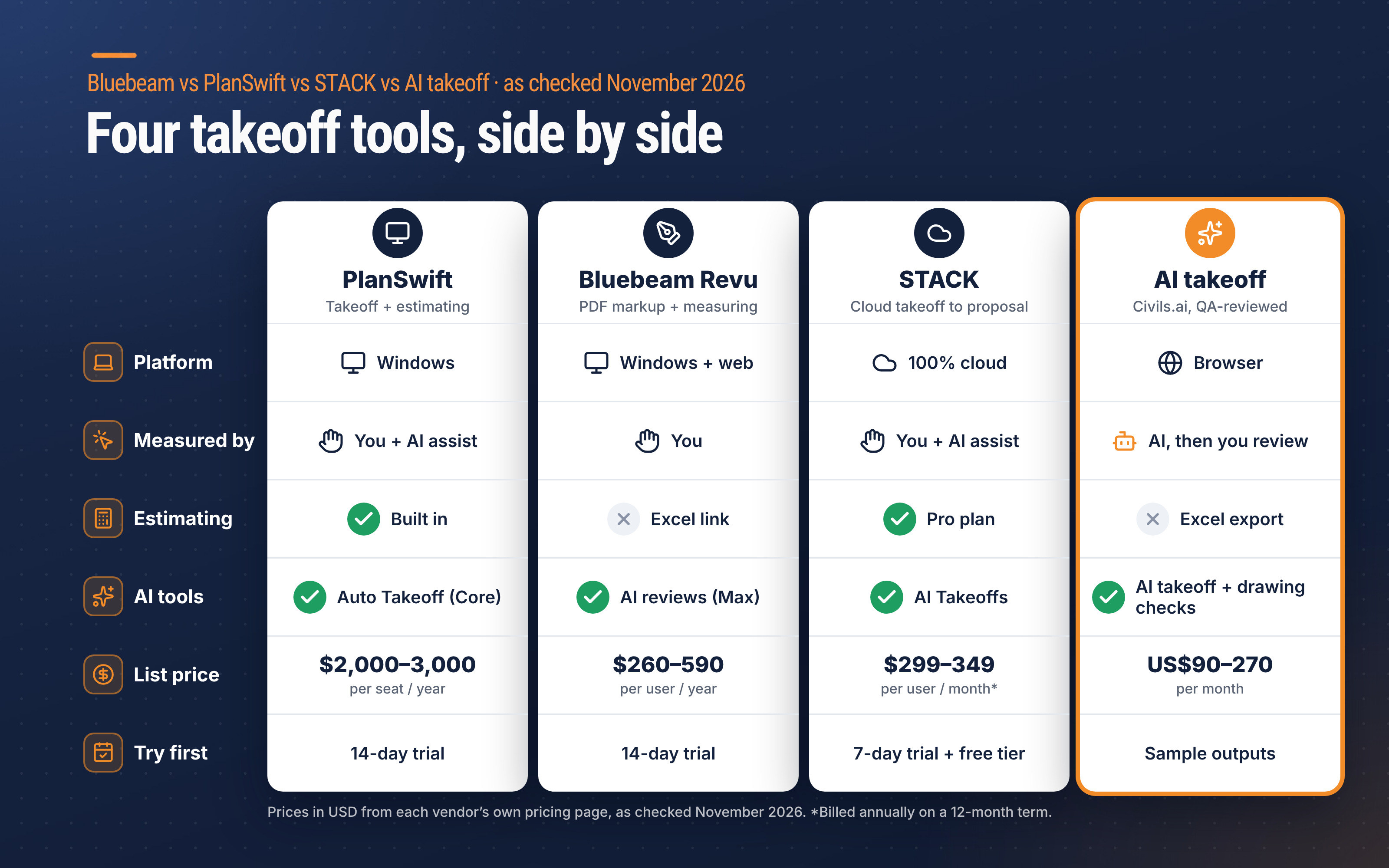
| As checked November 2026 | PlanSwift | Bluebeam Revu | STACK | Civils.ai (AI takeoff) |
|---|---|---|---|---|
| Built for | Takeoff + estimating | PDF markup, measurement and collaboration | Cloud takeoff, estimating and proposals | QA-reviewed AI takeoffs and drawing checks |
| Platform | Windows desktop (Mac only via Boot Camp or Parallels) | Revu for Windows, plus web and mobile | 100% cloud | Web browser |
| Who measures | You, with AI assist | You | You, with AI assist | AI, then QA team; you review and edit |
| AI features | Auto Count, Auto Scale, Auto Bookmark; Auto Takeoff on Core | AI drawing reviews and comparisons on Max | AI Takeoffs, symbol search, STACK IQ chat; missing-materials check on Pro | Plain-English scope runs the takeoff; discrepancy checks across sheets and specs |
| Estimating | Yes — assemblies, labor, material lists | No — Quantity Link to Excel on Complete | Pro plan — estimates, BNI cost library, proposals | No — Excel and annotated PDF export |
| List price | $2,000 or $3,000 per seat per year | $260, $330, $440 or $590 per user per year | $299 or $349 per user per month, billed annually | US$90 or US$270 per month; Enterprise custom |
| Try first | 14-day trial | 14-day trial of the Max plan (Bluebeam) | 7-day Pro trial, then a limited free tier | Sample outputs to download; monthly plans, cancel anytime |
Sources: PlanSwift pricing, PlanSwift install, Bluebeam pricing, STACK Takeoff & Estimate pricing, Civils.ai pricing. Third-party products are named for identification only.
1. PlanSwift: takeoff and estimating on one Windows desktop
PlanSwift combines takeoff and estimating in one program, with pre-built assemblies for your trade. Its own trade pages cover general contractors, concrete, drywall, electrical, flooring, framing, decking, HVAC, insulation, landscape, masonry, painting and plumbing.
PlanSwift pricing is published and simple. Essential is $2,000 per year for one seat, with Auto Count, Auto Scale and Auto Bookmark, priority support and two hours of live training. Core is $3,000 per year and adds the full Takeoff BOOST suite, including Auto Takeoff, which builds “a first-pass takeoff for areas, lengths, and counts”. Extra seats are discounted, and teams buying 10 or more licenses can ask for volume pricing (PlanSwift).
The catch is the platform. PlanSwift is Windows-only; on a Mac it runs through Boot Camp or a virtual machine such as Parallels (PlanSwift).
A note on On-Screen Takeoff: OST is ConstructConnect’s other Windows takeoff tool, aimed at commercial GCs and specialty subcontractors. It offers multi-condition takeoff and the same Takeoff Boost AI family, and it has a 14-day trial (On Center). Its price is not publicly listed — it is quote-based (ConstructConnect).
2. Bluebeam Revu: markup first, measurement second
Bluebeam is the PDF markup tool many project teams already use. Every plan includes Revu for Windows desktop plus Bluebeam on web and mobile (Bluebeam). For takeoff, the tier matters:
- Basics ($260 per user per year) — markups and length and area only. No perimeter or advanced measurements.
- Core ($330) — adds perimeters, counts, angles and volume, plus overlay and compare drawings.
- Complete ($440) — adds Dynamic Fill and Quantity Link with Microsoft Excel. Bluebeam itself points estimators to this tier.
- Max ($590, introductory price) — adds AI drawing reviews and AI drawing comparisons. The introductory price is locked through the 2027 renewal; later renewals move to a list price not yet announced.
Bluebeam’s pricing page lists markup, measurement and Excel links, not a cost database or estimating module. Most teams that use it for takeoff push quantities into a spreadsheet or a separate estimating program.
3. STACK: cloud takeoff to proposal
STACK is 100% cloud, with unlimited projects, plan pages, measurements and viewer seats on paid plans. STACK takeoff pricing has two tiers (STACK):
- Premium — $299 per user per month billed annually ($349 if paid monthly). Full takeoff toolset, item and assembly library, overlay compare, automatic plan naming, symbol search, AI Takeoffs and STACK IQ, a GPT-powered chat for project details.
- Pro — $349 per user per month billed annually ($399 monthly). Adds worksheet-style estimating, STACK for Excel, a regional BNI cost library, automatic identification of missing materials and native proposals.
All Takeoff & Estimate subscriptions are 12-month terms — monthly billing spreads the cost but does not shorten the commitment. Canadian buyers can switch the page to CAD: C$349 (Premium) and C$399 (Pro) per user per month on annual billing. After a 7-day Pro trial, a free tier allows one active project per month, up to 300 plan pages and 50 measurements per project.
4. AI takeoff: the software measures, you review
AI takeoff tools change who does the clicking. With Civils.ai, you upload PDF drawings, type the scope in plain English — “measure all paving and landscaping areas” — and AI runs the takeoff. The QA team reviews every result before it comes back, annotated on the drawing and exported to Excel.
Pricing is monthly: Starter is US$90 per month for 10 takeoffs and Professional is US$270 per month for 30, counted per drawing sheet by scale, with Enterprise on custom terms (Civils.ai). It does not replace an estimating program; it removes the measuring step that feeds one.
STACK vs PlanSwift: Cloud or Desktop?
This is the decision for most trades that want takeoff and estimating in one place. Both have assemblies and both have AI-assisted counting and takeoff. The differences are platform and cost model:
- Where you work — PlanSwift is installed on a Windows PC. STACK runs in any browser, so estimators on Mac, at home or across offices share the same projects.
- What a seat costs — PlanSwift Core is $3,000 per seat per year. STACK Pro on annual billing works out to $4,188 per user per year ($349 × 12), and Premium to $3,588.
- Who else needs access — STACK includes unlimited viewer seats, which helps when PMs or field staff only need to look.
If your estimators already live on Windows and want a single annual bill, PlanSwift is the simpler buy. If your team is spread out, STACK’s cloud model usually wins.
Which Fits Your Trade? Verdicts by Workflow
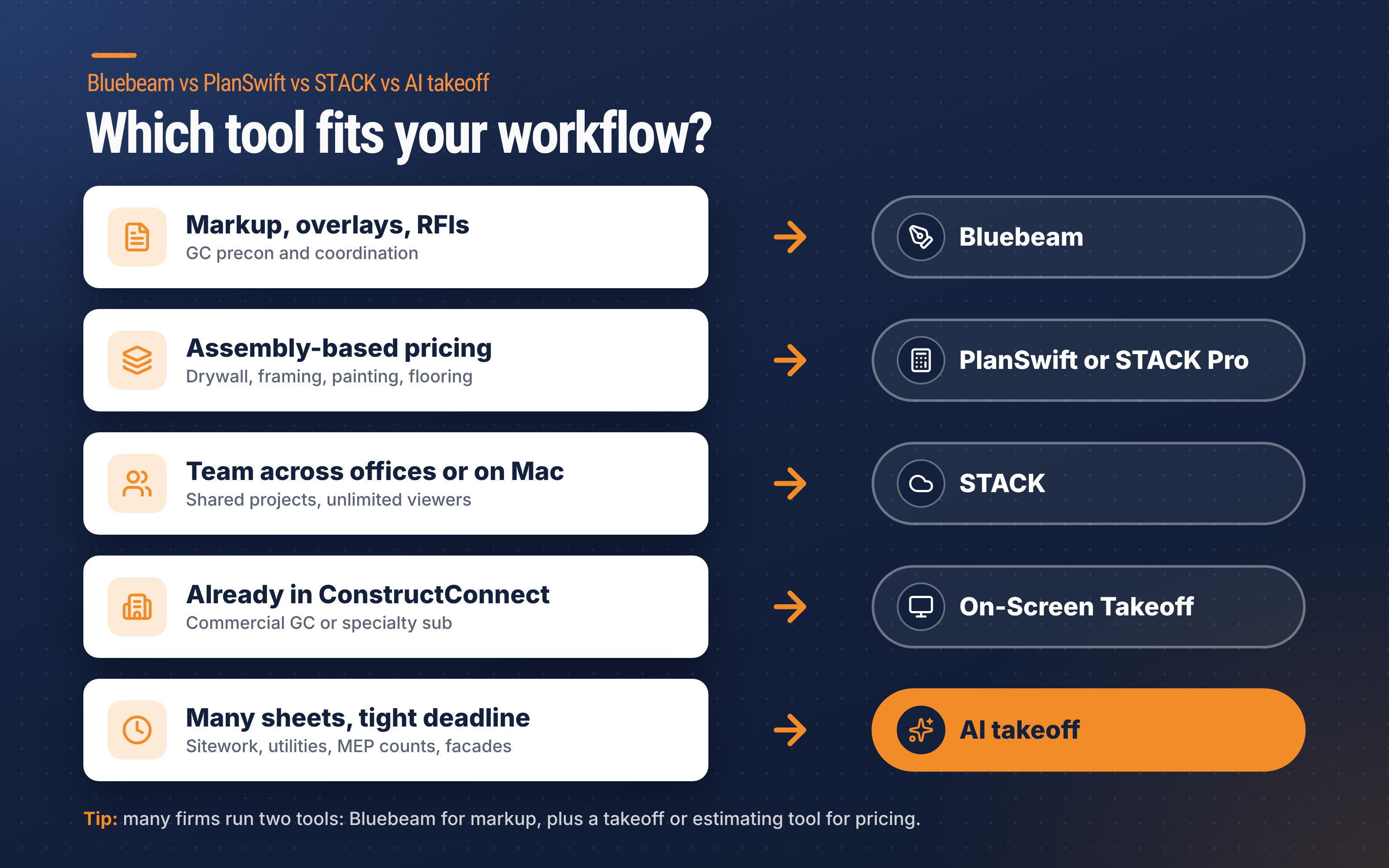
| If your work is mostly… | Start with | Why |
|---|---|---|
| GC precon: bid set review, scope packages, RFIs | Bluebeam (Core or Complete) | Markup, overlay compare and Studio collaboration matter more than assemblies |
| Drywall, framing, painting, flooring subs pricing from assemblies | PlanSwift or STACK Pro | Measurements turn straight into materials and labor |
| Multi-office or Mac-based estimating team | STACK | Browser-based, unlimited viewers, proposals on Pro |
| Commercial GC or specialty sub already in ConstructConnect | On-Screen Takeoff or PlanSwift | Same vendor ecosystem; OST pricing is quote-based |
| Sitework, paving, utilities, MEP counts, facades — many sheets, tight deadlines | AI takeoff, alongside your estimating tool | Measuring is the bottleneck; a reviewed draft beats a blank sheet |
Many firms end up with two tools: Bluebeam for markup and coordination, plus a takeoff or estimating tool for pricing. Choose on the workflow that eats most of your week, not the longest feature list.
How AI Changes Takeoff and Drawing Checking
PlanSwift, Bluebeam and STACK all now ship some AI, but in each one the estimator still drives: you pick the condition, start the count, and check what the tool found. That helps. It does not remove the hours spent measuring a 200-sheet set.
Purpose-built AI takeoff tools start from the scope instead. Civils.ai covers six categories — floor, road and landscaping areas; utilities, drainage and MEP; devices and fixtures; foundations and wall runs; facade and formwork elevation areas; and opening counts and sizes — and is built to cut the manual measuring effort by up to 90% (our own figure for the takeoff step). Civils.ai reports 97%+ accuracy on takeoffs, with every result reviewed by people before delivery (Civils.ai).
The second gain is drawing checking. Missed scope often comes from two sheets that disagree, not from mis-measuring. Civils.ai’s drawing checks flag sheet-to-sheet discrepancies, drawing-to-spec conflicts and cross-discipline clashes, each with a citation back to the sheet or clause, so you can raise an RFI before bid day. That pairs well with a clear request for bid to your subs and a structured bid leveling step when quotes come back.
Try AI takeoff on your drawings: upload a PDF set, type your scope and check the annotated result against the sheets. Plans and takeoff allowances are on the pricing page, and our sourced comparisons with Bluebeam Revu, STACK and others go deeper. For how AI handles PDF and CAD inputs, see AI for PDF and CAD quantity takeoffs.
AI-prepared takeoffs are a draft to support your work and should be reviewed by a qualified professional before issuing.
PlanSwift Alternatives: Checklist Before You Buy
| Check | What to ask |
|---|---|
| Platform | Does it run on every machine your estimators use, including Macs? |
| Term | Annual, 12-month with monthly billing, or month-to-month? |
| Tier | Which tier unlocks the measurements and AI you need (e.g., Bluebeam counts start at Core, PlanSwift Auto Takeoff at Core)? |
| Estimating | Built in, Excel link, or export to your current estimating program? |
| Seats | Paid seats vs viewer seats; volume pricing for larger teams |
| Proof | Run your own last bid set through the trial or sample output and compare against your known quantities |
The Bottom Line
Bluebeam vs PlanSwift is not a like-for-like fight. Bluebeam is the markup and coordination standard; PlanSwift is a desktop takeoff and estimating tool; STACK takes the same job to the cloud with proposals on top. On-Screen Takeoff is worth a quote if you already buy from ConstructConnect.
If measuring is still where your hours go, add AI takeoff to whichever tool you keep — and keep a qualified estimator reviewing every quantity.
Frequently Asked Questions
Is Bluebeam or PlanSwift better for takeoff?
It depends on the job. PlanSwift is built for takeoff and estimating, with assemblies that turn measurements into materials and labor. Bluebeam is stronger for markup and collaboration, and needs at least the Core plan for counts and perimeters.
How much does PlanSwift cost?
As checked November 2026, PlanSwift Essential is $2,000 per year and PlanSwift Core is $3,000 per year, each for one seat, with discounted additional seats and a 14-day trial.
How much does STACK takeoff cost?
STACK Premium is $299 and STACK Pro $349 per user per month when billed annually, or $349 and $399 when billed monthly, on 12-month terms. A limited free tier is also available.
Does Bluebeam have estimating?
No. Bluebeam’s plans cover PDF markup, measurement and collaboration. The Complete plan links quantities to Microsoft Excel through Quantity Link, but there is no estimating module or cost database on its pricing page.
How much does On-Screen Takeoff cost?
On-Screen Takeoff pricing is not published. ConstructConnect sells it by quote after a demo or sales contact, and offers a 14-day trial.
Can AI replace PlanSwift, Bluebeam or STACK?
No, not entirely. AI takeoff removes most of the manual measuring, but you still need somewhere to price, mark up and coordinate. Most teams add AI takeoff to their existing tools, with a qualified estimator reviewing the output.


