 Mary Janine L. Kamenić
 Julianna Widlund P.E
 Stevan Lukic CEng

Photo by Daniel McCullough on Unsplash
What is a takeoff in construction? It is the measured list of every quantity on a drawing set: the counts, lengths, areas and volumes that every estimate is priced from. Here is how a takeoff works, how to do one step by step, and how manual, on-screen and AI takeoff compare.
Quick Summary
| Topic | Key Finding |
|---|---|
| Definition | A takeoff measures the quantities of work and materials from drawings and specs so they can be priced |
| Takeoff vs estimate | The takeoff says how much; the estimate says how much it costs, adding labor, equipment, waste, overhead and markup |
| The four measurement types | Count (EA), linear (LF), area (SF/SY) and volume (CY) |
| Three methods | Manual (paper and scale ruler), on-screen or digital (you measure in software) and AI (software measures, you review) |
| Where takeoffs go wrong | Wrong scale, missed sheets or addenda, double counting and scope that falls between trades |
| The non-negotiable | Whatever the method, a qualified estimator checks every quantity before it goes into a bid |
Every bid starts with one question: how much work is on these drawings? A construction takeoff answers it. Get the takeoff wrong and careful pricing won't save the number. This guide covers the four measurement types, the process and the three methods, then links to our trade takeoff guides.
Key Term Definitions
Takeoff (quantity takeoff, material takeoff): A list of measured quantities taken "off" the drawings, such as 42 EA doors, 1,280 LF of 8" pipe or 310 CY of concrete.
Estimate: The priced version of the takeoff. It applies material, labor and equipment costs, then adds waste, overhead, profit and markup.
Bill of quantities (BoQ): The UK, Canadian and Australian name for a formal, itemized list of measured quantities, often prepared by a quantity surveyor.
On-screen (digital) takeoff: Measuring on a PDF or CAD file in software instead of on paper with a scale ruler.
AI takeoff: Software that detects and measures items on the drawings, leaving the estimator to review and edit the result.
What Is a Takeoff in Construction?
A takeoff in construction is the process of measuring and counting everything a scope requires from the contract drawings and specifications. The output is a quantity list, organized by item or cost code, that the estimator prices.
A takeoff answers "how much?" and nothing else. It holds no unit costs, no crew rates and no markup. Those belong to the estimate. Keeping them apart lets you see whether a quantity or a price was wrong.
GC estimators take off self-perform work and check subcontractor quantities. Subcontractors take off their own trade in detail. Suppliers use takeoffs to quote materials. On larger jobs, owners and quantity surveyors prepare takeoffs to build budgets and check bids.
A good takeoff is:
- Complete — every sheet, detail, schedule and addendum in the scope is covered
- Traceable — each quantity can be tied back to the sheet and location it came from
- Organized — grouped the way you price, such as by CSI MasterFormat division, area, level or phase
- Checked — someone other than the author has reviewed the big-ticket items
The Four Measurement Types in a Quantity Takeoff
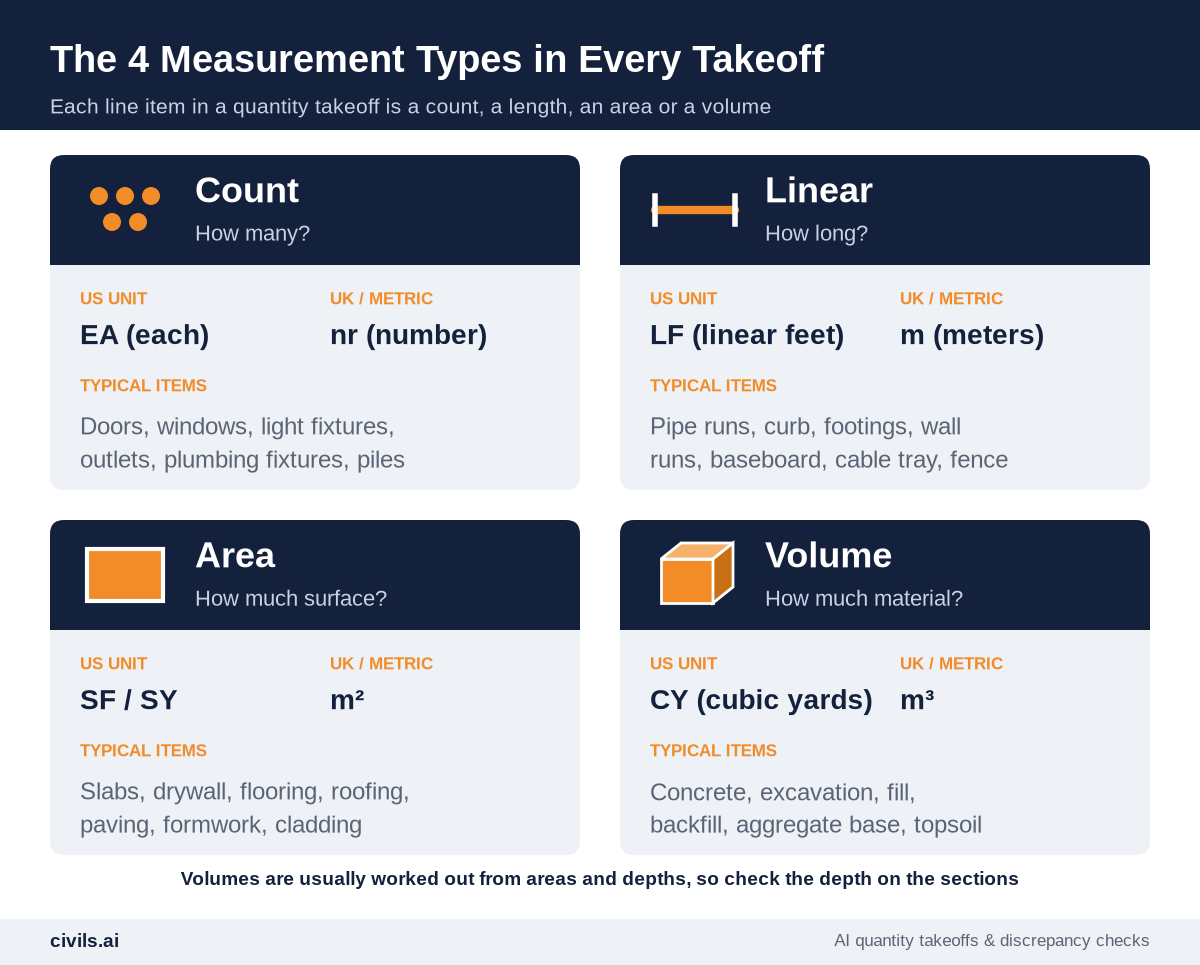
Every line in a quantity takeoff is one of four types. Knowing which type an item is tells you which unit to use, which tool to measure it with and where mistakes usually happen.
| Type | US unit | Typical items | Watch out for |
|---|---|---|---|
| Count | EA | Doors, windows, light fixtures, outlets, plumbing fixtures, piles | Items shown in schedules but not on plans (or the reverse), and symbols counted twice on overlapping sheets |
| Linear | LF | Pipe, conduit, curb, footings, wall runs, base, fence, cable tray | Vertical runs (risers, drops) that plan views don't show, and runs that continue onto the next sheet |
| Area | SF or SY | Slabs, drywall, flooring, roofing, paving, formwork, cladding | Deducting (or not) openings, roof pitch, and wall heights that come from sections, not plans |
| Volume | CY | Concrete, excavation, fill, backfill, aggregate base | Depths and thicknesses taken from the wrong detail, and mixing cubic feet with cubic yards (27 CF = 1 CY) |
Most volumes are an area or a length multiplied by a depth or cross-section. That is why so many concrete and earthwork errors trace back to the section drawings, not the plan.
Why Construction Takeoffs Go Wrong
Takeoff errors rarely come from bad arithmetic. They come from the drawing set and the process.
- Wrong or unverified scale — a sheet printed or exported at a different size, or a detail drawn at a different scale from the plan
- Missed sheets and addenda — a revised sheet that never made it into the takeoff, or an addendum that changed a schedule
- Double counting — the same area measured on two overlapping plans, or a fixture counted on both the plan and an enlarged plan
- Scope that falls between trades — items such as blocking, firestopping or trench backfill that each trade assumes is someone else's
- Specs not read — the drawings show a slab, but the specification sets the thickness, reinforcement or finish that drives the cost
- No audit trail — quantities in a spreadsheet with no link to the sheet they came from, so nobody can check them on bid day
These are failures of process, not failures of effort. A repeatable process fixes most of them.
How to Do a Construction Takeoff in 7 Steps
The steps are the same whether you use paper, on-screen software or AI. Only who does the measuring changes.
Step 1: Confirm the Scope and the Document Set
List the scope you're pricing and the exact drawings, specs and addenda it covers. On a GC bid, the request for bid should spell this out. If it doesn't, ask before you measure.
Step 2: Read the Specs and General Notes First
Specifications, general notes and schedules decide what you are measuring: thicknesses, materials, finishes and what's excluded. Read them before you open the plans.
Step 3: Set Up Your Takeoff Structure
Create the line items, units and groupings before measuring. Match them to how you price, by CSI MasterFormat division, cost code, area or level.
Step 4: Verify the Scale on Every Sheet
Check each sheet's scale against a known dimension, not just the title block. Details, enlarged plans and site plans are often at different scales.
Step 5: Measure by Type, Sheet by Sheet
Work through counts, then linear runs, areas and volumes. Mark up every item as you take it off so you can see what's done and what's missing. Use color by item or system.
Step 6: Apply Waste, Laps and Assumptions Separately
Keep the net measured quantity and the waste or lap allowance in separate columns. Record every assumption, such as "openings under 10 SF not deducted", so the estimate can be defended later.
Step 7: Check the Takeoff Before It's Priced
Have a second person review the biggest quantities against the drawings. Compare quantity ratios with similar past jobs. Confirm every addendum is in. Then hand it to pricing.
Manual vs On-Screen vs AI Takeoff Compared
There are three ways to produce a takeoff. They differ mainly in who does the measuring and how much checking is left at the end.

| Manual takeoff | On-screen / digital takeoff | AI takeoff | |
|---|---|---|---|
| How it works | Printed plans, scale ruler, highlighters and a calculator or spreadsheet | You click or trace each item on a PDF or CAD sheet; the software calculates | Software detects and measures items; you review and edit the result |
| Time | Slowest; grows directly with the number of sheets and items | Faster than paper, but still one measurement at a time | Fastest first pass; review time still depends on job size and drawing quality |
| Accuracy | Depends on the estimator's care, the print scale and the arithmetic | Calculations are reliable; depends on correct scale settings and complete clicking | Depends on drawing quality and how clearly the scope is described; must be reviewed |
| Audit trail | Marked-up paper sets, hard to share | Marked-up PDF and spreadsheet export | Annotated PDF and spreadsheet export |
| Best fit | Small jobs, quick sanity checks, field changes | Any trade where you want control of every measurement | High bid volume, repeat scopes, large or multi-sheet sets |
The lines are blurring: many on-screen tools now include AI features such as auto-count. What still differs is who drives. In on-screen takeoff, you measure and the software assists. In AI takeoff, the software measures and you review. For tools in each category, see our guide to the best construction estimating software and takeoff tools.
The human-review caveat: no takeoff method removes the need for a qualified estimator to check the result. AI can misread a symbol, a scan or an ambiguous scope just as a person can misread a scale. Treat every takeoff, manual or AI, as a draft until someone has checked it against the drawings.
How AI Changes the Construction Takeoff
AI changes the measuring step first. The estimator moves from clicking every wall run and fixture to reviewing a marked-up drawing. Scoping, pricing and the bid decision stay with the estimator.
Generic AI tools (such as ChatGPT) aren't built to measure scaled quantities across a drawing set or to show you where each number came from. Purpose-built construction AI tools are. With Civils.ai, you upload PDF drawings, type the scope in plain English (for example, "measure all asphalt paving areas"), and AI runs the takeoff. Civils.ai's QA team then reviews the result before it comes back as an annotated PDF and an Excel export you can edit in the browser.
Civils.ai reports over 97% accuracy for takeoffs from modern PDFs and up to 90% less manual measuring effort, and is used by 200+ firms (Civils.ai AI takeoff). Hand-drawn or older drawings are harder, which is one more reason the review step stays. It covers floors, roads and landscaping areas; utilities, drainage and MEP; devices and fixtures; foundations, footings and wall runs; facade and formwork elevations; and opening counts and sizes.
Try AI takeoff on your drawings: upload a past bid you've already measured and compare the result with your manual takeoff, line by line. Plans are listed on the pricing page.
AI-prepared takeoffs are a draft to support your work and should be reviewed by a qualified professional before they go into a bid.
Construction Takeoff Guides by Trade
Each trade measures different things and trips over different details. Start with the guide for your scope:
- Drywall takeoff — studs, track, boards and joints from PDF plans
- Plumbing takeoff — fixture counts and pipe runs from PDF drawings
- Roofing takeoff — roof areas and linear edges with AI
- PDF and 2D CAD takeoffs — how AI measures quantities from PDF and CAD files
- Takeoff and estimating software — tools by category, trade and team size
Notes for UK and Canadian Estimators
- UK — Quantities are usually measured in metric units (nr, m, m², m³) and set out in a bill of quantities, often to the RICS New Rules of Measurement (NRM). The takeoff steps above apply unchanged. Check that your output maps to the bill structure.
- Canada — Drawings may be imperial or metric, sometimes both in one set. Confirm the units and scale on every sheet before measuring.
Construction Takeoff Checklist
- Scope confirmed — the exact drawings, specs and addenda for your package are listed
- Specs and notes read — thicknesses, materials and exclusions captured before measuring
- Scale verified — every sheet checked against a known dimension
- Line items set up — units and groupings match how you price
- All four types covered — counts, linear, area and volume items for the scope
- Vertical and hidden quantities — risers, wall heights, depths and pitches taken from sections
- Waste and assumptions separate — net quantities, allowances and assumptions recorded
- Marked-up set saved — every quantity traceable to a sheet
- Second check done — big-ticket items reviewed by someone else, AI output included
The Bottom Line
A takeoff is the foundation of every estimate. It is a measured list of counts, lengths, areas and volumes, taken from the drawings and specs. Manual, on-screen and AI methods all produce the same thing. They differ in speed and in where the errors come from. Pick the method that fits your bid volume and drawings, follow the same seven steps every time, and keep a qualified estimator checking every number. Speed without a system produces faster mistakes.
Frequently Asked Questions
What is a takeoff in construction?
A takeoff is the process of measuring the quantities of work and materials from construction drawings and specifications, such as counts of doors, linear feet of pipe, square feet of drywall and cubic yards of concrete. The quantities are then priced in the estimate.
What is the difference between a takeoff and an estimate?
A takeoff measures how much. An estimate prices it, adding material, labor and equipment costs, waste, overhead and markup. The takeoff comes first.
What is a quantity takeoff vs a material takeoff?
The terms are often used interchangeably. A quantity takeoff measures the work, such as SF of wall. A material takeoff converts that into what to buy, such as sheets of board, studs and fasteners.
How long does a construction takeoff take?
It depends on the size of the drawing set, the number of items, the drawing quality and the method. On-screen takeoff is faster than paper, and AI takeoff shortens the measuring step further, but review time remains whichever method you use.
Can AI do a construction takeoff on its own?
No. AI can produce the first pass of measurements from PDF drawings, but a qualified estimator should review every quantity, confirm scope boundaries and check against the specs before it goes into a bid.