 Mary Janine L. Kamenić
 Julianna Widlund P.E
 Stevan Lukic CEng

Photo by Sven Mieke on Unsplash
There is no single best construction estimating software. There are four categories of tools, and most estimating teams need two of them. Here is an honest shortlist by category, a selection matrix by trade and company size, and the checks to run before you buy.
Quick Summary
| Topic | Key Finding |
|---|---|
| The four categories | On-screen takeoff, AI takeoff, estimating suites and pricing databases, and AI document checking |
| What most teams need | One way to price (an estimating suite, cost database or your own rates) plus one way to get quantities |
| Public pricing | Listed by Bluebeam, PlanSwift, STACK, Togal.AI, Kreo, Beam AI, RSMeans and Civils.ai; quote- or demo-led for HeavyBid, B2W, CostX, On Center and Document Crunch (checked 19 Oct 2026) |
| Heavy civil self-perform | Crew- and equipment-based estimating, such as HeavyBid or B2W Estimate |
| Drawing- and spec-heavy civils and trade work | AI takeoff plus AI discrepancy checking, such as Civils.ai |
| The deciding test | Run each shortlisted tool on one of your own past bids and compare it with the quantities you priced |
The best construction estimating software for your team depends less on the feature list and more on where your hours actually go. If you lose bid week to measuring, you need a better takeoff tool. If you lose it to pricing, you need better cost data. If you lose it to reading drawings and specs, you need help checking documents. This guide sorts the main tools by what they actually do. Every vendor fact below was checked on the vendor's own website on 19 October 2026.
Key Term Definitions
Quantity takeoff: Measuring areas, lengths, counts and volumes from drawings so they can be priced.
On-screen (digital) takeoff: Software where the estimator measures each item on a PDF or CAD sheet with digital tools instead of a scale ruler.
AI takeoff: Software where AI detects and measures the items, and the estimator reviews and edits the result.
Estimating suite / pricing database: Software that turns quantities into a price, using unit costs, crews, equipment, assemblies and markups.
AI document checking: Software that cross-checks drawings, specifications and contracts for conflicts and missing information, and cites where each issue came from.
Why Most "Best Construction Estimating Software" Lists Don't Help Estimators
Most lists rank a PDF markup tool, an AI takeoff service and a cost database side by side. They don't do the same job.
A drywall subcontractor and a heavy civil GC can search for the same software and need completely different things. The drywall sub needs fast wall and ceiling takeoffs with assemblies. The civil GC needs crew-based pricing for earthwork and pipe, plus quantities from site plans and profiles.
Start with the category, then pick the tool.
The 4 Categories of Construction Takeoff and Estimating Software
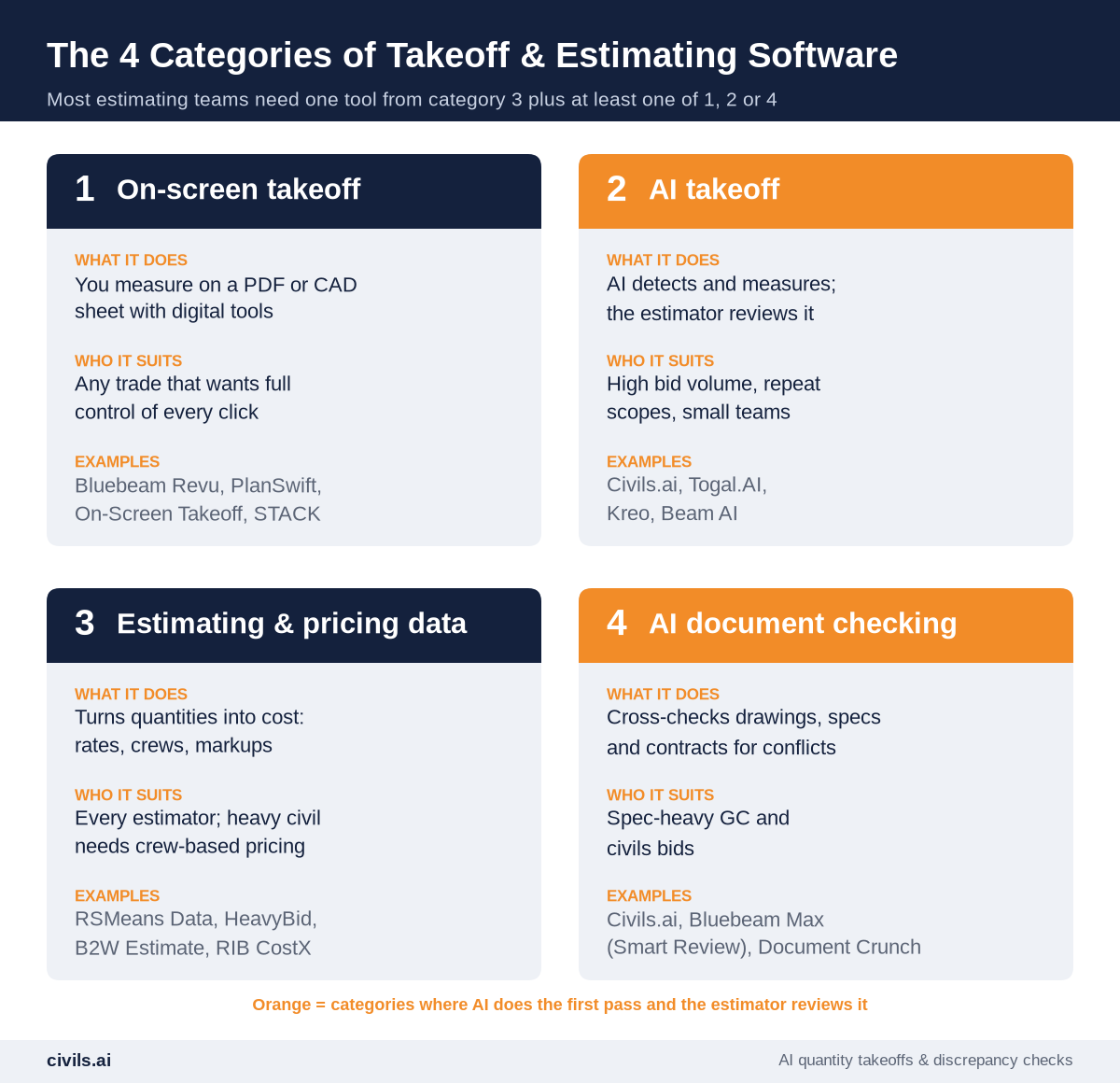
Several on-screen tools now ship AI features, so the line between categories 1 and 2 is blurring. The difference that still matters is who drives. In on-screen takeoff, the estimator measures and AI assists. In AI takeoff, AI measures and the estimator reviews.
The Best Construction Takeoff Software and Estimating Tools in 2026, by Category
1. On-Screen (Digital) Takeoff Software
- Bluebeam Revu — PDF markup and measurement used across design and construction. Every plan includes Revu for Windows desktop plus Bluebeam on web and mobile. Perimeter, count and volume measurement start on the Core plan, and Quantity Link to Excel is on Complete (Bluebeam pricing).
- PlanSwift — Takeoff and estimating in one Windows application, with pre-built assemblies by trade. Its Takeoff BOOST AI tools add auto count, auto scale and, on the Core plan, a first-pass Auto Takeoff (PlanSwift pricing).
- On-Screen Takeoff (On Center Software) — A long-running Windows takeoff tool, now with Takeoff Boost AI, that connects to Quick Bid for estimating (On-Screen Takeoff).
- STACK — Cloud-based takeoff and estimating with AI symbol counting, and a free version of its Takeoff & Estimate product (STACK pricing).
2. AI Takeoff Software
- Civils.ai — Browser-based. You type the scope in plain English, AI measures your PDF drawings, and a QA team reviews every result before it comes back as an annotated PDF and an Excel export. It covers six trade categories: floors, roads and landscaping; utilities, drainage and MEP; devices and fixtures; foundations, footings and wall runs; facade and formwork elevations; and openings (Civils.ai AI takeoff).
- Togal.AI — Cloud-based AI takeoff that automatically detects, measures and compares from drawings, with Togal.CHAT for questions about your plans (Togal.AI pricing).
- Kreo — Cloud-based takeoff for PDF, CAD and image files. AI takeoff, auto counting and the Caddie AI assistant are on Pro and above. Prices are listed in dollars, pounds and euros (Kreo pricing).
- Beam AI — Self-serve AI takeoff for HVAC, plumbing and steel, plus a "Done For You" service where takeoffs are QA-checked before delivery (Beam AI pricing).
For a sourced, feature-by-feature view of how these tools differ, see the Civils.ai comparison pages.
3. Estimating Suites and Pricing Databases
- RSMeans Data Online — A cloud cost database of material, labor and equipment costs, searchable by CSI MasterFormat, with costs localized to more than 970 locations across North America (RSMeans Data Online).
- HCSS HeavyBid — Heavy construction estimating built around activities, crews, historical estimates and pay items. HeavyBid Desktop interfaces with 30+ back-office systems, including Vista, QuickBooks and Sage 300 (HeavyBid).
- B2W Estimate (Trimble) — Heavy construction estimating and bidding with centralized cost data (B2W Software).
- RIB CostX — 2D and BIM takeoff and estimating for quantity surveyors and estimators, with a cloud option (RIB CostX).
4. AI Document Checking
- Civils.ai — Checks drawings sheet against sheet, drawing against spec, discipline against discipline, and against building codes. Each finding links to the exact sheet or clause, and your team accepts, dismisses or escalates it (Civils.ai discrepancy checks).
- Bluebeam Max — Bluebeam's Max plan adds AI drawing reviews, such as checks for missing sheets, missing door or plumbing fixture tags and gridline consistency, plus AI drawing comparisons.
- Document Crunch — An AI risk platform for contracts, specs and addenda, with answers cited to the source clause (Document Crunch).
These are the same cross-checks a GC should run on a bid package before it goes out. Our request for bid template lists six of them.
At a Glance: Deployment and Pricing
| Tool | Category | Runs on | Pricing (as listed on 19 Oct 2026) |
|---|---|---|---|
| Bluebeam Revu | On-screen takeoff | Windows desktop, web and mobile | $260–$590 per user, billed annually, across four plans ($590 Max is an introductory price) |
| PlanSwift | On-screen takeoff + estimating | Windows | $2,000/year (Essential) or $3,000/year (Core), per seat |
| On-Screen Takeoff | On-screen takeoff | Windows | Not listed; free trial and demo |
| STACK | On-screen takeoff + estimating | Cloud | Free version; paid "as low as" $299 per user/month |
| Civils.ai | AI takeoff + AI checking | Browser | US$90/month (10 takeoffs) or US$270/month (30 takeoffs); Enterprise custom |
| Togal.AI | AI takeoff | Cloud | $299/month per user, billed yearly; custom for 4+ users |
| Kreo | AI takeoff + estimating | Cloud | $100, $175 or $250 per user/month, billed annually |
| Beam AI | AI takeoff | Not stated on pages checked | From $8K/year per trade (self-serve); from $25K/year (done for you) |
| RSMeans Data Online | Pricing database | Cloud, desktop or mobile | Core from $396/year; Complete from $1,019/year; Complete Plus from $5,973/year |
| HeavyBid | Estimating suite (heavy civil) | Desktop | Custom quote |
| B2W Estimate | Estimating suite (heavy civil) | Not stated on pages checked | Contact sales |
| RIB CostX | Takeoff + estimating (QS) | Cloud option | Price on request |
| Document Crunch | AI document checking | Not stated on pages checked | Not listed; demo |
Prices change often. Confirm current terms with each vendor before you budget.
Construction Estimating Software Selection Matrix by Trade and Company Size
Use this as a starting shortlist, not a ranking. "Small" means one to three estimators; "larger" means four or more.
| Your business | Small team | Larger team |
|---|---|---|
| Finishing trades (drywall, flooring, painting) | PlanSwift or STACK (takeoff and pricing in one); add AI takeoff if bid volume is high | AI takeoff on a multi-user plan, with shared assemblies |
| MEP subcontractors | On-Screen Takeoff with Quick Bid, or STACK; Civils.ai for pipework, ductwork and cable tray runs | Beam AI or Civils.ai for first-pass quantities |
| Civil, groundworks and sitework | Civils.ai for paving, utilities, drainage and footings, priced in your own rates | Civils.ai takeoffs and checks, plus HeavyBid or B2W Estimate |
| Heavy civil self-perform GC | HeavyBid or B2W Estimate, with Bluebeam Revu for measurement | The same, plus AI takeoff and AI document checking on spec-heavy bids |
| Commercial GC preconstruction | Bluebeam Revu plus RSMeans Data for budgets | Bluebeam, an estimating suite and AI document checking |
| UK and Australian quantity surveyors | RIB CostX or Kreo | CostX or Kreo Business, with AI checking on large tender packs |
How to Shortlist Estimating and Takeoff Software in 5 Steps
Step 1: Log Where the Hours Go
Split one recent bid's hours into measuring, pricing and reading documents. The biggest bucket is the category to buy first.
Step 2: Choose the Category Before the Brand
An AI takeoff tool and a cost database solve different problems. Don't trial them against each other.
Step 3: Shortlist Two or Three Tools per Category
Drop anything that doesn't handle your drawing types, units or trade.
Step 4: Run a Past Bid Through Each Tool
Use a job you've already priced and compare quantities line by line. Demo files are chosen to make the software look good.
Step 5: Price the Whole Stack per Estimator
Add takeoff, estimating and checking tools together, per seat, per year. Get takeoff limits and annual terms in writing.
Notes for UK, Canadian and Australian Contractors
- UK — Bills of quantities are typically measured to RICS NRM 2, so check that a tool's export maps to your bill structure. Kreo lists prices in pounds, and CostX is aimed at quantity surveyors and estimators.
- Canada — RSMeans localizes costs across North America, and Beam AI says it serves businesses across the US and Canada. Confirm metric drawing support in the trial.
- Australia — RSMeans localization covers North America only, so you'll need local rates. CostX and Kreo both target quantity surveyors, and Civils.ai lists users in Australia among its 8 countries.
How AI Changes Construction Takeoff and Estimating
AI changes the measuring step first. The estimator moves from clicking every wall run to reviewing a marked-up drawing. Pricing, judgment and the bid decision stay with the estimator. For the wider picture, see how AI is changing construction estimating.
Generic AI tools (such as ChatGPT) aren't built for scaled takeoffs from drawing sets or for citing the sheet they're quoting. Purpose-built construction AI tools are. Civils.ai measures quantities from PDF drawings from a plain-English scope, has a QA team review every result, and returns an annotated PDF plus an Excel file you can check against the drawing. Civils.ai reports over 97% accuracy for takeoffs from modern PDFs and up to 90% less manual measuring effort, and is used by 200+ firms. See how it works on PDF and CAD quantity takeoffs, or how quantity surveyors use it in AI for quantity surveying.
It is strongest on drawing- and spec-heavy civils and trade work: roads, paving, utilities, drainage, footings and wall runs, where the same set also needs checking for conflicts between sheets and specs. Try AI takeoff on your drawings: upload a PDF, type the scope, and compare the result with your last manual takeoff. Plans are listed on the pricing page.
AI-prepared takeoffs and checks are a draft to support your work and should be reviewed by a qualified professional before they go into a bid.
Estimating and Takeoff Software Buyer's Checklist
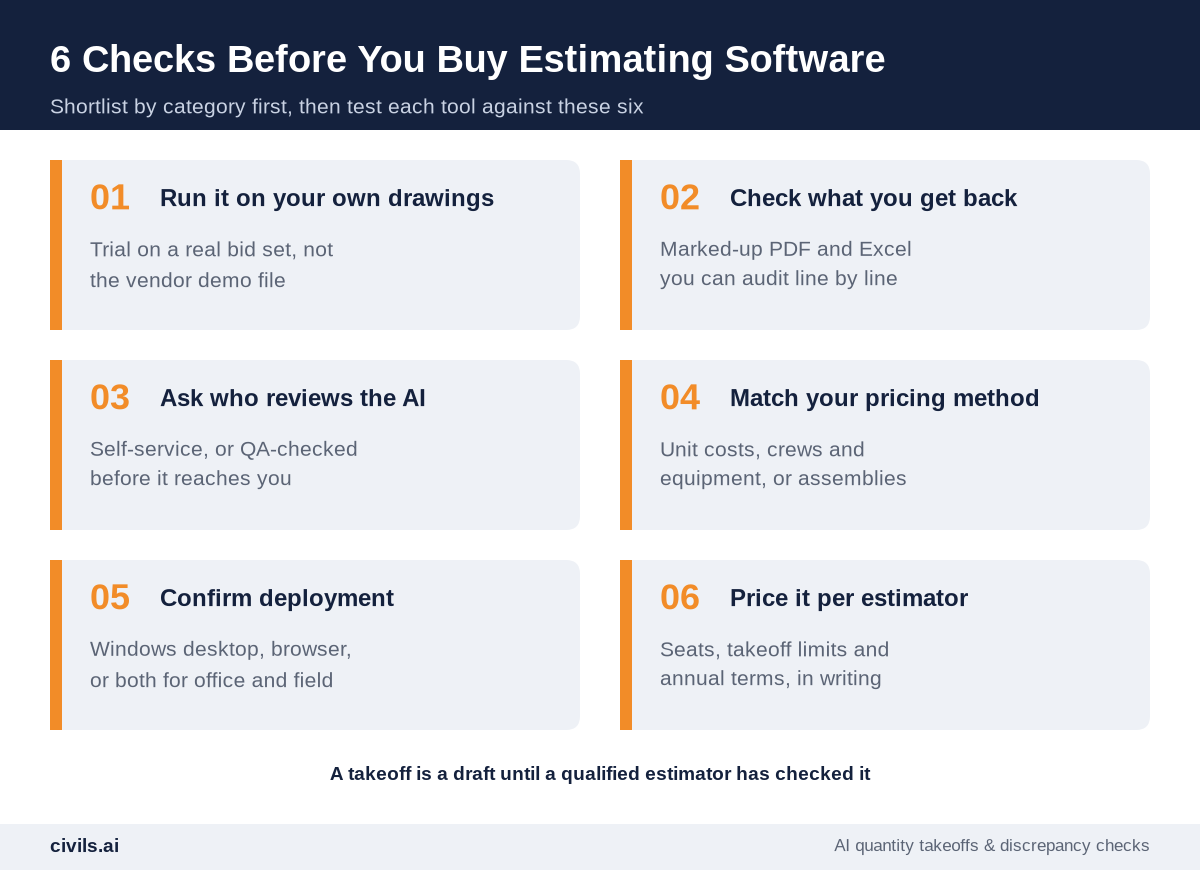
- Trial on your own drawings — a past bid with known quantities, not the vendor's demo file
- Output you can audit — a marked-up PDF and Excel export, traceable to each sheet
- Clear review model — self-service, or QA-checked before it reaches you
- Pricing method fits — unit costs, crews and equipment, or assemblies
- Deployment fits — Windows desktop, browser, or both for office and field
- Total cost in writing — seats, takeoff limits, annual terms and add-ons
The Bottom Line
Don't buy the "best" tool. Buy the right category for the step that costs you the most hours, then test the shortlist on a bid you've already priced. For drawing- and spec-heavy civils and trade work, pair AI takeoff with AI document checking and keep an estimator reviewing every number. Speed without a system produces faster mistakes.
Frequently Asked Questions
What is the best construction estimating software?
There isn't one. The right choice depends on your trade, team size and where your time goes. Most teams pair one pricing tool, such as an estimating suite or cost database, with one takeoff tool.
What is the difference between takeoff software and estimating software?
Takeoff software measures quantities from drawings. Estimating software prices those quantities with labor, material, equipment and markups. Some tools, such as PlanSwift, STACK and Kreo, do both.
Is AI takeoff accurate enough to bid from?
Yes, once it's reviewed. Treat every AI takeoff as a draft, check it against the drawing, and confirm scope boundaries yourself before the numbers go into a bid.
What estimating software do heavy civil contractors use?
Heavy civil estimators usually need crew- and equipment-based pricing, which is what tools such as HeavyBid and B2W Estimate are built for. Quantities for those estimates still have to come from a takeoff tool.
Which construction takeoff software is best for small subcontractors?
A tool that combines takeoff and pricing, such as PlanSwift or STACK, keeps costs and learning time down. If you bid a high volume of similar scopes, AI takeoff can cut the measuring time.
Related reading: Construction Estimator Software for GCs: The 2026 Buyer's Guide.