 Mary Janine L. Kamenić
 Julianna Widlund P.E
 Stevan Lukic CEng

Photo by Pedro Miranda on Unsplash
Looking for a Bluebeam alternative? 7 tools compared by job: PDF markup, takeoff and AI discrepancy checking, with vendor pricing as of October 2026.
Quick Summary
| Topic | Key Finding |
|---|---|
| Bluebeam pricing | $260 (Basics), $330 (Core), $440 (Complete) and $590 (Max, introductory) per user per year, billed annually, as of October 2026 (Bluebeam) |
| Bluebeam takeoff | Length and area on Basics; perimeter, count and volume from Core; Quantity Link to Excel and Dynamic Fill on Complete. The estimator places the measurements |
| Bluebeam AI | Max adds Smart Review and Smart Overlay AI drawing checks, both in preview; Smart Review is optimized for US vertical commercial construction (Bluebeam) |
| Three jobs, not one | Bluebeam covers PDF markup, takeoff and drawing review. Alternatives usually replace one of those jobs, not all three |
| Free options | Drawboard PDF essentials, Fieldwire Basic and STACK Free all have a $0 tier with limits (vendor pages, October 2026) |
| AI takeoff options | Togal.AI and Civils.ai draft the takeoff with AI; PlanSwift, On-Screen Takeoff and STACK add AI assist tools to on-screen takeoff |
| Rule that does not change | Every AI-drafted quantity is reviewed by an estimator before it goes into a bid |
Most estimators searching for a Bluebeam alternative are not unhappy with PDF markup. They are paying for a tool that does three jobs, PDF markup, quantity takeoff and drawing review, and only using one or two of them well. This guide splits the options by job, compares seven tools against Bluebeam’s own published features and pricing, and shows where AI takeoff and AI discrepancy checking now fit.
Key Term Definitions
PDF markup: Redlining, commenting, stamping and comparing drawing revisions on a PDF. This is what Bluebeam Revu is best known for.
On-screen takeoff: Measuring areas, lengths and counts on a scaled PDF by clicking and tracing. Bluebeam’s measurement tools, PlanSwift, On-Screen Takeoff and STACK all work this way, with varying levels of automation.
AI takeoff: Software that reads the drawing and produces a first-pass takeoff, which an estimator then checks and corrects. See what a takeoff in construction is for the full comparison of manual, digital and AI methods.
Discrepancy check: A review that compares sheets, specs and codes against each other to find conflicts, such as two sections giving different slab levels or a pipe material that does not match the spec.
Why Most Bluebeam Alternative Lists Don’t Help Estimators
The current search results for “Bluebeam alternative” are Reddit threads and PDF markup vendors comparing themselves to Bluebeam as a markup tool. That is useful for design review. It is not useful if your team bought Bluebeam to do takeoffs.
For estimators, the expensive hours are not spent adding clouds and comments. They are spent measuring, and then finding out during buyout that the drawings and specs disagreed. A markup tool that is cheaper than Revu but measures the same way does not save those hours.
So the first question is “what job am I replacing it for?”
What Bluebeam Does Today, and What It Costs
Bluebeam sells four plans, all billed annually per user, and all include Revu for Windows desktop plus Bluebeam on web and mobile (Bluebeam pricing, as of October 2026):
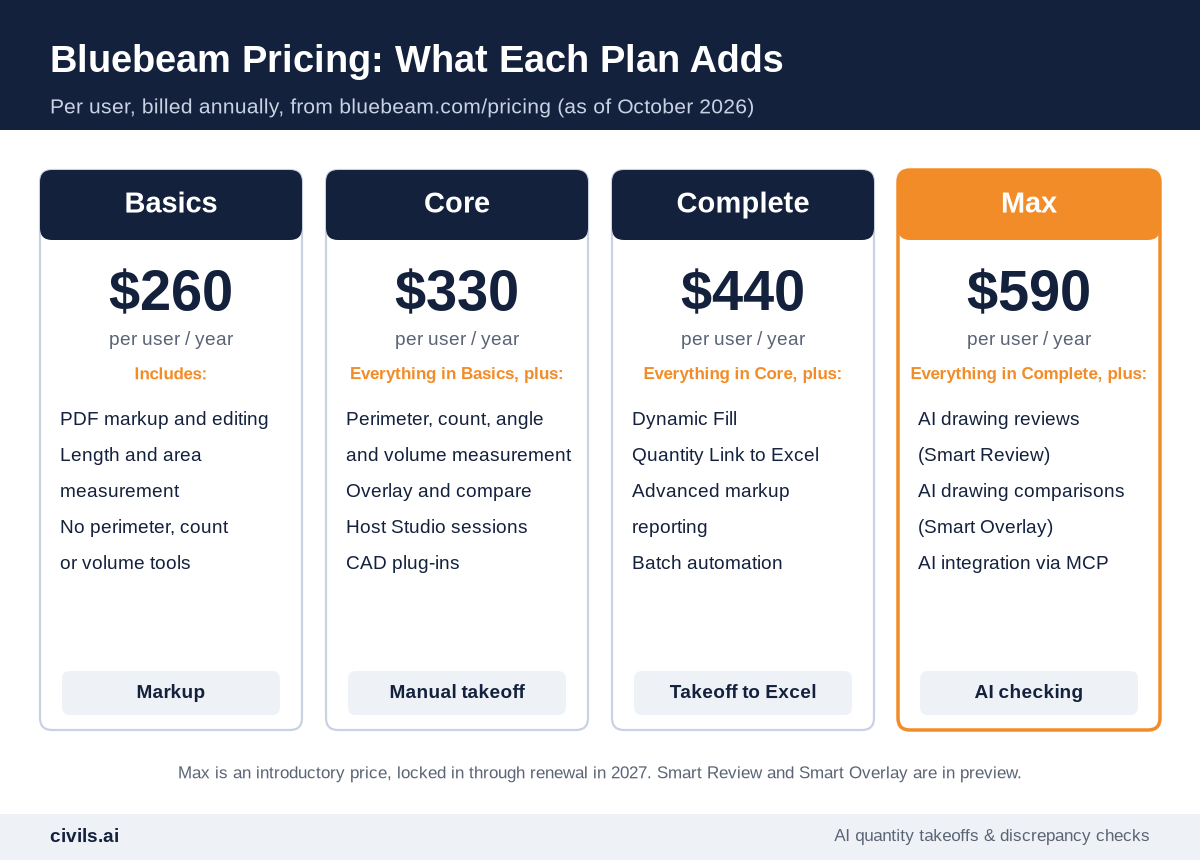
- Basics, $260 — PDF markup and editing, length and area measurement, no perimeter or advanced measurements
- Core, $330 — perimeter, count, angle and volume measurement, overlay and compare, and hosting Studio sessions
- Complete, $440 — Dynamic Fill, Quantity Link with Microsoft Excel, advanced markup reporting and batch automation
- Max, $590 — an introductory price locked through renewal in 2027, adding AI drawing reviews, AI drawing comparisons and AI integration via MCP
Two details matter for estimators. First, Bluebeam takeoff is measurement markup: the estimator places every measurement, and Complete links those quantities to Excel. Second, Max’s Smart Review checks for issues such as missing sheets, missing door or plumbing fixture tags and gridline inconsistencies. Bluebeam states that Smart Review and Smart Overlay are in preview, and that Smart Review is optimized for US-based vertical commercial construction (Bluebeam Max).
Revu itself runs on Windows. Mac users rely on Bluebeam on web and mobile.
What Are You Replacing Bluebeam For?
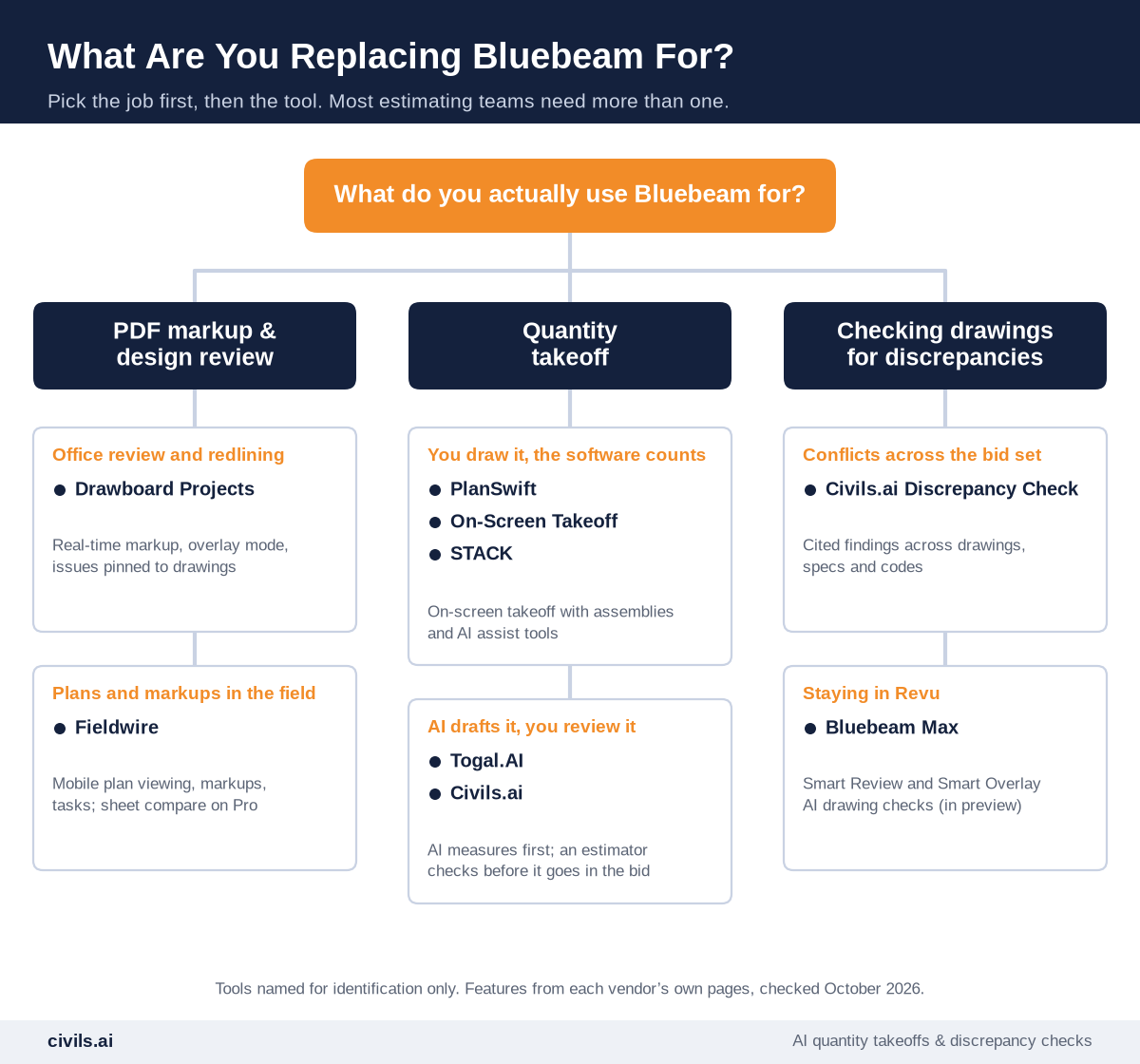
Most estimating teams end up with two tools: one for markup, and one for takeoff or checking.
7 Bluebeam Alternatives Compared, by Job
All features and prices below are from each vendor’s own pages, checked October 2026. Where a vendor does not publish a price, none is given.
PDF Markup and Design Review
1. Drawboard Projects
Drawboard Projects is a real-time PDF markup and design review platform for Windows, iOS and web. It includes calibrated length, rectangular area and polygon area measurement, overlay mode for comparing revisions, issues pinned to drawings, and Procore and Aconex sync. Team is $29 per user per month (up to 25 users) and Growth is $39, or $270 and $370 per user per year billed annually (Drawboard pricing). The separate Drawboard PDF app has a free essentials tier.
Best for: design review and redlining teams who do not need count, perimeter or volume takeoff.
2. Fieldwire
Fieldwire, by Hilti, is a field management platform built around plan viewing, markups, tasks and checklists. Basic is $0 for up to five users, three projects and 100 sheets. Pro ($39), Business ($64) and Business Plus ($89) are per user per month, billed annually. Sheet compare starts on Pro, and RFIs, submittals and change orders are on Business Plus (Fieldwire pricing).
Best for: getting current plans and markups to the field. It is not a takeoff tool.
Quantity Takeoff
3. PlanSwift
PlanSwift combines takeoff and estimating, with pre-built assemblies by trade and support for PDF, JPG, TIFF and CAD plans. Essential is $2,000 per seat per year, with Auto Count, Auto Scale and Auto Bookmark. Core is $3,000 and adds Auto Takeoff, which PlanSwift describes as building a first-pass takeoff for areas, lengths and counts. There is a 14-day free trial with no credit card (PlanSwift pricing).
Best for: trade contractors who want takeoff and estimating in one tool.
4. On-Screen Takeoff (On Center)
On-Screen Takeoff is On Center’s long-running takeoff software, which it describes as proven for 35+ years. Takeoff Boost adds AI to automate repetitive takeoff work, and there is a free web preview where you upload a plan and see a first pass. On Center does not publish a price on its site, so ask for a quote (On Center).
Best for: estimating departments already standardized on OST.
5. STACK
STACK is cloud-based takeoff and estimating with trade-specific AI tools. The Free plan is $0 with one active project per month, up to 300 plan pages and 50 measurements per project. Premium is $299 per user per month and Pro is $349, billed annually, with Pro adding worksheet-style estimating (STACK pricing).
Best for: subcontractors who want browser-based takeoff through to proposal.
6. Togal.AI
Togal.AI is an AI takeoff tool that detects, measures and compares drawing sets, with Togal.CHAT for questions about plans. Togal states up to 98% accuracy on floor plans. Growth is $299 per user per month, billed yearly, with unlimited automated takeoffs. Business is custom for teams of four or more users (Togal pricing).
Best for: estimators who want to run AI takeoff in-house.
AI Takeoff and Discrepancy Checking
7. Civils.ai
Civils.ai automates the measuring and adds cited checking across the whole bid set. AI takeoff: upload PDF drawings, type the scope in plain English, and get back quantities on an annotated PDF plus an Excel export, with every takeoff reviewed by Civils.ai’s QA team before delivery. AI discrepancy checks: sheet-to-sheet, drawing-to-spec, cross-discipline and building code checks, each finding cited to the exact sheet or clause.
Starter is US$90 per month with 10 takeoffs and unlimited AI searches and checks. Professional is US$270 per month with 30 takeoffs. Both are billed monthly, and you can cancel anytime (Civils.ai pricing). Civils.ai is not a general PDF markup tool, so many teams keep Bluebeam or Drawboard for redlining. See the Civils.ai vs Bluebeam Revu comparison and other side-by-side comparisons.
Best for: GCs and subcontractors (civil, groundworks and MEP) who want the measuring and the checking done before they price.
At a Glance: Bluebeam Alternatives and Pricing
| Tool | Main job | Published pricing (as of October 2026) |
|---|---|---|
| Drawboard Projects | PDF markup and design review | $29 (Team) or $39 (Growth) per user per month, or $270 / $370 per user per year billed annually; Enterprise custom |
| Fieldwire | Field plan viewing, markup and tasks | Basic $0; Pro $39, Business $64, Business Plus $89 per user per month, billed annually |
| PlanSwift | On-screen takeoff and estimating | Essential $2,000 and Core $3,000 per seat per year; 14-day free trial |
| On-Screen Takeoff | On-screen takeoff with Takeoff Boost AI | No price published on oncenter.com; free web preview of Takeoff Boost |
| STACK | Cloud takeoff and estimating | Free $0; Premium $299 and Pro $349 per user per month, billed annually |
| Togal.AI | AI takeoff | Growth $299 per user per month, billed yearly; Business custom for 4+ users |
| Civils.ai | AI takeoff and discrepancy checking | Starter US$90 per month (10 takeoffs), Professional US$270 per month (30 takeoffs), billed monthly; Enterprise custom |
For more takeoff and estimating tools by trade and company size, see the best construction estimating software and takeoff tools in 2026.
How to Switch From Bluebeam Without Losing a Bid
Step 1: List What You Actually Use
Check your markup lists and tool sets. If nobody uses count or volume tools, Basics or a markup tool may be enough. If Quantity Link feeds your estimate, the replacement must export to Excel.
Step 2: Keep Revu Where It Works
Swapping markup tools mid-project adds risk. Add a takeoff or checking tool alongside Revu first.
Step 3: Rerun a Past Bid
Take a job you have already measured and run it through each shortlisted tool. Compare quantities line by line and time the whole workflow, not just the measuring.
Step 4: Price the Stack per Estimator
Add up the markup tool, the takeoff tool and any checking tool per estimator per year. Note which prices are introductory or billed annually.
How AI Changes Takeoff and Document Checking
AI changes who does the first pass. Instead of an estimator tracing every area and counting every fixture, the software drafts the takeoff and the estimator checks it.
The same applies to checking. Instead of flipping between the structural and architectural sheets to see whether the slab levels agree, an AI check compares them and points you to both sheets.
Not all AI is equal here. Generic AI tools (such as ChatGPT) are not built to measure scaled construction drawings. Purpose-built construction AI measures on the actual sheet and shows its working. Civils.ai is built for this use case:
- AI takeoff — areas, lengths, counts and concrete volumes from PDF drawings, with up to 90% less manual measuring effort and 97%+ accuracy on takeoffs (Civils.ai’s own figures)
- QA-reviewed output — every takeoff checked by Civils.ai’s QA team, returned as an annotated PDF and Excel
- Discrepancy check — conflicts between sheets, specs and codes, each cited to the source page
Try AI takeoff and discrepancy checking on your own drawings. Upload a past bid and compare the results with your Bluebeam quantities. Plans are on the pricing page, and for the PDF and CAD workflow in detail, read AI for PDF and CAD quantity takeoffs.
AI-prepared takeoffs are a draft to support your work and should be reviewed by a qualified professional before issuing.
Bluebeam Alternative Checklist
- Job defined — markup, takeoff, checking, or a mix
- Measurement types covered — area, length, count, perimeter and volume for your trade
- Excel export — quantities flow into your estimate without retyping
- Revisions handled — overlay or compare when addenda land
- Platform fit — Windows, Mac, web or mobile for every user who needs it
- Pricing checked — from the vendor’s own page, with billing terms and introductory rates noted
- Pilot on a past bid — quantities compared line by line
- Review step kept — an estimator checks every AI-drafted quantity before it is priced
Once quantities are checked, they feed straight into your subcontractor packages. Use the request for bid template to issue them.
The Bottom Line
Bluebeam is still a strong PDF markup tool, and many teams should keep it. The right Bluebeam alternative depends on the job. For markup, Drawboard and Fieldwire are cheaper or more field-focused. For takeoff, PlanSwift, On-Screen Takeoff and STACK speed up measuring by hand, while Togal.AI and Civils.ai draft it with AI. For catching drawing and spec conflicts before bid day, use a dedicated discrepancy check. Speed without a system produces faster mistakes, so keep the estimator review in every workflow.
Frequently Asked Questions
What is the best Bluebeam alternative?
It depends on the job. For PDF markup, Drawboard Projects or Fieldwire. For takeoff, PlanSwift, On-Screen Takeoff or STACK, or Togal.AI and Civils.ai for AI takeoff. For drawing discrepancy checks, Civils.ai.
How much does Bluebeam cost?
As of October 2026, Bluebeam lists Basics at $260, Core at $330, Complete at $440 and Max at $590 (introductory) per user per year, billed annually.
Can Bluebeam do quantity takeoffs?
Yes. Bluebeam has measurement tools on every plan, perimeter, count and volume from Core, and Quantity Link to Excel on Complete. The estimator places the measurements.
Is there a free Bluebeam alternative?
Yes, with limits. Drawboard PDF has a free essentials tier, Fieldwire Basic is $0 for up to five users, and STACK Free allows one active project per month.
Does Bluebeam have AI?
Yes. Bluebeam Max adds Smart Review, Smart Overlay and AI integration via MCP. Bluebeam states Smart Review and Smart Overlay are in preview.