 Mary Janine L. Kamenić
 Julianna Widlund P.E
 Stevan Lukic CEng

Photo by Evgeniy Surzhan on Unsplash
Compare the best AI takeoff software in 2026: 7 tools by workflow, review model and published pricing, plus a way to test them on your own drawings.
Quick Summary
| Topic | Key Finding |
|---|---|
| What AI takeoff software does | Reads PDF drawings and returns a first-pass takeoff of areas, lengths and counts for an estimator to review |
| Two delivery models | Self-service: your estimators run and check the AI (Togal.AI, Kreo, STACK, PlanSwift, On-Screen Takeoff). QA-reviewed: the vendor checks results before delivery (Civils.ai, Beam AI Done For You) |
| Published pricing | From US$90 per month (Civils.ai Starter) to annual licenses from $25K (Beam AI Done For You), per vendor pages as of November 2026 |
| Accuracy claims | Every vendor publishes its own figure, measured its own way. None of them is measured on your drawings |
| How to choose | Run every shortlisted tool on the same past bid and compare each line item against your checked takeoff |
| ChatGPT and general AI | Not takeoff tools. An independent benchmark found symbol counting on floor plans “unreliable for production use without human verification” (AECV-Bench) |
| Rule that does not change | An estimator reviews every AI quantity before it goes into a bid |
Choosing AI takeoff software in 2026 is harder than it looks. Every vendor promises faster takeoffs and quotes an accuracy figure, but each figure is measured on the vendor’s own drawings, in its own way. This guide compares seven AI takeoff tools from each vendor’s own published features and pricing, then gives you a method and scorecard to test them on a bid you have already priced. We have not run a head-to-head test, so no test results are reported here. The method lets you produce your own.
Key Term Definitions
AI takeoff: Software that reads construction drawings and produces a first-pass quantity takeoff (areas, lengths, counts and volumes) that an estimator then reviews. See what a takeoff in construction is for how manual, digital and AI methods compare.
On-screen takeoff: The estimator measures on a scaled PDF by clicking and tracing.
Self-service vs QA-reviewed: In self-service tools, your estimators run the AI and check every result. In QA-reviewed tools, the vendor’s team checks the output before it is delivered, and your team reviews it again.
Element-level accuracy: The variance of each line item (slab area, fixture count) against a checked takeoff, rather than one percentage for the whole job.
Why AI Takeoff Accuracy Claims Don’t Help You Choose
Togal.AI states “up to 98% accuracy” and “98% accuracy on floor plans” (Togal.AI). Beam AI promises “99%+ accurate, QA-checked takeoffs” (Beam AI). On Center says Takeoff Boost delivers results “up to 95% faster than manual clicks” (On Center). Civils.ai lists “97%+ accuracy on takeoffs” on its pricing page.
These figures are not comparable. They come from different drawings and trades, each vendor defines accuracy its own way, and speed claims rarely include the time spent checking and fixing the output.
Workflows differ too. A self-service tool returns a result in minutes, but your estimator owns the checking. A QA-reviewed service takes longer but arrives checked. Timing only the AI step misleads.
The figures that matter are accuracy and time on your drawings. The test method below shows how to get them.
The 7 Best AI Takeoff Software Tools Compared
Features and prices come from each vendor’s own pages, checked in November 2026, grouped by delivery model.
QA-Reviewed AI Takeoff
1. Civils.ai
Civils.ai is built around the prompt: upload PDF drawings, type the scope in plain English (for example, “measure all asphalt road surfacing and paving areas”), and AI runs the takeoff. Its QA team reviews every result before it comes back. You then edit in the browser and export an annotated PDF and an Excel file. Six categories cover areas, utilities and MEP, fixtures, foundations and wall runs, elevations and openings (Civils.ai AI takeoff).
Starter is US$90 per month with 10 takeoffs, and Professional is US$270 per month with 30. Both are billed monthly, with takeoffs counted per drawing sheet, per trade, and unlimited AI searches and checks (Civils.ai pricing).
Best for: GCs and subcontractors, especially civil, sitework and MEP, who want checked quantities without running the AI themselves.
2. Beam AI
Beam AI offers two models. In Done For You, you upload plans, specifications and legends, confirm the required quantities and add project-specific instructions. Beam’s AI extracts the quantities and every takeoff is QA-checked before delivery, in 24–72 hours. Do It Yourself gives instant AI takeoffs for HVAC, plumbing and steel (Beam AI). DIY starts at an $8K annual license per trade, and Done For You starts at a $25K annual license based on trade and volume (Beam AI pricing).
Best for: subcontractors with steady volume in one or two trades who are comfortable with an annual license. See Civils.ai vs Beam AI.
Self-Service AI Takeoff
3. Togal.AI
Togal.AI automatically detects, measures and compares drawings, with cloud collaboration (Togal.AI). Togal.CHAT answers questions about uploaded drawings and specs, but Togal’s help center states that it “cannot perform takeoff”. Quantities come from the takeoff tools (Togal.CHAT). Growth is $299 per user per month, billed yearly, with unlimited automated takeoffs. Business is custom for teams of four or more (Togal pricing).
Best for: GC and trade estimators who want unlimited AI takeoff in-house. See Civils.ai vs Togal.AI.
4. Kreo
Kreo is cloud takeoff and estimating software for PDF, CAD and image files. Its AI tools include Auto Measure for rooms, walls, doors and windows, Auto Count, and Caddie, an AI agent that Kreo says “reads your drawings, runs the measurements, and delivers exact quantities” (Kreo). Pro is $175 per user per month and Business is $250 per user per month (five seats included), both billed annually. The $100 Essential plan does not include AI (Kreo pricing).
Best for: estimators and quantity surveyors who want CAD and BIM-friendly takeoff software they run themselves. See Civils.ai vs Kreo.
5. STACK
STACK is cloud takeoff and estimating. AI Takeoffs, symbol search and STACK IQ are listed on Premium ($299) and Pro ($349) per user per month, billed annually (STACK pricing). STACK IQ, launched on September 1, 2026, connects STACK to AI models including Claude and ChatGPT, so users can describe what they need in plain language (STACK IQ).
Best for: subcontractors who want takeoff through to proposal in one platform. See Civils.ai vs STACK.
6. PlanSwift
PlanSwift combines takeoff and estimating. Core, at $3,000 per seat per year, adds the full Takeoff BOOST suite, including Auto Takeoff, which PlanSwift describes as building “a first-pass takeoff for areas, lengths, and counts in minutes”. Essential is $2,000 without it (PlanSwift pricing).
Best for: trade contractors who already estimate in PlanSwift and want AI on top.
7. On-Screen Takeoff (On Center)
On-Screen Takeoff is On Center’s long-running takeoff software. Takeoff Boost is its AI tool suite, giving a head start on quantities such as net area, linear measurements and counts, which estimators then “review and refine”. On Center publishes no price on its site (On Center).
Best for: estimating departments already standardized on OST.
At a Glance: AI Takeoff Software Compared
| Tool | Who checks the AI output | Published pricing (as of November 2026) |
|---|---|---|
| Civils.ai | Civils.ai QA team, then you | Starter US$90/month (10 takeoffs), Professional US$270/month (30 takeoffs); Enterprise custom |
| Beam AI | Beam AI QA (Done For You), then you | DIY from $8K per trade per year; Done For You from $25K per year |
| Togal.AI | Your estimators | Growth $299 per user per month, billed yearly |
| Kreo | Your estimators | Pro $175 and Business $250 per user per month, billed annually |
| STACK | Your estimators | Premium $299 and Pro $349 per user per month, billed annually |
| PlanSwift | Your estimators | Core (with Auto Takeoff) $3,000 per seat per year |
| On-Screen Takeoff | Your estimators | No price published |
For non-AI tools, see the best construction estimating software in 2026 and Bluebeam alternatives for takeoff, or browse all comparisons.
How to Test AI Takeoff Software on Your Own Drawings
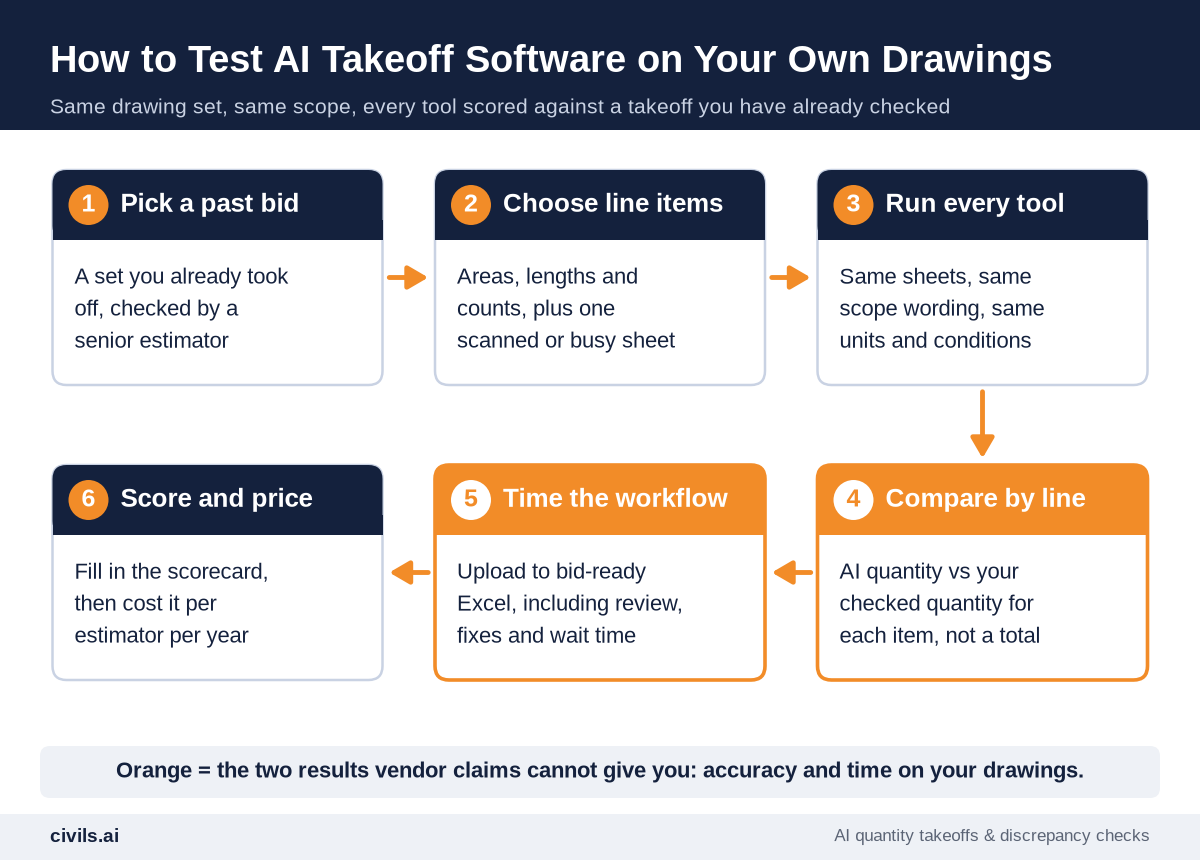
Step 1: Pick a Past Bid You Have Already Checked
Use a recent job a senior estimator has checked: that is your ground truth. Use the set as issued, with addenda.
Step 2: Choose 8–12 Line Items Across Element Types
Include areas (slabs, paving), lengths (walls, pipe, curb) and counts (fixtures, doors). Add a hard case: a scanned sheet, mixed scales or a dense MEP plan.
Step 3: Run Every Tool on the Same Set, With the Same Scope
Same sheets, same scope wording, same units. Send QA-reviewed services the scope exactly as you would on a live bid.
Step 4: Compare Each Line Item, Not the Total
Variance per item is AI quantity minus your checked quantity, divided by your checked quantity. Record every line and flag the worst, because overruns and shortfalls cancel out in a total.
Step 5: Time the Whole Workflow
Time it from upload to bid-ready Excel, including setup, checking, fixes and any turnaround wait. Record your team’s hours and elapsed time separately: a next-day result with little rework can beat an instant one that takes an afternoon to fix.
Step 6: Run the QA Checks, Then Score and Price
Check every quantity traces to markup on the sheet, and reissue one sheet to see how each tool handles revisions. Then fill in the scorecard and price each tool per estimator per year.
AI Takeoff Evaluation Scorecard
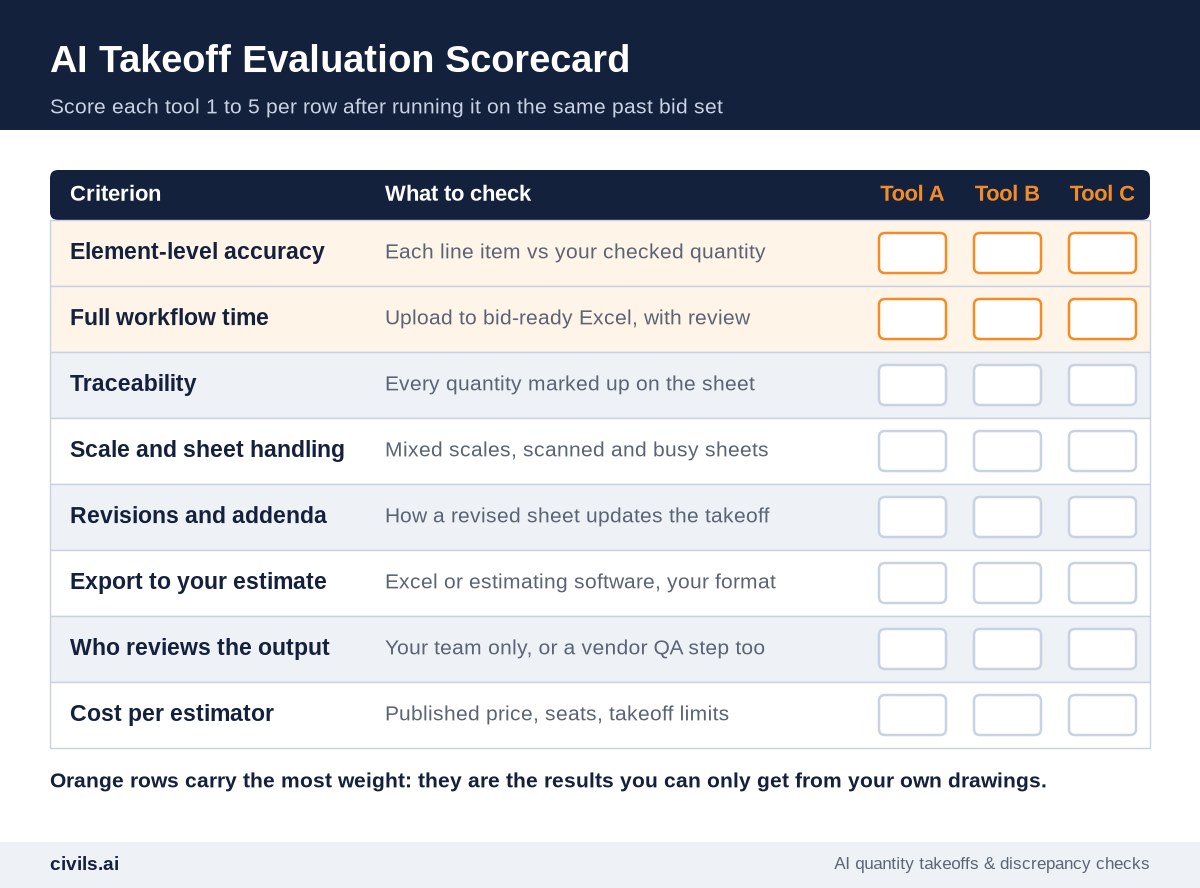
Score each row 1–5. Weight accuracy and workflow time the most: they are the only rows a vendor’s website cannot answer.
How AI Changes Construction Takeoff
AI turns hours of measuring into a review task. The estimator moves from tracing every wall to checking a first pass and catching what the drawings got wrong. See how AI is changing construction estimating.
Generic AI tools such as ChatGPT are not built for this. In Civils.ai’s benchmark of general-purpose LLMs on a civil drawing package, Claude and ChatGPT underestimated the priced bid by 39% and 43% against a quantity surveyor’s ground truth. Purpose-built AI construction takeoff tools measure to scale and show their work on the sheet.
Civils.ai’s AI quantity takeoff is built for that review:
- Scope in plain English — type exactly what to measure, trade by trade, instead of building conditions by hand
- QA-reviewed before delivery — every takeoff is checked by Civils.ai’s QA team before it reaches you
- Traceable results — quantities come back marked up on the original drawing, editable in the browser and exported to Excel
- Checks across the bid set — the same platform searches specs and bid documents
On its homepage, Civils.ai says it helps “firms like JTC automate quantities measurements from drawings and run AI checks across their projects”, with ROI verified over 12 months across a team of 38 users, showing 97% takeoff accuracy and 528+ hours of efficiency saving (Civils.ai).
Try AI takeoff on your drawings and put Civils.ai through the scorecard above. Plans start at US$90 per month, billed monthly, and you can cancel anytime (Civils.ai pricing). AI-prepared takeoffs are a draft to support your work and should be reviewed by a qualified professional before you issue a bid.
AI Takeoff Software Buyer’s Checklist
- Same test set for every tool — one past bid, already checked, with addenda
- Line-item variance recorded — for every item, with the worst miss flagged
- Full workflow timed — setup, review, fixes and turnaround, not just the AI step
- Traceability confirmed — every quantity links to markup on the sheet
- Your trades covered — tested on your hardest scope, not the vendor’s demo plan
- Revision handling tested — one sheet reissued and the change tracked
- Real cost calculated — seats, takeoff limits, annual vs monthly billing and per-trade licenses
- Data terms read — whether your drawings are used to train the vendor’s models
The Bottom Line
In AI for construction estimating, the best AI takeoff software is the one that is most accurate on your drawings, for your trades, with the least rework. Vendor accuracy claims are a starting point, not a result. Shortlist two or three tools, run them on a bid you have already checked, and let the line-item variances and workflow time decide. Whichever tool wins, an estimator still signs off every quantity. Keep sub bids on the same scope with our request for bid template.
Frequently Asked Questions
What is the best AI takeoff software?
It depends on your trades and workflow. Civils.ai and Beam AI deliver QA-reviewed takeoffs. Togal.AI, Kreo, STACK, PlanSwift and On-Screen Takeoff are self-service tools your estimators run. Test two or three on a past bid before you buy.
Can ChatGPT do a construction takeoff?
Not reliably. General-purpose chatbots cannot consistently measure to scale, and an independent benchmark on real floor plans found door and window counting “unreliable for production use without human verification” (AECV-Bench). Use purpose-built AI takeoff software and check the output. See Civils.ai vs ChatGPT.
How accurate is AI takeoff?
It varies with the drawings, the trade and the tool. Vendors publish figures from their own tests. The only way to know for your work is to compare each line item against a takeoff you have already checked.
Will AI takeoff software replace estimators?
No. AI takes over the measuring, but estimators still define scope, check quantities, judge risk and price the work.
What is the difference between AI takeoff and AI construction estimating software?
AI takeoff produces quantities from drawings. AI construction estimating software also prices them with labor and material costs. Beam AI, STACK Pro and PlanSwift work as AI estimating software as well as takeoff tools.