 Mary Janine L. Kamenić
 Julianna Widlund P.E
 Stevan Lukic CEng

Photo by Vitaly Gariev on Unsplash
Bid leveling turns a stack of subcontractor proposals into one apples-to-apples comparison. Use this step-by-step process and copy-ready template, then see how software flags the scope gaps and exclusions hiding in sub bids.
Quick Summary
| Topic | Key Finding |
|---|---|
| What bid leveling is | Organizing sub bids to compare them like for like (Procore) |
| The core layout | One column per bidder, one row per scope item |
| Why the low bid misleads | It is often low because of what it leaves out |
| How gaps get priced | Plugs, visible only to your team in tools such as BuildingConnected |
| Software options | Bid platforms, AI leveling tools and spec-checking tools |
| Where AI helps today | Reading proposals and checking sub scope against the spec |
Bid leveling is how a general contractor makes sense of bid day. Five drywall proposals arrive in five formats. One excludes taping above ceilings. One is silent on fire-rated assemblies. The totals look comparable. The scopes are not.
This guide is for GC estimators in the US and Canada: a seven-step process, a bid leveling template to copy, where scope gaps hide, and the software that now reads proposals for you.
Key Term Definitions
Bid leveling: Organizing, comparing and analyzing subcontractor bids so the package details and quotes are equal for comparison (BuildingConnected).
Bid tabulation (bid tab): The side-by-side table of bidders and prices as submitted. A leveled bid tab adjusts it so every column prices the same scope.
Scope gap: Work required by the drawings, specs or contract that a bidder excluded, qualified or never mentioned.
Exclusion and qualification: An exclusion is an item a bidder states is not in their price. A qualification is a condition on the price — a schedule assumption, a substitution or a shifted risk.
Plug: An adjustment your team adds to cover missing or mis-priced scope. In BuildingConnected, plugs change the “Leveled Bid” while the “Base Bid” stays as submitted (BuildingConnected).
Why Bid Leveling Goes Wrong
The goal is the lowest price that includes everything in the scope of work (Procore). It breaks down in three places:
- Unstructured proposals — subs send their own quotes instead of your bid form, with exclusions in a cover letter or a footnote of a scanned PDF.
- Scope never defined line by line — “drywall per plans and specs” lets every bidder draw their own line around the work. You end up leveling different scopes, not prices.
- No time on bid day — late and revised bids arrive in the last hours, and the apparent low gets carried with its gaps.
These are failures of process, not failures of effort. A gap found before award is a plug; after award, it is a change order.
Most of the fix starts before bids come back. A bid form with a dedicated exclusions section makes leveling possible — see our request for bid template. So does catching gaps before the package goes out; see how to review construction documents faster without missing scope.
Bid Leveling Process: 7 Steps
Step 1: Build the scope sheet before bids arrive
List the package scope line by line, grouped by CSI MasterFormat section, including Division 01 items that land on the trade — testing, temporary protection, cleanup, submittals. These lines become the rows of your leveling sheet.
Step 2: Issue a bid form with the same structure
Ask every bidder to price against those rows: base bid, unit prices, alternates and allowances, plus a required exclusions section and a list of addenda received.
Step 3: Log every proposal as received
Record bidder, date, revision, addenda acknowledged and the base bid exactly as submitted. Log a revised bid as a new revision — never overwrite the old number.
Step 4: Map each proposal to the scope sheet
For every scope row, mark each bidder Included, Excluded or Not mentioned, with the proposal page that supports the call. “Not mentioned” is a gap until the bidder confirms otherwise.
Step 5: Read exclusions and qualifications against the spec
This is where most scope gaps hide. “Excludes winter protection” matters only if the spec requires it — and on a cold-weather pour, it usually does. Flag substitutions, schedule assumptions and shifted risk separately from price.
Step 6: Plug the gaps or request a revision
For each gap, add a plug from your own estimate or another bidder’s price for the same item, or ask the sub to confirm or revise. Note where every plug came from, and tell the sub exactly what is missing by spec section.
Step 7: Compare leveled totals, then decide
Re-sort by leveled total, not base bid, and check each bid against your own estimate. Then weigh what a total does not show: qualifications, lead times, bonding and past performance. The sheet makes the award defensible; it does not make it for you.
Bid Leveling Template
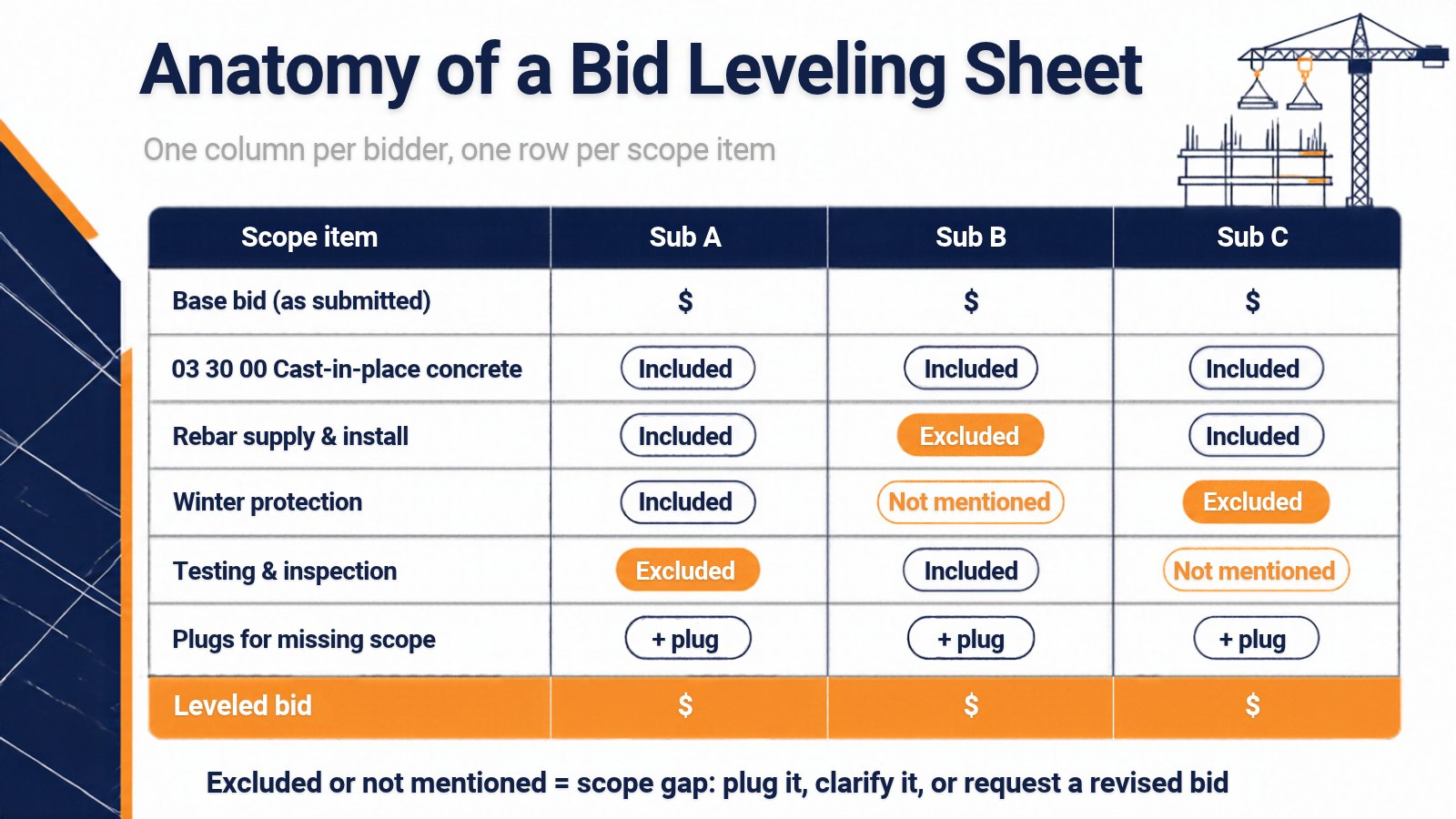
Copy this bid leveling template into Excel or Google Sheets, with one column per bidder and one row per spec line. It works as a bid tabulation template on bid day and a bid comparison template when revisions arrive.
| Section / row | Spec ref | Sub A | Sub B | Sub C | Notes |
|---|---|---|---|---|---|
| 1. Bidder details | |||||
| Company, date, revision | — | [ ] | [ ] | [ ] | Log every revision |
| Addenda acknowledged | 00 91 13 | [ ] | [ ] | [ ] | Missing addenda = scope risk |
| 2. Price as submitted | |||||
| Base bid | — | $ | $ | $ | Never edit this row |
| 3. Scope lines (one row per spec item) | |||||
| [Scope item 1] | [Section] | Included / Excluded / Not mentioned | [ ] | [ ] | Proposal page ref |
| [Scope item 2] | [Section] | [ ] | [ ] | [ ] | |
| Division 01 items carried by this trade | 01 xx xx | [ ] | [ ] | [ ] | Testing, protection, cleanup |
| 4. Alternates, unit prices and allowances | |||||
| Alternate 1 (add / deduct) | 01 23 00 | $ | $ | $ | Keep out of base total |
| Unit prices × your quantities | 01 22 00 | $ | $ | $ | Same quantity for every bidder |
| Allowances carried | 01 21 00 | $ | $ | $ | |
| 5. Exclusions, qualifications and plugs | |||||
| Exclusions listed | — | [ ] | [ ] | [ ] | Check each against the spec |
| Qualifications / assumptions | — | [ ] | [ ] | [ ] | Schedule, substitutions, risk |
| Plugs for missing scope | — | + $ | + $ | + $ | Note the source of every plug |
| 6. Result | |||||
| Leveled bid | — | $ | $ | $ | Base bid + plugs |
| Variance to GC estimate | — | [ ] | [ ] | [ ] | Check outliers |
| Schedule / lead times, bonding and insurance | — | [ ] | [ ] | [ ] | Award factors beyond price |
The spec references are typical MasterFormat Division 00 and 01 sections; use the numbers in your project manual. Keep the base bid row untouched — every adjustment goes in the plugs row, with a note. That rule is what lets you defend the leveled number later.
Where Scope Gaps Hide in Sub Bids
The low bid is often low because of what it leaves out. Watch for these patterns:
- Exclusions in the fine print — “by others” or “excludes testing” on the last page, contradicting a spec requirement.
- Silent items — the proposal never mentions a requirement at all. Silence is not inclusion.
- Division 01 requirements — submittals, mockups, protection, cleanup and closeout that subs rarely price unless asked.
- Interface scope — blocking, firestopping, sealants and sleeves between two trades. Each sub assumes the other has it.
- Substitutions — a different product or grade priced without saying so where the spec names a basis of design.
- Addenda not acknowledged — a sub pricing an earlier revision prices a different job. See addendum tracking and bid-day scope misses.
- Qualifications that move risk — schedule assumptions, escalation clauses and working-hours limits that change what the price covers.
On a bid tab, every one of these looks like a clean number. Only a line-by-line read against the spec turns it into a gap you can plug.
How AI Changes Bid Leveling
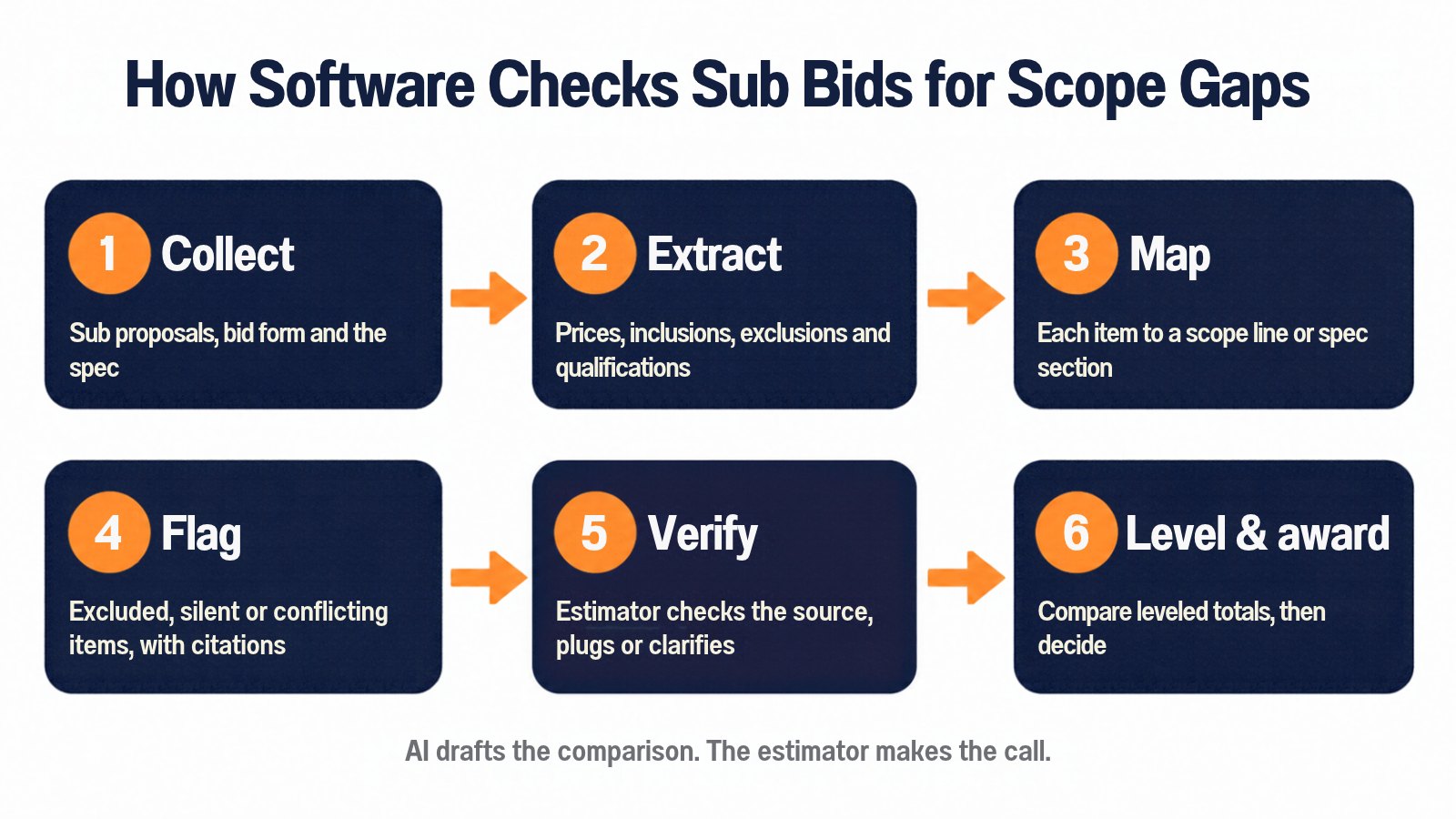
Spreadsheets lay bids side by side. They do not read them. The slow part of bid leveling is opening every proposal, finding the exclusions and deciding whether each matters under the spec — the part AI now handles well.
Generic AI tools (such as ChatGPT and Microsoft Copilot) can summarize one proposal, but they do not know your scope sheet or spec, and rarely show where an answer came from. Purpose-built construction AI tools read every proposal against the same scope and cite the page behind each flag.
Civils.ai is built for the spec side of that check. Upload the subcontractor proposals alongside the specifications and drawings, and Civils.ai cross-checks subcontract scope, inclusions and compliance against the project requirements to flag gaps and conflicts before you sign — and can score each subcontractor option with a decision matrix. Every finding links to the exact page or clause, so the estimator can check it and accept, dismiss or escalate it. The same checks run across drawings and specs; see AI for checking construction drawings and specifications.
Civils.ai reports 99.5% accuracy on structured checklists and has reviewed over 66,000 construction documents. At JTC, a team of 38 users recorded more than 528 hours of efficiency savings over 12 months of use (Civils.ai).
Ready to level your next package faster? Run AI scope and spec checks on your sub bids, or see Civils.ai pricing.
AI drafts the comparison; it does not award the subcontract. Plugs, qualifications and the decision stay with the estimator.
Bid Leveling Software Compared
Bid leveling software falls into three groups: bid management platforms that compare bids submitted through their forms, AI tools that read proposals in any format, and tools that check scope against the spec. Features below come from each vendor’s own site or help center.
| Tool | Type | What it does for bid leveling | Best for |
|---|---|---|---|
| Civils.ai | AI spec and discrepancy checks | Checks sub scope, inclusions and compliance against the spec, with cited gaps and a decision matrix | Spec checks before award |
| Procore Bid Management | Bid management platform | Compares bids by line item, counts excluded or missing items, exports to CSV or Excel (Procore support) | Procore users |
| Autodesk BuildingConnected | Bid management platform | Proposals sorted to the apparent low beside your estimate; private plugs and notes | BuildingConnected users |
| Melt Bid | AI bid leveling | Levels any-format proposals into your tally template, plugs gaps and drafts clarification emails; Excel plugin | Excel-first estimators |
| Consight | AI preconstruction platform | Generates scopes and levels bids, linking each value to the source proposal | Scoping and leveling together |
| ProcurePro BidLevel | AI bid leveling | Reads PDF and Excel quotes into your scope or BOQ, traced to the PDF | Fast first-pass comparisons |
| Trunk Tools (TrunkBid) | AI agent | Maps subcontractor bids against your scope and highlights the gaps | Trunk Tools users |
These groups work together: a platform runs invitations and the bid tab, an AI tool reads the proposals and the spec. Before you buy, plant an exclusion in one real proposal and see whether the tool surfaces it, with a link to the page.
Bid Leveling Checklist
- Scope sheet built from the spec — every line tied to a CSI section, Division 01 included
- Bid form issued — base bid, unit prices, alternates, allowances and exclusions section
- Proposals logged — bidder, date, revision and addenda acknowledged
- Base bids untouched — all adjustments carried as plugs with a note
- Every scope line marked — included, excluded or not mentioned, with a page reference
- Exclusions read against the spec — not just listed
- Interface scope assigned — firestopping, blocking and sleeves owned by one trade
- Leveled totals checked — against your estimate, outliers questioned
- Clarifications closed — every gap plugged or confirmed in writing
The Bottom Line
Bid leveling is not about finding the lowest number. It is about finding the lowest number that buys the whole scope. Build the scope sheet from the spec, force every proposal into it, and read exclusions against the documents, not the other bids. Software can do the reading; the judgment is yours. Speed without a system produces faster mistakes.
Frequently Asked Questions
What is bid leveling in construction?
Bid leveling is organizing subcontractor bids so they can be compared like for like — one column per bidder, one row per scope item — so the GC can spot exclusions and choose the lowest bid that covers the full scope.
What is the difference between a bid tabulation and bid leveling?
A bid tabulation records what each bidder submitted. Bid leveling adjusts it with plugs for missing scope and notes on qualifications, so every column prices the same work. The tab shows the apparent low; leveling shows the true low.
What should a bid leveling template include?
Bidder details and addenda acknowledged, the base bid as submitted, one row per scope line by spec section, alternates, unit prices and allowances, exclusions and qualifications, plugs with notes, and the leveled total.
What is a plug in bid leveling?
A plug is an amount your team adds to a bid to cover scope the bidder excluded or did not mention. It changes the leveled bid, not the base bid, and in BuildingConnected it is visible only to your team.
Can AI level subcontractor bids?
Yes, as a first pass. AI tools read PDF and spreadsheet proposals, extract prices and exclusions, map them to your scope and flag gaps with a source link. An estimator should verify every flag, set the plugs and make the award.
How does Civils.ai help with bid leveling?
Civils.ai checks subcontractor scope, inclusions and compliance against your specs and drawings, flags gaps and conflicts with citations to the exact page or clause, and can score options in a decision matrix. Your estimator reviews each finding.