 Mary Janine L. Kamenić
 Julianna Widlund P.E
 Stevan Lukic CEng
Photo by Ronnakorn Triraganon on Unsplash
AI is already doing real work in civil engineering, from reading borehole logs to flagging possible cracks in inspection photos. This guide maps where it helps, what other fields have learned the hard way, and how to use it without giving up professional responsibility.
Quick Summary
| Topic | Key Finding |
|---|---|
| What it is | Machine learning, computer vision, language models and optimization applied to engineering data (Frontiers in Built Environment review) |
| Where it works best | Pattern-heavy tasks with a checkable answer: screening design options, structuring ground data, spotting defects, measuring drawings, cross-checking documents |
| Where it falls short | Judgment about code intent, governing assumptions and risk, and anything that depends on data it has not seen |
| Who stays accountable | The licensed engineer. ASCE Policy Statement 573 says AI cannot be held accountable |
| Lessons from other fields | Medicine, manufacturing, finance and law all require validation, independent challenge and traceable sources |
| How to start | One repeatable task, a finished project with a known answer, citations on every output and a named sign-off |
Ask ten civil engineers what AI means for their work and you will hear ten answers. A designer thinks of surrogate models, an inspector of drone photos, an estimator of a 400-sheet drawing set. All three are right.
This guide pulls those threads together. It covers the main use cases across the project lifecycle, how medicine, manufacturing, finance and law handle the same problem of trusting a model, what the professional bodies in the US, UK, Canada and Australia say about responsibility, and a practical way to start.
What “AI in Civil Engineering” Actually Means
“AI” is an umbrella term. In civil engineering it usually means one of five things:
- Machine learning: models trained on past data to predict an outcome, such as soil response, deflection or project duration.
- Computer vision: models that read images and video, for example to find defects or check that workers are wearing hard hats.
- Language models and natural language processing: models that read and summarize specifications, contracts and reports.
- Optimization and generative design: search methods that test many design options against constraints.
- Robotics and autonomous equipment: drones and machines that collect data or perform site tasks.
A 2025 review in Frontiers in Built Environment covers machine learning, deep learning, language processing, computer vision, robotics and generative AI across design, construction, monitoring, transportation, geotechnical, environmental and asset management. It also lists the limits: data quality, interpretability and ethics.
Some of this is not new. Rule-based checking of building designs was reviewed in Automation in Construction in 2009, and the US Federal Highway Administration has promoted adaptive signal control for years. What is new is that language and vision models can now handle messy inputs such as scanned PDFs, photos and unstructured specification text.
How Civil Engineers Use AI Today
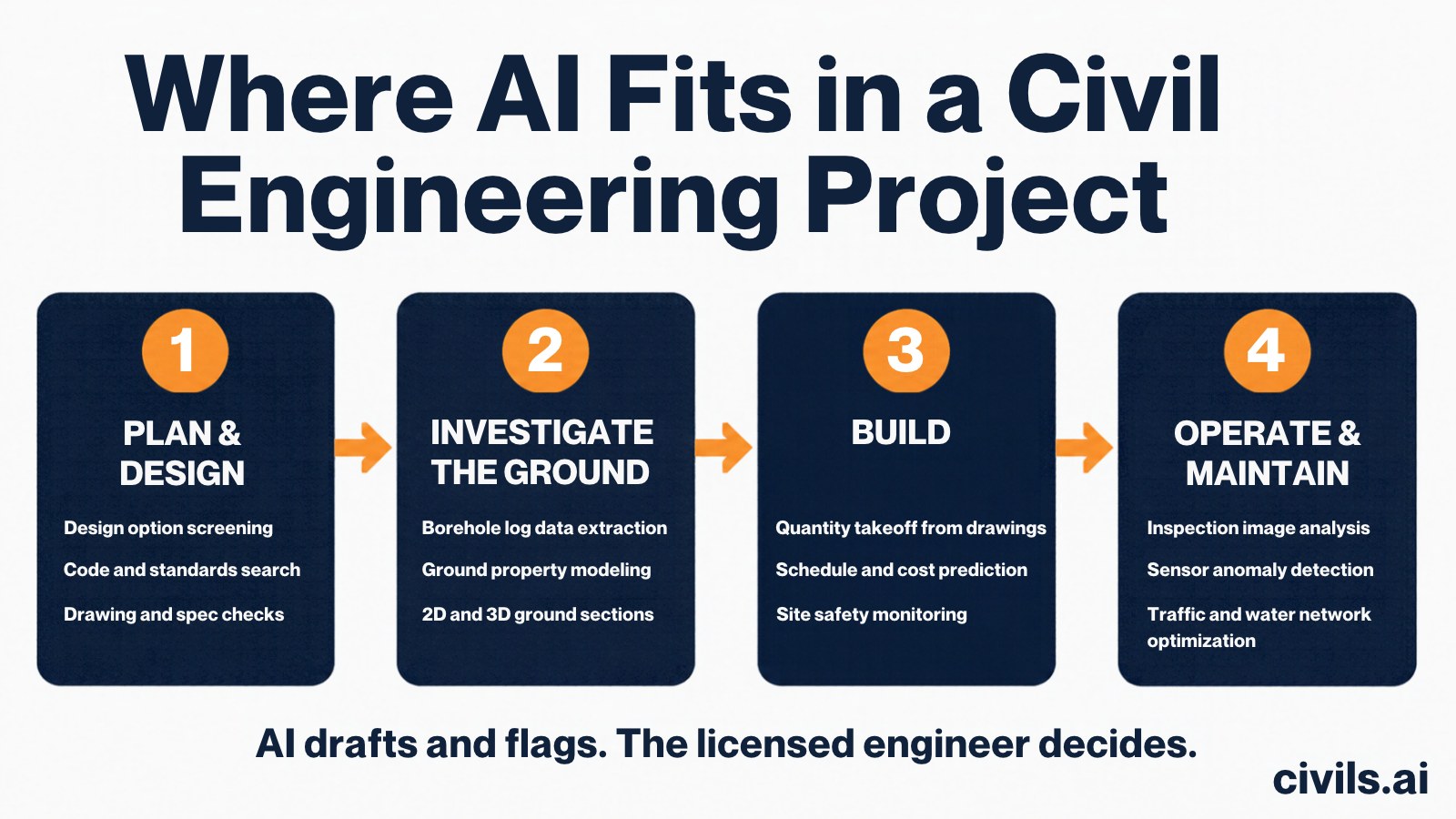
The table below summarizes the main use cases. The last column matters most: in every case, a person checks the output.
| Use case | What goes in | What comes out | Human check |
|---|---|---|---|
| Design option screening | Parameters, constraints, past analyses | Ranked candidate options | Independent analysis and code check |
| Ground data | Borehole logs, test reports | Structured data, sections | Compare with the source logs; engineer interprets |
| Inspection and monitoring | Photos, video, sensor streams | Defect candidates, anomaly flags | Inspector confirms in the field |
| Traffic and water networks | Detector, pressure and flow data | Signal timing updates, leak alerts | Operator oversight and validation |
| Site safety | Site video | Detections such as missing PPE | Site team reviews each alert |
| Drawings, specs and contracts | PDF drawing sets and documents | Discrepancy and risk lists with citations | Engineer opens every citation |
| Quantity takeoff | PDF drawings and a scope description | Measured quantities, marked-up drawings | Estimator edits and signs off |
Design exploration and optimization
The Frontiers review describes machine-learning surrogate models that let engineers screen many design alternatives quickly, then run full analysis on the few that look promising. The limit is built in: a surrogate is only as good as the analyses it was trained on, so the final design still rests on conventional analysis and the governing code. For a structural view, see our guide to AI for structural engineering.
Geotechnical and ground data
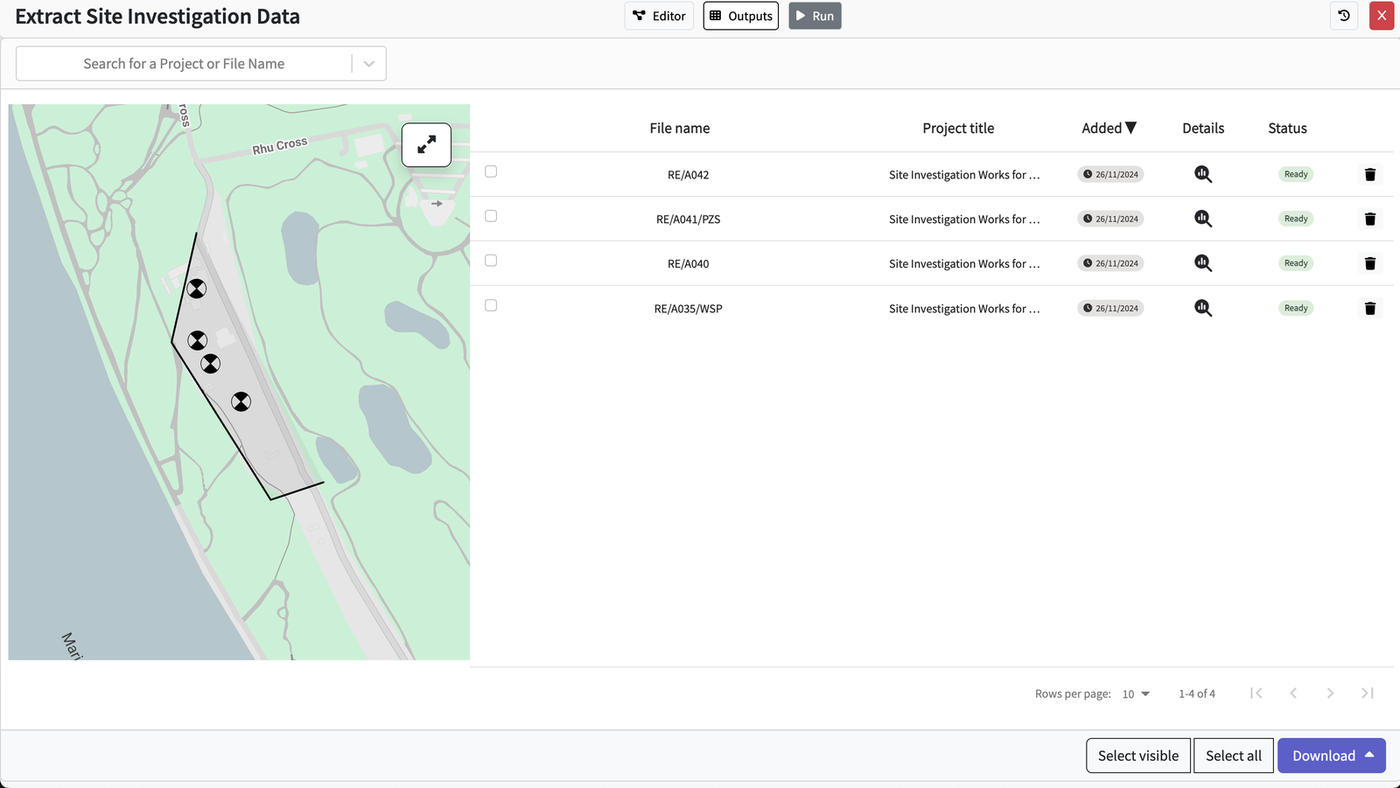
Ground data is a natural fit for machine learning because projects generate many boreholes and tests. A 2020 review in Geoscience Frontiers covers soft-computing methods in underground excavations. It compares XGBoost, MARS, neural networks and support vector machines for predicting the maximum lateral wall deflection of braced excavations, and discusses their merits and limits against conventional approaches.
A more immediate gain is data preparation. Borehole logs often arrive as PDFs. Civils.ai’s subsurface data extraction reads logs and exports them as AGS 4.1 or Excel, then places them on a map for sections. The engineer still interprets the ground. See also our posts on AI use cases in geotechnical engineering and borehole log digitizing.
Inspection and structural health monitoring
A 2019 review in Engineering by Spencer, Hoskere and Narazaki examines computer vision for inspection and monitoring: identifying components, characterizing damage, detecting change and measuring displacement and strain. It also states that challenges remain.
The regulator’s position is cautious. The FHWA’s National Bridge Inspection Standards guidance says advanced technologies may be used to supplement but not supplant bridge inspection personnel. On the sensor side, Zhang, Zhang and Wu applied an LSTM network to acceleration data from a suspension bridge to detect anomalies. An anomaly is a flag in the data, not confirmed damage. See AI for bridge engineering for more.
Transportation and traffic
Adaptive signal control is the clearest transport example. The FHWA describes a loop in which sensors collect traffic data, timing improvements are developed and timing updates are implemented, repeated every few minutes. FHWA reports that on average the technology improves travel time by more than 10 percent. FHWA does not call this AI, so treat it as a close relative: sensor-driven, model-based control. More in AI in transportation engineering and AI for highways engineering.
Water networks
Wan, Kuhanestani, Farmani and Keedwell reviewed data analytics for leak detection using pressure and flow sensors in water distribution systems. They compare data-driven methods with hydraulic-model-based methods, note that most methods focus on burst detection, and stress that data uncertainty must be considered. See AI for water engineering.
Construction safety and site monitoring
Computer vision is also used on site. One example from the research literature is detecting non-hardhat use from far-field surveillance video with deep learning (Fang et al., 2018). The Frontiers review also covers machine learning for schedule and cost prediction. These tools generate alerts and forecasts for the site team to act on. See AI for construction safety, AI for construction inspection and AI for construction planning.
Drawings, Specifications and Quantities: Where Civils.ai Fits
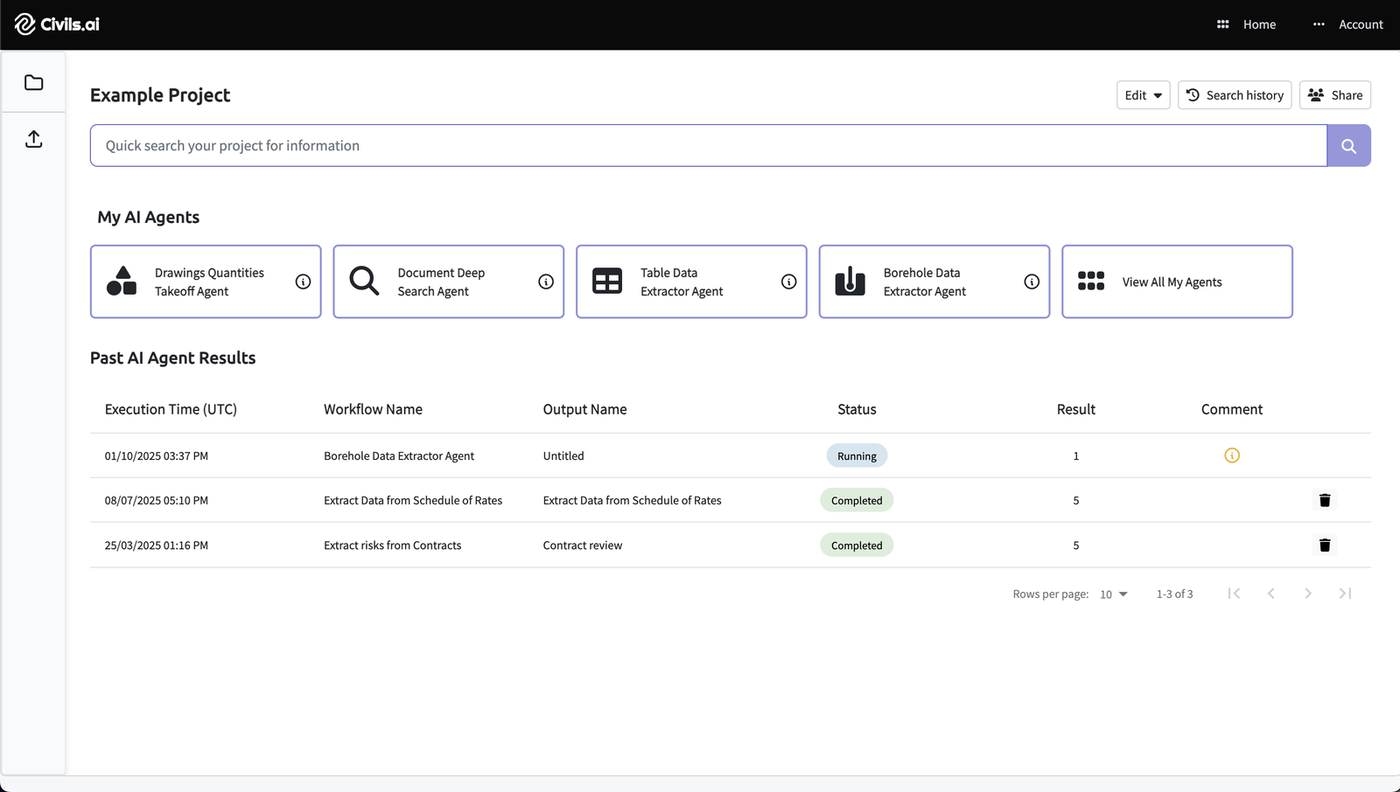
Much of the daily friction in civil work sits in documents: a drawing set that disagrees with its specification, or a quantity that has to be measured by hand from PDFs. Civils.ai builds AI agents for that document work. The project view below shows four of them: drawing quantities takeoff, document deep search, table data extraction and borehole data extraction.
Drawing and specification checking
Civils.ai’s drawing and specification checking page lists four checks: sheet to sheet, drawing to specification, across disciplines, and building code compliance. Each finding points to an exact sheet or clause, and your team accepts, dismisses or escalates it. The example below is an illustration from the Civils.ai site, not a screenshot of the interface: the drawing calls for DN150 PVC where the specification says DN150 HDPE.
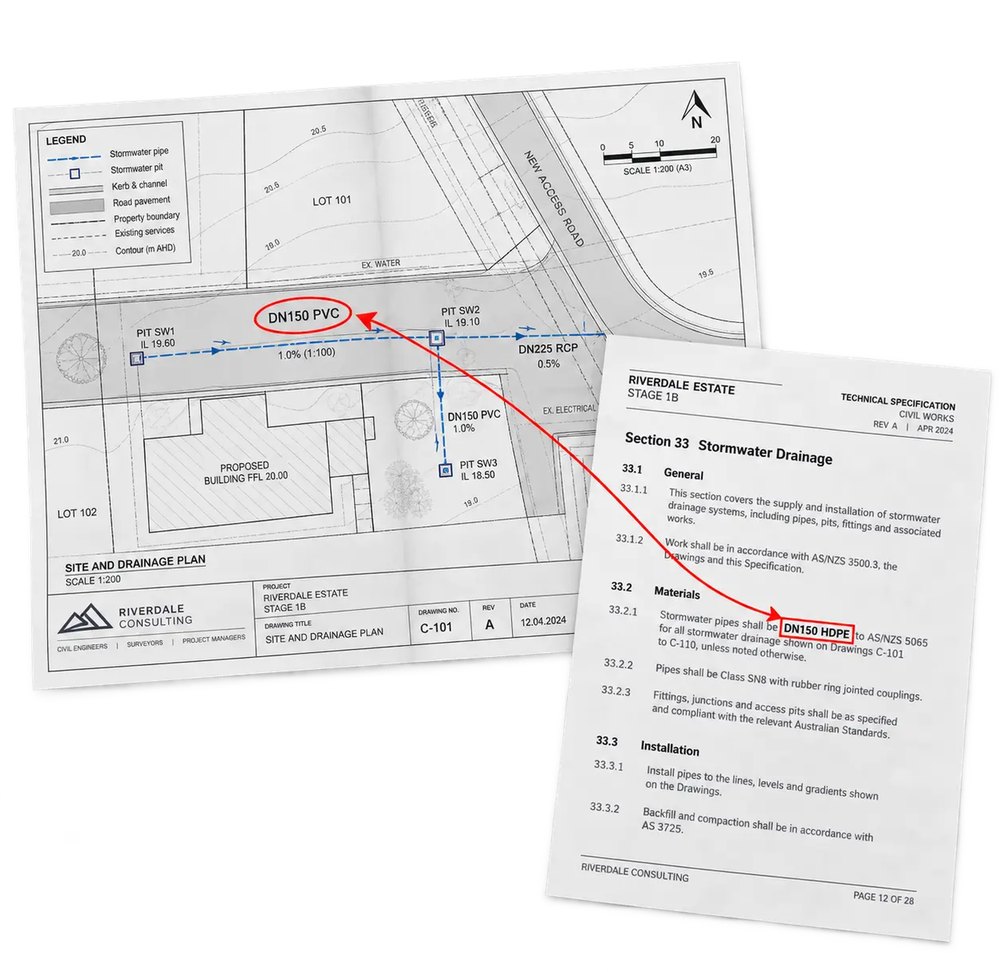
This is the same idea as the rule-based checkers reviewed in 2009, with one difference. Nobody has to hand-code the rules, which is also why every flagged item needs to be opened and confirmed. More on the problem in construction drawing and specification discrepancies.
Quantity takeoff
On the AI quantity takeoff page, Civils.ai describes the workflow: describe the scope in plain English, and the AI measures areas, lengths, counts and elevations from PDF drawings. Results are marked up on the original drawing and can be edited, then exported to Excel and as an annotated PDF. Related reading: AI for quantity surveying and AI for PDF and CAD takeoffs.
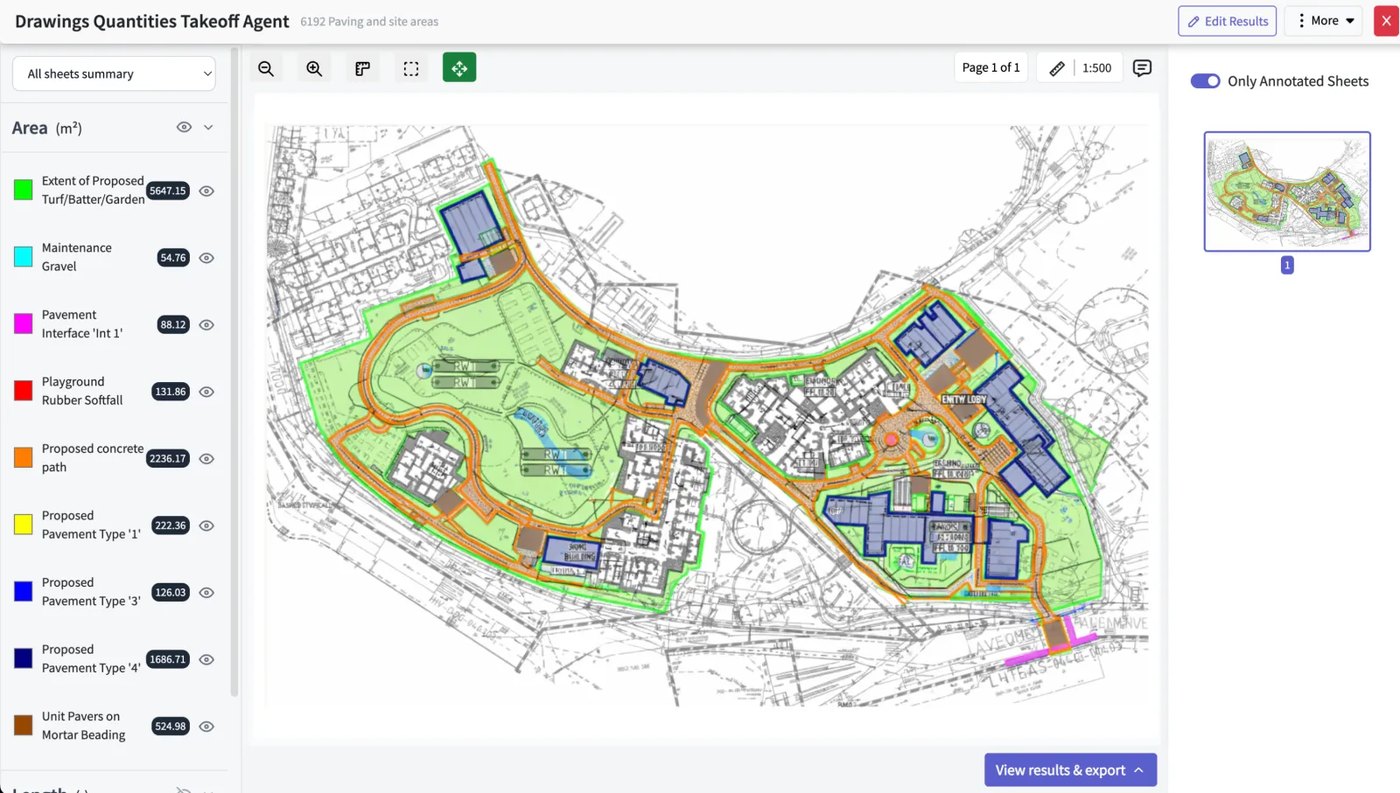
Civils.ai also covers tender documents and contract risk review, with the same pattern: AI reads and flags, people decide.
How AI Is Used in Other Fields
Civil engineering is not the first safety-critical profession to meet AI. Four other fields have public records of what works and what goes wrong.
| Field | How AI is used | What the source says | Lesson for civil engineers |
|---|---|---|---|
| Medicine | AI-enabled medical devices | The FDA keeps a public list of AI-enabled devices authorized for US marketing. Listed devices met premarket requirements, including a focused safety and effectiveness review for the intended use. The list is not comprehensive. | State the intended use, then validate against that use before relying on a tool. |
| Manufacturing | Sensor data for diagnostics (what happened) and prognostics (when something will happen) | The NIST PHMC program says manufacturers need standards and guidance to design, implement, verify and validate these technologies. | Sensor-plus-model monitoring needs a verified baseline, the same as structural health monitoring. |
| Finance | Models for risk and decisions | US bank regulators’ April 2026 model risk guidance (SR 26-2) calls for “effective challenge”: critical analysis by objective, qualified people with the independence and standing to change outcomes. Generative and agentic AI are outside its scope. | Have someone other than the tool’s user challenge the result. Expect rules for generative AI to keep evolving. |
| Law | Research and drafting with language models | In Mata v. Avianca (S.D.N.Y. 2023), a court sanctioned lawyers who filed opinions that did not exist, generated by ChatGPT. The court said nothing is inherently improper in using a reliable AI tool, but lawyers keep a gatekeeping role. | A plausible citation is not evidence. Trace every clause, standard and reference to its source. |
One framework crosses all four. The NIST AI Risk Management Framework is voluntary and organizes AI risk work into four functions: Govern, Map, Measure and Manage. A small engineering firm can borrow the structure: write a policy (Govern), list where tools are used (Map), test them on finished projects (Measure) and review results over time (Manage).
Limits and Professional Responsibility
The main limits are practical. Models trained on limited or unrepresentative data can fail on unusual sites. Language models can state wrong answers with confidence. Scanned and low-quality drawings reduce accuracy. And confidentiality matters: in a March 2026 article, ASCE’s Civil Engineering Source reports that firms worry about reliability, hallucinations, human oversight and data security, and that some tell staff not to paste project documents into public consumer AI tools. One firm leader quoted there notes that as models improve, their mistakes become harder to spot.
The professional bodies agree on the principle. Rules differ by jurisdiction, so check your own regulator.
| Body | What it says |
|---|---|
| ASCE (US) | Policy Statement 573, adopted July 18, 2024: AI cannot be held accountable, nor replace the training, experience and judgment of a professional engineer. It remains a tool with potential to enhance civil engineering processes. |
| NSPE (US) | Position statement on AI, last revised February 2026. An NSPE Board of Ethical Review case on AI use concludes AI-generated work needs at least the same scrutiny as human work, and that responsible charge is not met by reviewing only after the fact. |
| Engineering Council (UK) | Statement of Ethical Principles (February 2026): consider fully the risks and ethical implications of emerging technologies such as AI. |
| Engineers Canada | National position statement (March 2026): where AI is used as a tool to practise engineering, the work must be undertaken by a licensed engineer, who has an ethical responsibility to verify the output. |
| Engineers Australia | January 2025 report: generative AI outcomes should have human oversight and be reviewed for accuracy, with clear guidelines on data and confidentiality. |
In practice this means a repeatable checking routine, not a general sense of caution.
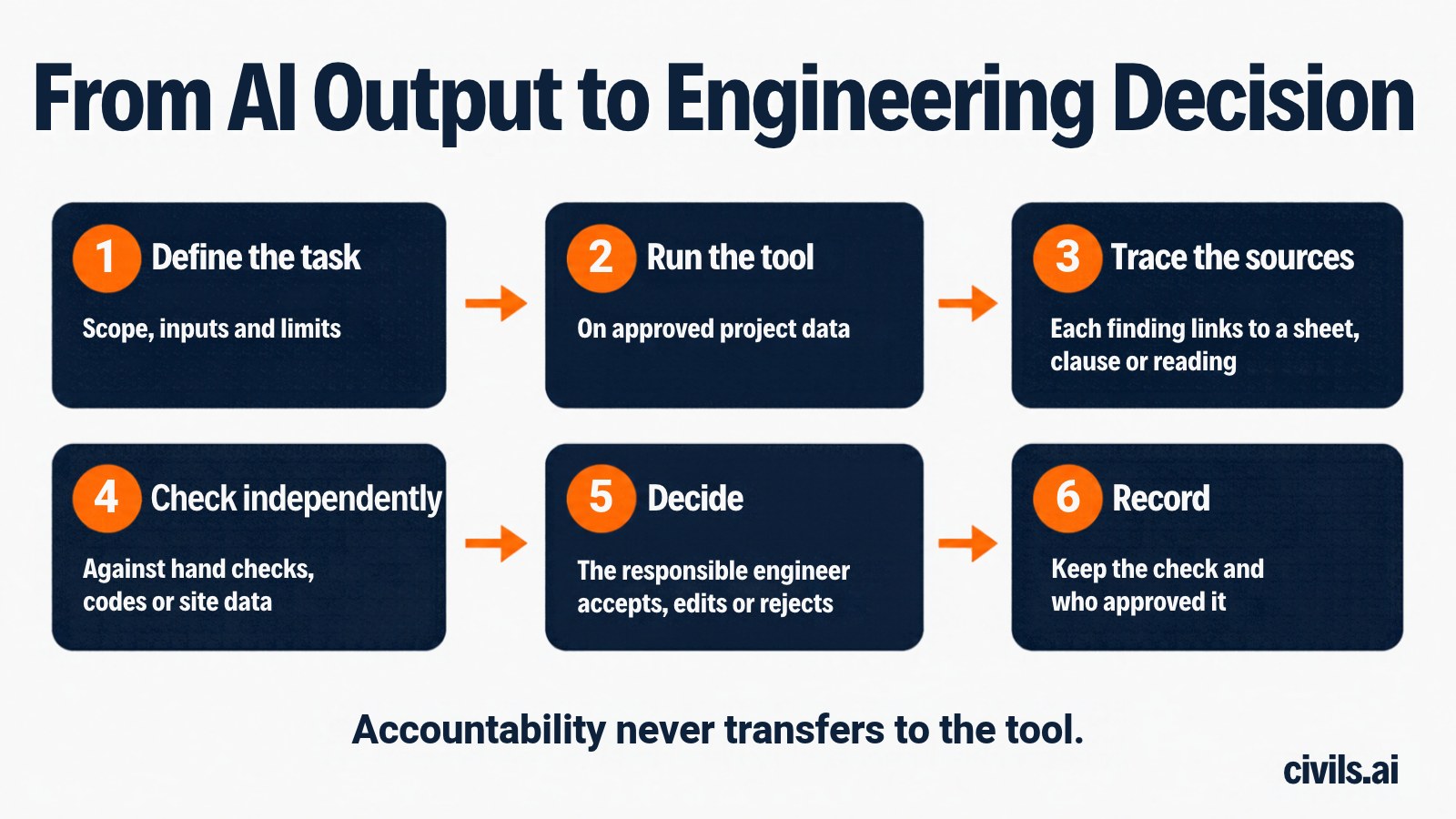
For a wider view of current tools, see our review of construction AI strengths and limitations.
How to Get Started
- Pick one repetitive, checkable task. Good first candidates are cross-checking a drawing set, measuring areas on a site plan or structuring borehole data. Avoid starting with design decisions.
- Set data rules first. Decide which documents may be uploaded, check the tool’s terms on storage and model training, and follow your client and contract confidentiality requirements.
- Test on a finished project. Run the tool on a job where you already know the answer. Record what it catches and what it misses.
- Require citations. Prefer tools where each output points to a sheet, clause or page you can open.
- Name the sign-off. Write down who checks the output and who is in responsible charge, and keep a short record.
For structured learning, see our AI in civil engineering training course and AI adoption in construction statistics.
Frequently Asked Questions
How is AI used in civil engineering?
AI is used to screen design options, structure ground investigation data, flag possible defects in inspection images, detect anomalies in sensor data, adjust traffic signals, find leaks in water networks, and read drawings and specifications for takeoff and discrepancy checking. In each case a qualified person reviews the result.
Will AI replace civil engineers?
No source we reviewed supports that. ASCE’s policy states AI cannot be held accountable or replace the training, experience and judgment of a professional engineer, and Engineers Canada requires AI-assisted work to be undertaken by a licensed engineer who verifies the output. AI changes how some tasks are done, particularly repetitive document and data work.
What AI tools do civil engineers use?
They fall into a few groups: machine-learning add-ons in analysis software, inspection and monitoring platforms, adaptive traffic control systems, document and drawing tools such as AI quantity takeoff and drawing checking, and general-purpose chat assistants. See our comparison of AI takeoff software.
Can ChatGPT-style assistants be trusted for civil engineering work?
They can help draft and summarize, but they can state wrong things confidently. The Mata v. Avianca case shows the risk of unverified citations. Check every figure, clause and reference against the source. Our comparison of general-purpose models on civil estimates looks at this for quantities.
What should I check before trusting an AI output?
Confirm the task was defined clearly, trace every claim to a source you can open, check key numbers independently, and record who made the final decision. If the tool cannot show its sources, treat the output as a lead, not a result.
Is it safe to upload project documents to an AI tool?
It depends on the tool and your obligations. ASCE’s 2026 article reports firms telling staff not to paste project documents into public consumer AI tools. Before uploading, check where data is stored, who can access it and whether it is used to train models, and compare that with your contract terms.
The Bottom Line
AI is useful in civil engineering where the task is repetitive, data-heavy and checkable: reading documents, measuring drawings, structuring ground data, screening options and watching sensor streams. Other fields show the same pattern. Tools earn trust through validation against a stated purpose, independent challenge and traceable sources. In civil engineering, the licensed engineer remains the person who decides.
Start small, test on a project where you know the answer, and keep the sources visible. For the document side of the work, explore AI quantity takeoff and drawing and specification checking.


