 Mary Janine L. Kamenić
 Julianna Widlund P.E
 Stevan Lukic CEng

Photo by Marina Zvada on Unsplash
A specification review method for estimators: 6 drawing vs spec conflict types, order of precedence rules and a discrepancy log template for bid day.
Quick Summary
| Topic | Key Finding |
|---|---|
| What a discrepancy is | Two parts of the tender set describe the same work differently: a drawing and a spec, a plan and a schedule, an addendum and the base set |
| Most common conflict types | Drawing vs spec, plan vs schedule, addendum vs base set, discipline vs discipline, plan vs detail, Division 01 vs trade sections |
| Who decides which document wins | The order-of-precedence clause in your contract. There is no single industry-wide rule |
| AIA A201-2017 default | No ranking list. §1.2.1 says the Contract Documents are complementary, and what is required by one is as binding as if required by all (AIA) |
| US federal default | FAR 52.236-21: in case of difference between drawings and specifications, the specifications govern (acquisition.gov) |
| What to do with a conflict | Log it, check the precedence clause, and submit it as a question before the pre-bid question deadline. Do not resolve it quietly in your price |
| Where AI helps | Purpose-built tools cross-check sheets, specs and codes and cite the exact sheet or clause, so the estimator reviews findings instead of hunting for them |
Every tender set has conflicts. The drawings show one thing, the specs say another, and an addendum changes a third. A proper specification review finds those conflicts while there is still time to ask about them. This guide covers the six most common conflict types, how order-of-precedence clauses decide which document wins, and how to log and RFI every discrepancy before bid day. It includes a discrepancy log template you can copy.
Key Term Definitions
Discrepancy: Two parts of the Contract Documents that describe the same work in different ways. A pipe material, a slab thickness, a door hardware set or a submittal requirement that does not match from one document to the next.
Specification review (spec review): Reading the project manual section by section against the drawings for your scope, to find requirements that change cost, schedule or risk.
Order of precedence: A clause in the contract that ranks the documents, so that when they conflict, one governs. For example, “the Specifications take precedence over the Drawings.”
Construction addendum: A change to the bidding documents issued before bids are due. Under AIA A201-2017 §1.1.1, “Addenda issued prior to execution of the Contract” are Contract Documents, except the portions relating to bidding requirements (AIA A201-2017).
RFI (pre-bid question): A written question to the architect or engineer asking which requirement applies. Instructions to bidders usually set a deadline for them.
Why Drawing Discrepancies Survive to Bid Day
The estimator doing the takeoff works from the drawings. Someone else, or no one, reads the specs. Addenda arrive in the last week and get filed rather than checked against the sheets they affect. By the time anyone notices that the plan and the spec disagree, the question deadline has passed.
That leaves three bad options: price the cheaper option and hope, price the expensive option and lose the job, or carry an assumption that the owner may not accept. Some owners close this gap for themselves. The University of Wisconsin’s modified A201 General Conditions say that where documents conflict, “the more stringent or better quality requirement, in the Owner’s sole discretion, shall be controlling without any increase in the Contract Time or Contract Sum” (UW General Conditions, §1.2.1). Under a clause like that, a conflict you missed is a conflict you pay for.
These are failures of process, not failures of effort. If you have not already, read how GCs track addenda on bid day and how to read Division 1 specs as an estimator. For the wider workflow, see how to review construction documents faster.
The 6 Most Common Drawing and Spec Conflicts
1. Drawing vs Spec
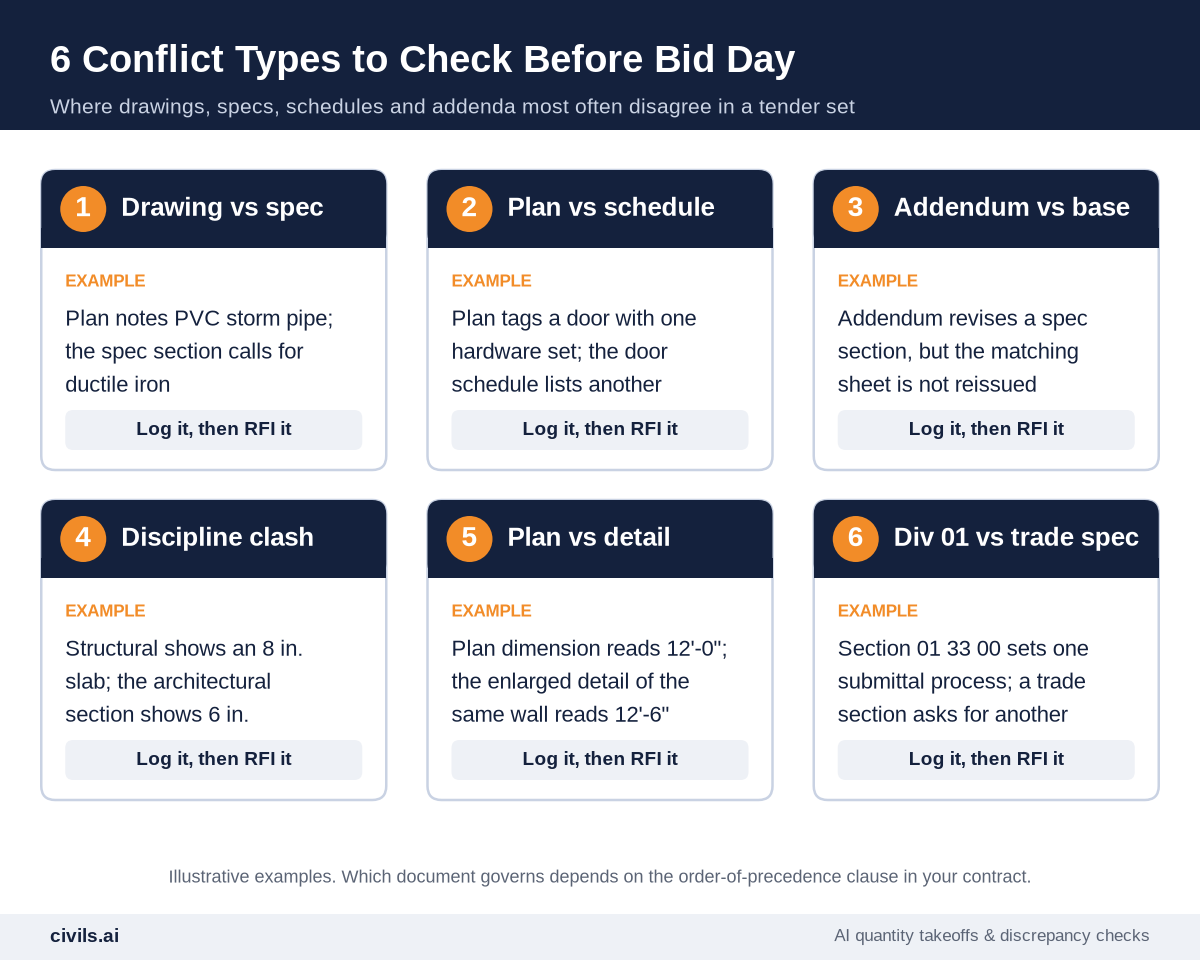
The classic conflict. A plan note calls for one material, product or grade, and the spec section for that work calls for another. Check every material callout against the matching spec section, not just the general notes.
2. Plan vs Schedule
Door, window, fixture, equipment and finish schedules are where counts and types get out of step with the plans. A tag on the plan that does not appear in the schedule, or a schedule row with no tag on any plan, is a discrepancy.
3. Addendum vs Base Set
An addendum revises a spec section but the sheet showing the same work is not reissued, or the reverse. Each addendum item should be traced to every sheet and section it touches.
4. Discipline vs Discipline
Structural, architectural, civil and MEP sheets are drawn by different teams. Slab thicknesses, opening sizes, invert levels and ceiling voids are common clash points.
5. Plan vs Detail
A dimension on a small-scale plan does not match the enlarged detail of the same element.
6. Division 01 vs Trade Sections
Division 01 sets project-wide requirements such as submittals, temporary facilities and closeout. A technical section that sets its own, different requirement creates a conflict inside the spec itself.
Code conflicts sit on top of all six: a drawing can match the spec and still fall short of the code it cites. See AI building code compliance for how those checks work.
Order of Precedence: Which Contract Document Wins?
There is no universal answer. The order of precedence for contract documents is set by the contract itself, so check the agreement, the general conditions and the supplementary conditions before you price a conflict.
AIA A201-2017 (standard form). §1.2.1 says “The Contract Documents are complementary, and what is required by one shall be as binding as if required by all.” The standard form does not rank the documents. §3.2.2 also requires the Contractor to “promptly report to the Architect any errors, inconsistencies or omissions discovered by or made known to the Contractor as a request for information” (AIA A201-2017).
US federal contracts. FAR 52.236-21 states: “In case of difference between drawings and specifications, the specifications shall govern.” It also says discrepancies in figures “shall be promptly submitted to the Contracting Officer,” and that any adjustment made without a written determination is at the contractor’s own risk (FAR 52.236-21).
Owner-modified general conditions. Many owners add their own ranking. Here is one real example:
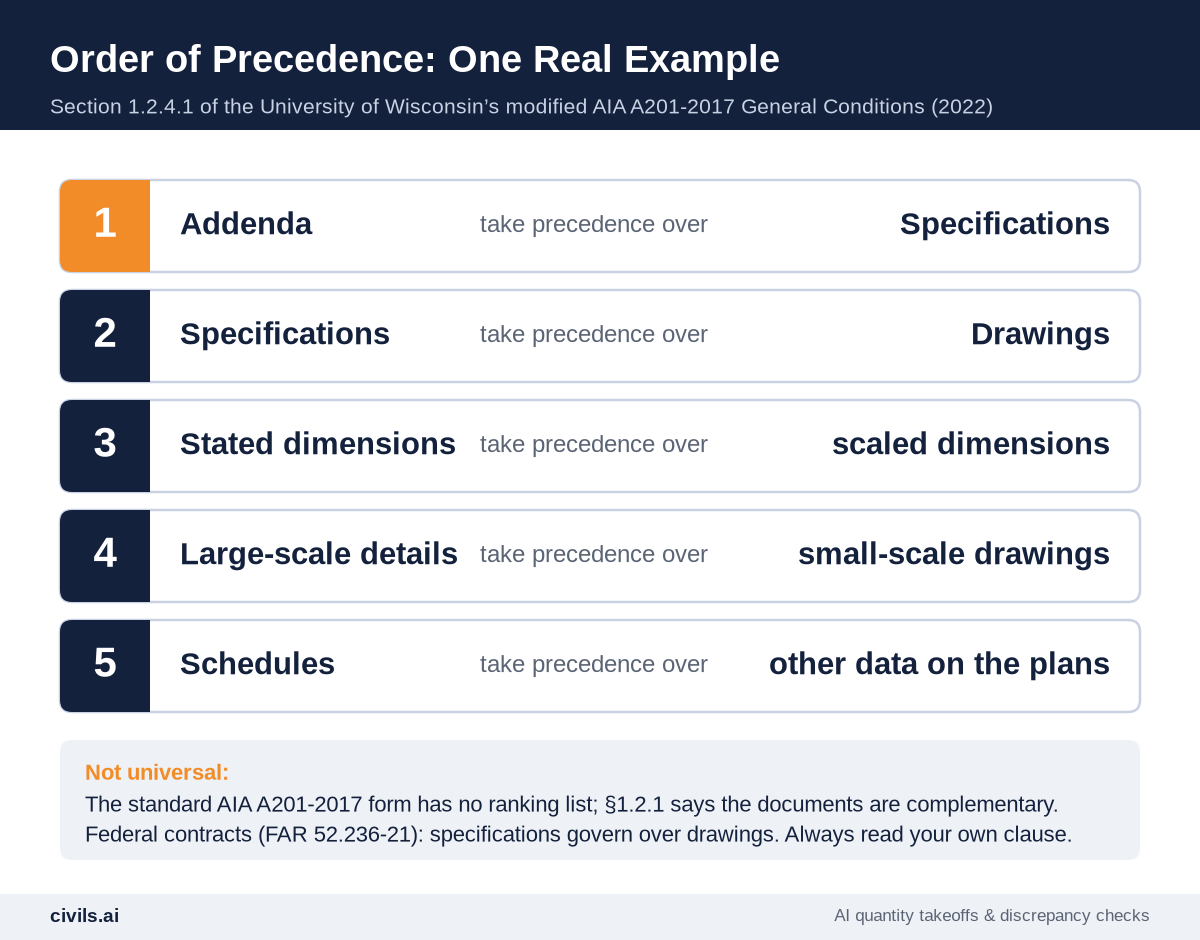
Two points matter for estimators. First, a precedence clause tells you which document governs once the contract is signed. It does not stop the owner from asking why you did not raise the conflict during bidding. Second, a “more stringent requirement governs” clause removes the benefit of the doubt entirely. For more on reading these clauses, see understanding AIA contracts and how to analyze a construction contract before you sign.
Outside the US, UK, Canadian and Australian standard forms each handle priority of documents differently, and owners amend them. Read the clause in the contract you are bidding.
How to Run a Specification Review That Catches Conflicts
Step 1: Confirm You Have the Full, Current Set
Check the sheet index and the project manual table of contents against what you actually received. List every addendum, its date and the items it changes.
Step 2: Read the Precedence Clause and Division 01 First
Before any takeoff, find the order-of-precedence clause and the question deadline in the instructions to bidders. Then read Division 01.
Step 3: Cross-Check by Scope, One Spec Section at a Time
For each spec section in your scope, open the sheets that show that work and compare materials, sizes, counts and standards. Do the same for the schedules. This is where the takeoff and the spec review meet: quantities come from the drawings, but what you are pricing comes from the spec.
Step 4: Log Every Conflict in One Discrepancy Log
One log per bid, shared by everyone reviewing the set. Record both documents word for word, and note which one governs under the precedence clause. Use the template below.
Step 5: RFI Before the Deadline, Then Price What Is Left
Send each open conflict as a written pre-bid question, citing the sheet and section. Do not assume. Do not resolve conflicts internally. If no answer arrives, price the governing requirement and state your assumption where the bid form allows it. Subcontractors should send their conflicts up to the GC early. GCs can ask for this in the bid invitation, as in this request for bid template.
Discrepancy Log Template
Copy these columns into a spreadsheet. One row per conflict. The example entry is illustrative.
| Column | What to record | Example entry |
|---|---|---|
| ID | A running number per bid | DL-07 |
| Date found / by | When and who logged it | Oct 12, estimator |
| Documents in conflict | Exact sheet and spec section references | Sheet C-301 vs Section 33 41 00 |
| What each says | Quote both, word for word | C-301: “12 in. PVC storm”; 33 41 00: ductile iron pipe |
| Conflict type | One of the six types below | Drawing vs spec |
| Governing document | Which one wins under your precedence clause, with the clause number | Spec governs (General Conditions 1.2.4.1) |
| Price impact | Which option costs more, and how you priced it | Carried ductile iron; PVC alternate noted |
| Action | RFI number, or assumption stated in the bid | Pre-bid question #4, sent Oct 13 |
| Status / response | Open, answered, or closed by addendum | Closed by Addendum 2, item 5 |
If you price from a bill of quantities, add a column for the BoQ item reference so every answered RFI flows back into the right line. See the bill of quantities guide for the item structure.
How AI Changes Drawing and Spec Discrepancy Checks
Manual cross-checking scales badly: every extra sheet has to be compared against every related section, schedule and addendum.
Generic AI tools such as ChatGPT can summarize a spec section, but they do not reliably cross-reference a drawing set, and they can state requirements that are not in the document. Purpose-built construction AI works differently. Civils.ai’s discrepancy checks compare what is written on the drawings, including callouts, dimensions, levels, tags and notes, against the other sheets, the specification and the code. They cover four check types:
- Sheet-to-sheet discrepancies — for example, two sections through the same slab giving different finished levels
- Drawing-to-spec discrepancies — a pipe material, fixture model or concrete grade on the drawing that differs from the spec
- Cross-discipline conflicts — a drainage invert above the foundation underside, or a structural slab that differs from the architectural build-up
- Building code compliance — a noted value, such as a handrail height or a fire rating, below the clause it cites
Every finding links back to the exact sheet or clause it came from. Your team opens the citation, checks it and decides whether to accept, dismiss or escalate it to an RFI. The check surfaces the issue. Your team makes the call.
You can also save a list of checks once and re-run it on every new tender pack with tender automation, so each bid gets the same specification review.
Try a discrepancy check on your tender documents. Plans start at US$90 per month with unlimited AI searches and checks under fair use, or request a demo (Civils.ai pricing). AI-flagged discrepancies are a starting point for your review and should be checked by a qualified professional before you issue an RFI or price a bid.
Comparing tools? See Bluebeam alternatives for takeoff and document checking and the best construction estimating and takeoff software.
Pre-Bid Discrepancy Checklist
- Full set confirmed — sheet index and spec table of contents match what you received
- Addenda logged — every addendum item traced to the sheets and sections it changes
- Precedence clause found — clause number noted at the top of the discrepancy log
- Question deadline in the calendar — with time to send a second round
- Division 01 read — conflicts with trade sections logged
- Each spec section cross-checked — against plans, details and schedules for your scope
- Disciplines compared — structural, architectural, civil and MEP at shared elements
- Every conflict quoted — both documents, word for word, with references
- RFIs sent and tracked — each log row has an RFI number or a stated assumption
- Answers carried into the price — every closed row checked against the final estimate
The Bottom Line
Drawing and spec conflicts are normal. Finding them after award is not. A specification review that reads the precedence clause first, checks each conflict type and logs every discrepancy gives you time to ask while answers are still free. Let software do the cross-checking, and keep the judgment with your estimators.
Frequently Asked Questions
What is a specification review in construction?
A specification review is a section-by-section read of the project specs against the drawings for your scope, to find requirements and conflicts that affect cost, schedule or risk before you bid.
Do specifications take precedence over drawings?
Often, but not always. FAR 52.236-21 says specifications govern in US federal contracts. The standard AIA A201-2017 form does not rank documents, and many owners add their own order of precedence. Check your contract.
What should I do if the drawings and specs conflict during bidding?
Log it, check the order-of-precedence clause, and send a written pre-bid question before the deadline. If it is not answered, price the governing requirement and state your assumption where the bid form allows it.
Is a construction addendum part of the contract?
Yes, in most cases. Under AIA A201-2017, addenda issued before the contract is signed are Contract Documents, except portions relating to bidding or proposal requirements.
Can AI find discrepancies in construction documents?
Yes. Purpose-built tools such as Civils.ai cross-check drawings, specs and codes and cite the source of each finding. A qualified professional should review every finding.


