 Mary Janine L. Kamenić
 Julianna Widlund P.E
 Stevan Lukic CEng

Photo by RONNAKORN TRIRAGANON on Unsplash
Submittals in construction explained: the 4 submittal types, where the spec book hides them, and how to build a submittal register from the spec.
Quick Summary
| Topic | Key Finding |
|---|---|
| What a submittal is | Shop drawings, product data, samples and similar documents the contractor sends for review to show how it will meet the Contract Documents |
| Contract status | Under AIA A201-2017 §3.12.4, submittals are not Contract Documents. They show how the contractor proposes to conform to them (AIA) |
| Where requirements live | Division 01 Section 01 33 00 Submittal Procedures sets the process; the Part 1 “Submittals” articles of each technical section list what to submit |
| Four standard types | Action, informational, closeout and maintenance material submittals, as set out in CSI SectionFormat (CSI) |
| Why the register matters | Under A201-2017 §3.12.7, no work that needs a submittal can proceed until the Architect approves it |
| Cost of a late schedule | If the contractor fails to submit a submittal schedule, A201-2017 §3.10.2 bars any increase in Contract Sum or Contract Time based on submittal review time |
| Where AI helps | Purpose-built tools pull every submittal requirement from the spec book with a citation to the section and page, so the team checks a draft register instead of typing one |
Submittals decide when work can start. Nothing that needs a shop drawing, product data sheet or sample gets fabricated or installed until it is approved, and every one of those requirements is written somewhere in the spec book. The submittal register is the list of all of them. Registers built from memory or the last job’s log are where items go missing. This guide covers what submittals are, the four standard types, and a step-by-step method to build a submittal register straight from the spec, with a template you can copy.
Key Term Definitions
Submittal: A document or sample the contractor sends to the design team to show how it will meet the Contract Documents. AIA A201-2017 §3.12.4 says their purpose is “to demonstrate how the Contractor proposes to conform to the information given and the design concept expressed in the Contract Documents” (AIA A201-2017).
Shop drawings: “Drawings, diagrams, schedules, and other data specially prepared for the Work” by the contractor, a subcontractor, manufacturer, supplier or distributor (A201-2017 §3.12.1).
Product data: Illustrations, standard schedules, performance charts, instructions, brochures and diagrams that show the materials or equipment proposed (A201-2017 §3.12.2).
Samples: Physical examples that “establish standards by which the Work will be judged” (A201-2017 §3.12.3).
Submittal register (submittal log): A table with one row for every required submittal: spec reference, description, type, who prepares it, who reviews it, the dates and the status.
Submittal schedule: The register with dates attached. Under A201-2017 §3.10.2 it must be coordinated with the construction schedule and allow the Architect reasonable time to review submittals.
What Are Submittals in Construction?
Submittals are how the design team checks that what the contractor plans to buy, fabricate and install matches the design before it is built. The contract sets the rules. Under AIA A201-2017:
- The contractor reviews first — §3.12.5 requires the contractor to review submittals for compliance, approve them and submit them to the Architect in line with the approved submittal schedule
- No approval, no work — §3.12.7 says the contractor shall perform no portion of the Work that requires a submittal until that submittal has been approved by the Architect
- Approval does not move the risk — under §3.12.8, approval does not relieve the contractor of responsibility for deviations unless it specifically notified the Architect of the deviation at the time of submittal and the deviation was approved
§3.12.4 also lets the Architect return submittals the Contract Documents do not require without action. The spec book defines what is required, so it is the only reliable source for the register.
CSI SectionFormat groups submittals into four types (CSI):
| Type | What it is | Typical examples |
|---|---|---|
| Action submittals | Need a written response from the design professional, such as “approved,” “approved as noted” or “revise and resubmit” | Shop drawings, product data, samples |
| Informational submittals | Show compliance; the reviewer generally responds only if something does not comply | Qualification data, certificates, test reports, manufacturer’s instructions |
| Closeout submittals | Furnished at or near the end of the work | Warranties, O&M manuals, record documents |
| Maintenance material submittals | Proof that spare parts, extra materials and special tools were delivered to the owner | Extra stock, spare parts, tools, owner receipts |
Why Submittal Registers Miss Items
Submittal requirements are scattered. Section 01 33 00 sets the procedure, but the list of what to submit sits inside each technical section, often split across action, informational and closeout articles. Copy the register from a previous job and you inherit the last project’s spec, not this one’s.
Some owners say plainly that a missing line is your problem. The US federal guide specification for submittals, UFGS 01 33 00, states that approval of the register “does not relieve the Contractor of supplying submittals required by the contract documents but that have been omitted from the register or marked ‘N/A’” (UFGS 01 33 00).
Schedule risk follows. A201-2017 §3.10.2 says that if the contractor fails to submit a submittal schedule, or fails to provide submittals in line with it, the contractor is not entitled to more money or time based on the time required for review. A late mix design or a missed precast shop drawing becomes your delay.
Submittal requirements also carry cost: testing, mockups, delegated design and attic stock all need pricing. Our concrete scope of work guide shows how mix design submittal lead times get missed at bid stage, and how to read Division 1 specs as an estimator covers the Division 01 requirements GCs skip.
How to Build a Submittal Register From the Spec
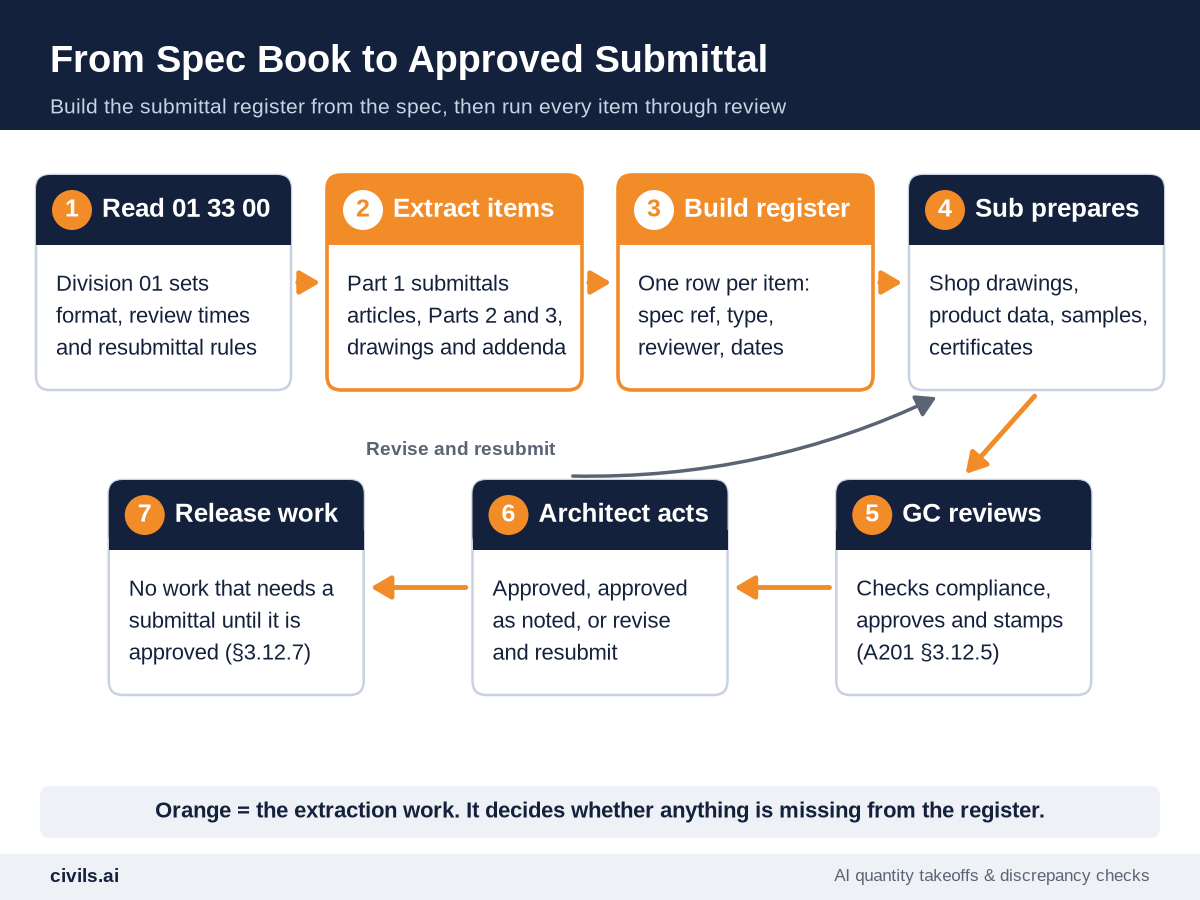
Step 1: Read Section 01 33 00 First
Division 01 Section 01 33 00 Submittal Procedures sets the rules for every submittal on the job: format, transmittal form, number of copies or electronic delivery, review periods and resubmittal rules. In MasterFormat 2016 it sits alongside related sections such as 01 33 13 Certificates, 01 33 16 Design Data, 01 33 19 Field Test Reporting and 01 33 23 Shop Drawings, Product Data, and Samples (MasterFormat 2016). Closeout submittals are usually covered under 01 78 00. Note the review period at the top of your register; every date depends on it.
Step 2: Walk the Part 1 Submittals Articles in Every Section
Go section by section through the table of contents. In SectionFormat, Part 1 “General” holds the submittal articles: Action Submittals, Informational Submittals, Closeout Submittals and Maintenance Material Submittals, or a single “Submittals” article. Then scan Parts 2 and 3 for anything that says “submit”, such as mix designs in Products or test reports under field quality control.
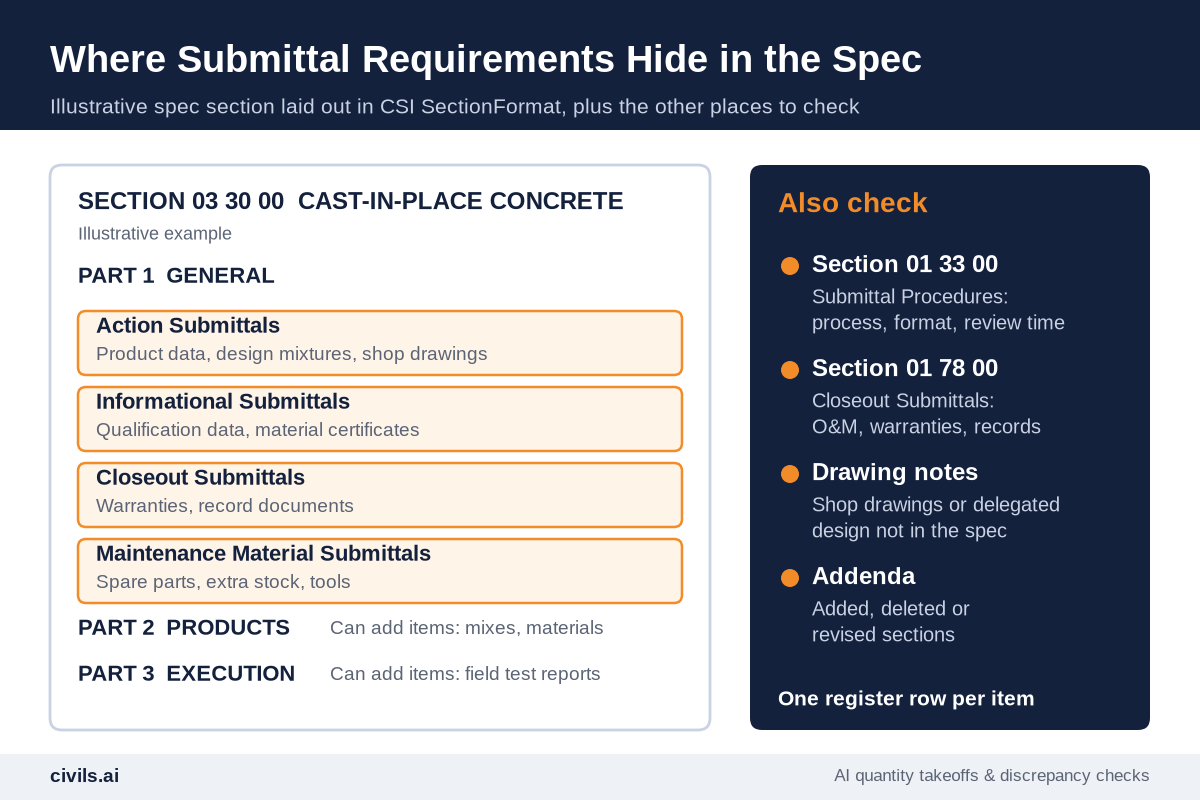
Step 3: Write One Line Per Item
Log each item separately, not “03 30 00 submittals” as one row. Quote the spec wording and record the paragraph number, or the row cannot be checked later.
Step 4: Classify Each Item and Name the Reviewer
Mark each row as action, informational, closeout or maintenance material, and note who approves it. Federal specs do this explicitly: in UFGS sections, a “G” after a submittal item means it needs Government approval, and items without a “G” or “S” are for contractor quality control approval or information only (UFGS 01 33 00).
Step 5: Work Dates Back From the Need Date
For each item, start with the date the material is needed on site, subtract fabrication and delivery lead time, then subtract the review period from Section 01 33 00, plus time for one resubmittal on anything complex. UFGS 01 33 00 uses this same structure, with fields for the contractor submit date, the date approval is needed and the date material is needed. Long-lead items such as switchgear, elevators, precast and structural steel go to the top.
Step 6: Reconcile Against Drawings and Addenda
General notes on the drawings often ask for shop drawings or delegated design that the spec does not mention, and addenda add, delete or revise sections. Where the drawing note and the spec section disagree, log it as a discrepancy and ask. See drawing vs spec conflicts and how GCs track addenda.
Step 7: Push It Into Subcontract Scopes
Attach each sub’s register rows to its bid package, so it knows which submittals it owes before it signs. Our request for bid template shows where they fit.
Submittal Register Template
Copy these columns into a spreadsheet or your construction submittal software. The example row is illustrative.
| Column | What to record | Example entry |
|---|---|---|
| Item no. | A running number, or section number plus sequence | 03 30 00-002 |
| Spec section and paragraph | Where the requirement is written | 03 30 00, 1.4.B |
| Description | What must be submitted, in the spec’s words | Design mixtures for each concrete mix |
| Type | Action, informational, closeout or maintenance material | Action |
| Responsible party | Sub or supplier who prepares it | Concrete sub / ready-mix supplier |
| Reviewer | GC reviewer, then the Architect, Engineer or other approving party named in the spec | Structural engineer of record |
| Required by | Date material is needed on site, from the schedule | Footings pour, week 6 |
| Lead time | Fabrication or delivery time after approval | 2 weeks |
| Submit by | Need date minus lead time minus review time | Week 1 |
| Status | Not started, submitted, approved, approved as noted, revise and resubmit, closed | Submitted, week 1 |
How AI Changes Submittal Register Prep
Construction submittal software manages the log once it exists: transmittals, reviewers, due dates and status. The slow part is filling it from every section of the spec book.
Generic AI tools such as ChatGPT can summarize a section you paste in, but they do not reliably work across a full project manual, and they can state requirements that are not in the document. Purpose-built construction AI works from your actual files. Civils.ai’s AI for searching construction specifications searches your spec book, contracts and drawings and answers with citations to the exact page and section. Its contract administration checks extract submission dates, review periods, approvals and required deliverables into a checklist.
For a submittal register, that means:
- Every requirement, section by section — one query across the whole spec instead of a manual read of each Part 1
- A citation on every line — each extracted item links back to the section and page, so a reviewer can check it in one click
- Procedures from Division 01 — review periods, formats and resubmittal rules pulled from 01 33 00 alongside the item list
- Conflicts flagged — drawing notes and spec sections that ask for different things, caught before they become a rejected submittal
Save the questions once and re-run them on every new project with tender automation, so every job starts from a register built from its own spec.
Run your spec through Civils.ai and pull every submittal requirement, with citations. Plans start at US$90 per month with unlimited AI searches and checks under fair use, or you can request a demo (Civils.ai pricing). An AI-extracted register is a draft. Your project team should check it against the spec before it is issued.
Submittal Register Checklist
- Section 01 33 00 read — review periods, format and resubmittal rules noted at the top of the register
- Every section opened — register checked against the spec table of contents, section by section
- Part 1 articles captured — action, informational, closeout and maintenance material items each logged
- Parts 2 and 3 scanned — mix designs, test reports and field quality control submittals included
- One row per item — each with a spec paragraph reference
- Reviewer named — GC reviewer and approving party for every row
- Dates worked back — from the need date, through lead time and review time
- Long-lead items first — flagged and scheduled ahead of the rest
- Drawings and addenda reconciled — extra submittals added and conflicts logged as RFIs
- Sub scopes updated — each sub has its list of submittals before signing
The Bottom Line
Submittals control when work can start, and the spec book defines every one of them. Build the register from the spec, not from memory or the last job, and you find the testing, mockups and long-lead items while there is still time to price and schedule them. Let software do the extraction and keep the review with your team. See also how to review construction documents faster.
Frequently Asked Questions
What are submittals in construction?
Shop drawings, product data, samples and similar documents the contractor sends to the design team to show how it will meet the Contract Documents. Work that needs a submittal waits until it is approved.
Are submittals part of the Contract Documents?
No. Under AIA A201-2017 §3.12.4, shop drawings, product data, samples and similar submittals are not Contract Documents. They show how the contractor proposes to conform to them.
Where are submittal requirements in the spec book?
Division 01 Section 01 33 00 Submittal Procedures sets the process. The items themselves are listed in the Part 1 submittal articles of each technical section, with more sometimes in Parts 2 and 3.
What is the difference between a submittal register and a submittal schedule?
The register lists every required submittal. The schedule adds submission and review dates, coordinated with the construction schedule. Many teams keep both in one log.
Who prepares submittals?
Usually the subcontractor, supplier or manufacturer prepares them. The general contractor reviews, approves and submits them to the Architect, as AIA A201-2017 §3.12.5 requires.
Can AI build a submittal register?
Yes, as a draft. Purpose-built tools such as Civils.ai pull submittal requirements from the spec with citations to each section and page. Your team should check every line before the register is issued.