 Mary Janine L. Kamenić
 Julianna Widlund P.E
 Stevan Lukic CEng
What a construction addendum is, how addenda change the bid set, and a practical method for tracking every revision so superseded sheets and silent quantity changes do not reach the bid.
A construction addendum is how the design team changes the bid documents before the contract is signed. One missed sheet, one revised spec section, or one quantity that changed without a clouded mark can leave a hole in the bid that only shows up at buyout. This guide explains what a construction addendum is and is not, why addenda are where discrepancies are born, and how general contractor estimators and trade subcontractors can track every change without missing scope.
Quick Summary
| Topic | Key Finding |
|---|---|
| What a construction addendum is | A written or graphic revision of the bidding documents, issued before bids are received (and, under AIA A201, before the contract is executed). Once issued, it becomes part of the set you are bidding. |
| What it is not | A change order. After the contract is signed, changes are handled as modifications (change orders, construction change directives or written amendments), not as bid addenda. |
| Where bids go wrong | Superseded sheets left in the takeoff, spec sections that were replaced, quantities that changed without an obvious markup, and trades that never received the latest addendum. |
| What to keep | A running change log: addendum number and date, documents affected, what changed, who was notified, and whether the takeoff and bid form were updated. |
| Where AI helps | Discrepancy checking can compare an addendum against the base set and cite the exact sheet or clause. A person still has to confirm each finding and update the estimate. |
Key Term Definitions
Construction addendum (plural: addenda): A written or graphic instrument that revises the proposed contract documents during bidding. In US practice this is often called a bid addendum; in UK and other tendering markets the same idea is often called a tender addendum.
Base set: The drawings, specifications and other bidding documents as first issued, before later addenda.
Sheet index: The list of drawings (and their current revision) that defines which sheets are in the set. If the index and the files you are measuring do not match, the takeoff is already wrong.
Superseded sheet: A drawing that has been replaced by a later revision or a later addendum. Measuring from it means pricing work that is no longer in the set, or missing work that was added.
Modification: Under AIA A201-2017, a change issued after the contract is executed: a written amendment signed by both parties, a Change Order, a Construction Change Directive, or a written order for a minor change in the Work.
What a Construction Addendum Is (and What It Is Not)
Under AIA A201-2017 §1.1.1, the Contract Documents include the Agreement, Conditions of the Contract, Drawings, Specifications, Addenda issued prior to execution of the Contract, other documents listed in the Agreement, and Modifications issued after execution of the Contract. The same section says that, unless they are specifically enumerated in the Agreement, portions of Addenda relating only to bidding or proposal requirements are not Contract Documents.
AIA A701-2018, the Instructions to Bidders, sharpens the timing for the bid period. AIA's official summary of A701-2018 notes that the definition of Addenda was clarified: addenda are written or graphic instruments that are part of the Proposed Contract Documents and are issued prior to the date for receipt of Bids, not prior to execution of the Contract. In practice, a bid addendum arrives while you are still pricing the job. Once you submit, and once the contract is signed, later changes follow the contract's change process, not a new addendum to the bid set.
Always read the instructions to bidders and the general conditions on the project in front of you. Public work, design-build and non-AIA forms may use different words, but the job is the same: identify every revision issued before you bid, price the current documents, and say which addenda your bid acknowledges.
Why Addenda Are Where Discrepancies Are Born
Addenda do useful work. They correct errors, answer bidder questions, add or delete scope, and update drawings and specifications. They also create a second (or third, or fourth) version of the same project, and the versions are rarely perfectly coordinated.
Typical problems include:
- Superseded sheets that stay in circulation — a new structural revision is issued, but the estimator's takeoff file, or a subcontractor's set, is still the previous one.
- Spec sections that are swapped or revised — a material, a test, a finish or a responsibility changes in language, with little or no change on the plans.
- Quantities that change silently — a footing grows, a slab thickens, or a count changes in a schedule, sometimes without a cloud or a revision note that is easy to see.
- Answers to pre-bid questions that never reach the takeoff — a clarification in the addendum text conflicts with a drawing note, and only one of them is picked up.
- Cross-discipline knock-ons — an architectural revision changes a wall, but the structural or MEP sheets in the same addendum, or in a later one, do not match.
Those are the same kinds of conflicts that later become RFIs and change orders. Catching them during bidding is cheaper than finding them after award. For how conflicts in the documents should be handled once you are under contract, see our guides to drawing and specification discrepancies and to turning discrepancies into RFIs.
How to Track Every Construction Addendum Change
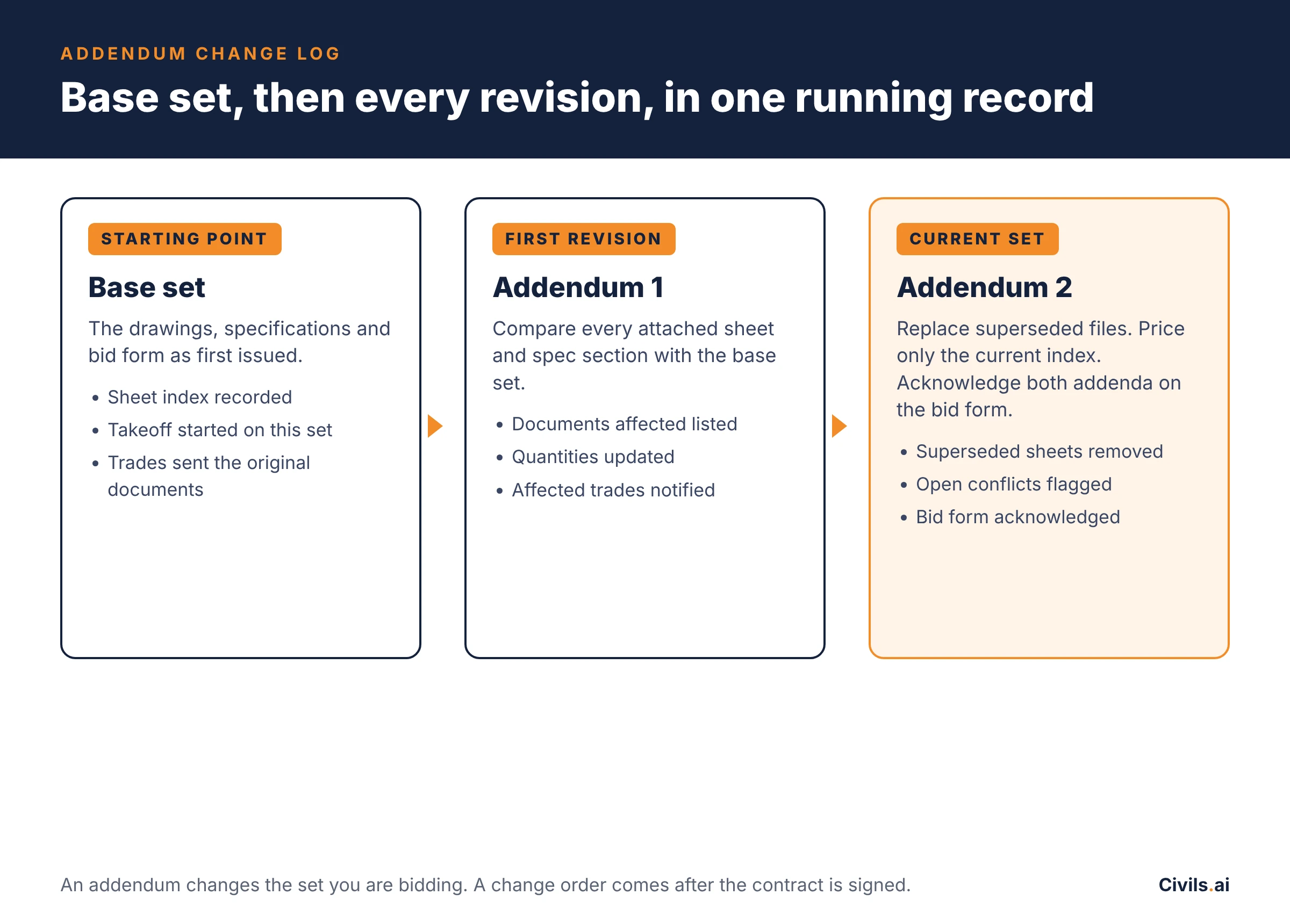
The aim is a current set, a current takeoff, and a bid form that lists every addendum you received. A simple change log, updated as soon as each addendum arrives, is more reliable than relying on memory during the last afternoon of the bid.
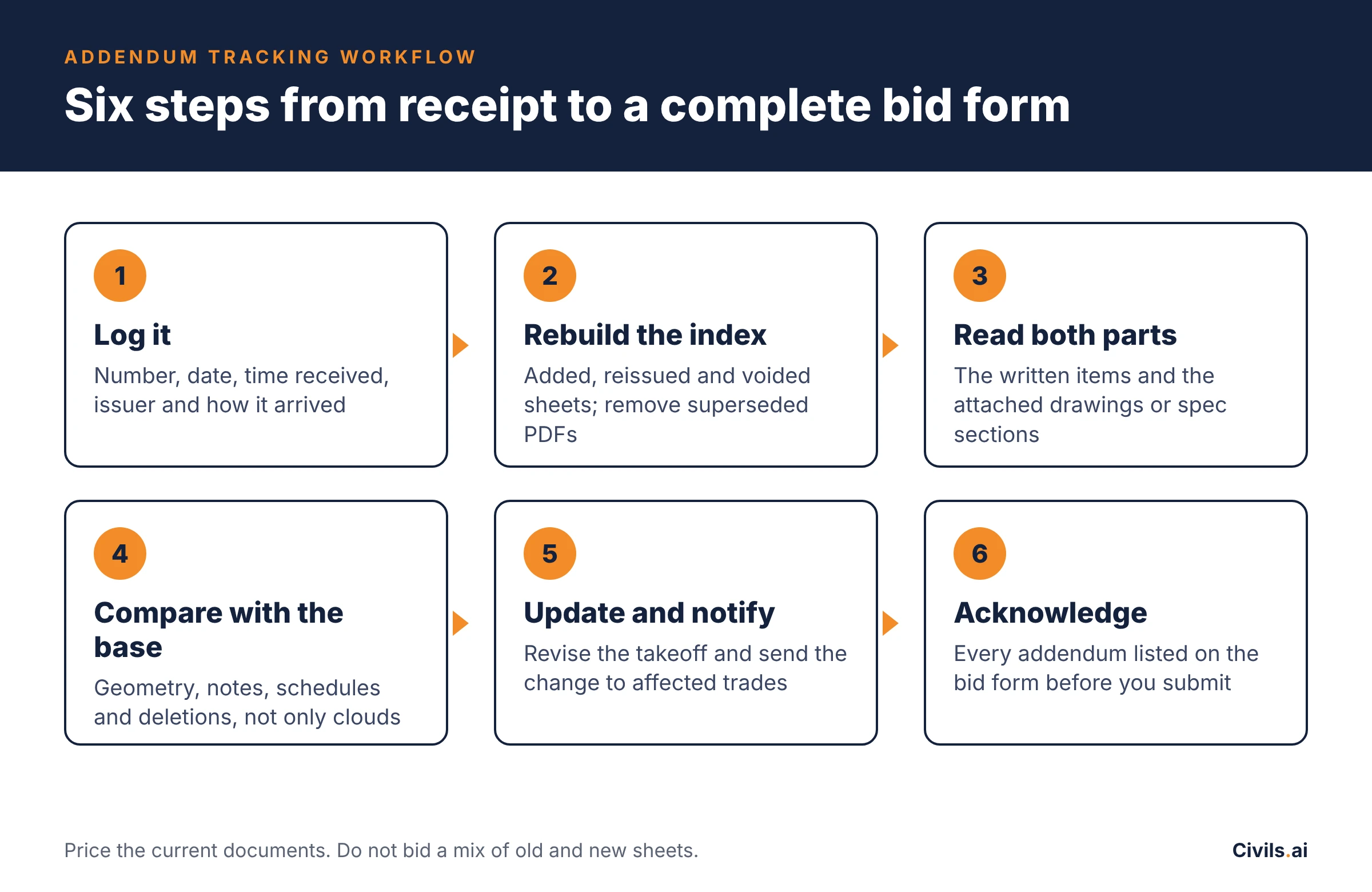
1. Log it as soon as it arrives
Record the addendum number, date and time received, the issuer, how it was transmitted, and a short description. Note the bid date, and whether the addendum changed the bid date or the time for receipt of bids. If your invitation or instructions require you to acknowledge addenda on the bid form, add that to the log so it cannot be forgotten at submission.
2. Rebuild the current sheet index
Do not start with the drawings you already have open. Start with the latest list of sheets and specification sections. Mark which sheets were added, reissued, voided or left unchanged. Then replace the files in the working set so that nobody on the team is measuring from a superseded PDF. If the addendum's list of documents and the files issued with it do not match, treat that as a discrepancy and ask the question in writing, within the time the instructions to bidders allow.
3. Read the narrative and the graphics
Many addenda have a written item list plus attached drawings or specification sections. The narrative tells you what the issuer thinks changed. The attachments are the change. Read both. A note that says "see revised Sheet S-201" is not a substitute for opening S-201 and comparing it with the previous revision.
4. Compare the new sheets with the base set
Use whatever comparison method you trust: a plan overlay, a revision cloud review, a side-by-side PDF comparison, or a printed markup. Look for geometry changes, note changes, schedule changes and deleted work, not only clouds. Clouds help, but they are not complete, and they are sometimes left over from an earlier revision.
5. Update the takeoff, then tell every trade that is affected
Change the quantities, the inclusions and the exclusions. Then send the addendum, and a short note of what changed in their scope, to every subcontractor or supplier whose price could be affected. A trade that prices the base set while you bid the addenda is a scope miss waiting for buyout. For a bid-day view of the same problem, see addendum tracking on bid day.
6. Close the loop on the bid form
Before you submit, confirm that the bid form (or the letter of transmittal) acknowledges every addendum in the log, that the takeoff matches the current index, and that late prices from trades were based on the same documents. If an addendum arrived too late to price fully, follow the instructions to bidders. Do not stay silent and hope the issue can be cleaned up later.
An Addendum Change-Log You Can Keep
You do not need a complicated system. A table like this, one row per addendum or per change item, is enough if it is kept current:
| Field | What to record |
|---|---|
| Addendum no. and date | Number, issue date, and time received |
| Documents affected | Sheet numbers and revisions, spec sections, bid form, instructions |
| What changed | Added, deleted or revised scope, in one or two sentences, with the item number from the addendum |
| Quantity effect | Takeoff lines updated, or "no quantity change, language only" |
| Trades notified | Who was sent the addendum, when, and whether a revised quote is needed |
| Bid form | Acknowledged / still outstanding |
| Open questions | Conflicts still unresolved, and whether a pre-bid question was issued |
How AI Changes Addendum Review
The hard part of addendum review is not listing the files. It is finding what actually changed, and whether the revised drawings, specifications and schedules still agree with each other and with the base set.
AI discrepancy checking can make that comparison faster. With Civils.ai Discrepancy Check, you upload the drawings and specifications, including later addenda, and the AI cross-checks them for issues, each with a citation back to the exact sheet or clause:
- Sheet-to-sheet discrepancies — dimensions, levels, tags or notes that differ between plans, sections, details and schedules, including between a base sheet and a revised one.
- Drawing-to-spec discrepancies — a material, product, grade or responsibility on a drawing that differs from the spec section covering it, including a spec section revised by addendum.
- Cross-discipline conflicts — for example, an architectural revision that does not match the structural or services sheets.
- Reusable bid checks — a saved list of questions or risk checks that you can run again when the next addendum arrives.
Because every finding links to its source page, your team can open the citation, confirm whether the issue is a real change or a false flag, and then update the change log and the takeoff. For a broader method of reading a set quickly, see how to review construction documents faster. You can also run document searches across a tender pack with Civils.ai tender review.
AI findings are a starting point for review, not a replacement for a qualified person reading the addendum and the current set. Whether a difference is a scope change, a drawing error or nothing at all remains your judgment.
Run a discrepancy check on your tender documents with Civils.ai, or see plans and pricing.
Addendum Tracking Checklist
- Every addendum logged — number, date, time received and source.
- Current index rebuilt — added, reissued and voided sheets identified; superseded PDFs removed from the working set.
- Narrative and attachments both read — written items checked against the revised drawings and spec sections.
- Base set compared — geometry, notes, schedules and deletions reviewed, not only revision clouds.
- Takeoff updated — quantities, inclusions and exclusions revised, with a drawing or spec reference on each change.
- Trades notified — affected subcontractors and suppliers sent the addendum and asked for a revised price where needed.
- Bid form completed — every addendum acknowledged, and late quotes checked against the same documents.
- Open conflicts listed — unresolved discrepancies raised in time, or clearly assumed in the bid.
The Bottom Line
A construction addendum is part of the set you are bidding. The work is to keep one current set, one current takeoff, and a bid that acknowledges every revision you received. A short change log, a comparison against the base set, and a clear notice to the trades will catch more missed scope than rereading the addendum under time pressure.
When the documents disagree, treat that disagreement as a discrepancy, not as a guess. Trace every quantity back to the latest sheet that governs it.
Frequently Asked Questions
What is a construction addendum?
A construction addendum is a written or graphic revision of the bidding documents, issued during the bid period. It changes the drawings, specifications or other proposed contract documents that bidders are required to price.
What is the difference between an addendum and a change order?
An addendum revises the documents before the contract is executed. A change order (or another contract modification) changes the work after the contract is in place. Pricing an addendum is part of the bid; pricing a change order is part of administering the contract.
What is a bid addendum or a tender addendum?
They are names for the same idea in different markets. Bid addendum is the usual US term. Tender addendum is commonly used in the UK and in other markets that tender rather than bid. Always follow the defined terms in the project's own instructions.
How do you track construction addenda so you do not miss scope?
Log each addendum when it arrives, rebuild the sheet index, compare revised documents with the base set, update the takeoff, notify affected trades, and acknowledge every addendum on the bid form. Keep open questions visible until they are answered or clearly assumed.
Can AI compare an addendum with the original drawings and specs?
Yes. Discrepancy checking tools can cross-check revised sheets and specifications against the rest of the set and cite the source page. A qualified person still has to confirm each finding and decide how it affects the bid.